Buy KorgTurbo, get a free gift with purchase:
Turbo is an oscillator plugin for Korg’s multi engine, based on variable waveshaping synthesis. An original technology developed at Sinevibes, it uses a pair of sine oscillators coupled with special sine-based waveshapers which essentially “curl” the waveform in real time, enriching it with new harmonics. The final tone depends not only on the waveshaper curve itself but is also highly sensitive to frequency and level relations of the sine partials, and this allows Turbo to create a very wide range of characterful tones: from warm and rounded to buzzy and abrasive.
This plugin is part of the Sinveibes KorgOSC Collection. The following plugins are also available in the series:
- KorgBent
- KorgTube
Features
- Two sine oscillators with variable balance, frequency ratio and beating frequency.
- Five different waveshaping algorithms with continuously variable curve complexity.
- Built-in lag filters for noise-free, ultra-smooth parameter adjustment and modulation.
- Built-in envelope generator with widely adjustable attack and decay times (1 ms to 10 s).
Package Contents
- Turbo plugin in prologue, minilogue xd and NTS-1 formats
- 16 example patches in prologue and minilogue xd formats
- PDF user manual
System Requirements
- Korg Prologue
- Korg Minilogue XD
- Korg NTS-1
Important Note: This product is a plugin for Korg Prologue, Korg Minilogue XD and Korg NTS-1. It is only compatible with these hardware synthesizers.
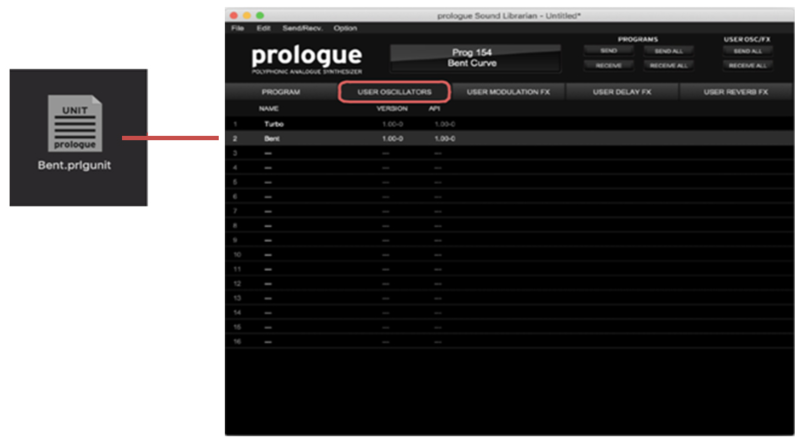
Note: KorgBent is used as the example.
Before You Start ⚠️
In order for oscillator plugins and supplied presets to function correctly, you must make sure that your Korg synthesizer has the latest available firmware update and that after installing it you also perform the panel update and voice update procedures.
If you install the firmware update but do not complete the panel and the voice updates, this can negatively affect other aspects of your instrument’s operation, not just compatibility with third-party plugins. When you power your Korg on, the main screen will warn you if such additional updates are required. Please refer to your Korg product's user manual for how to check the firmware version installed on your synthesizer - and visit www.korg.com to download the latest version. The download package will also contain the instructions for doing the panel and voice updates.
Plugin Installation
1. Download the .zip file from within your Plugin Boutique User Account > Double-click it to extract the contents.
2. Connect your Korg synthesizer to your computer via MIDI or USB-MIDI and launch the Librarian app.
3. While in the USER OSCILLATORS tab, drag and drop the Bent plugin file into an available slot.

Important Note: For the supplied presets to work, Bent needs to be placed in the #2 user oscillator slot.
4. Press the SEND ALL button in the USER OSC/FX toolbar section.
Patch Installation
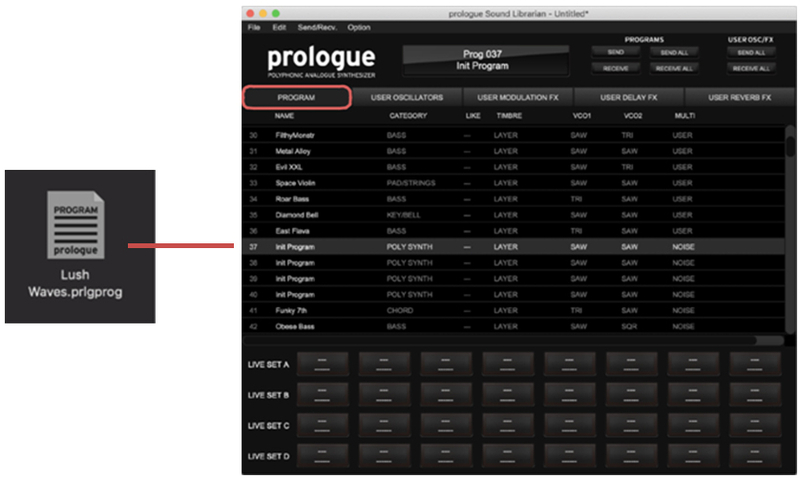
1. Connect your Korg synthesizer to your computer via MIDI or USB-MIDI and launch the Librarian app.
2. While in the PROGRAM tab, click to highlight the location into which you want to load the patch.
3. Drag and drop the patch file onto the highlighted location.

4. Press the SEND ALL button in the PROGRAMS toolbar section.
Your Korg Multi Engine Plugin and Patches are now installed and ready to use within your Korg Synthesizer.