


 Log In

Free gifts available with your purchase

Clear & Wide
For decades, audio engineers have used a certain processing trick on vocals to help lacklustre mono vocals leap from stereo speakers. Now you can replicate that secret technique with one simple plugin. Vocal Splitter is a handy one-stop unit for turning mono vocals into thick, modern-sounding stereo. When W.A Production developed this plugin, they went one stage further, including frequency and drive parameters to help your vocal performances stand out from the crowd. Of course, you can also this plugin on audio other than vocals... download the demo and give it a try.
Under The Hood
Feel free to skip this part if you like, but here’s what is going on under the hood: Vocal Splitter uses a combination of a phase-offset vibrato effect (that splits the left and right channel by asymmetrically detuning the channels) and an asymmetrical rectification of the left and right signal (creating a better defined stereo image). Combining these two effects in one plugin is an especially effective way to create a defined stereo split vocal signal with minimal phasing.
Mix
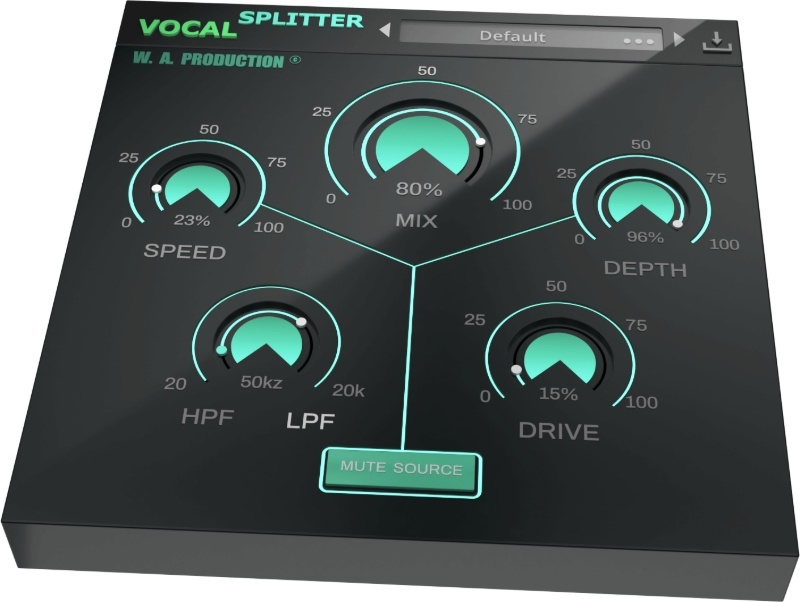
The central mix dial sets the dry / wet ratio of the original source signal and added stereo signal. If you want to listen to the added stereo signal in solo mode or use the plugin on an effects bus, just press the Mute Source button, muting the source signal so that you only hear Vocal Splitter’s processed audio.
Speed & Depth
These dials work together to control the behaviour of the phase-offset vibrato effect that splits the left and right channels. The channels are asymmetrically detuned and these dials adjust that effect so that you can achieve any intensity of processing, from subtle thickening to full-on doubling.
Drive
The drive feature lets you control the intensity of the asymmetrical rectification of the left and right signal, creating a better-defined stereo image. If that sounds technical, don’t worry. All you need to know is that pushing it hard provides a
saturation-like effect and brings the stereo image back in towards the centre.
Filters
The high pass and low pass filters allow you to filter the added stereo signal, especially important if you want the effect to only apply to a specific frequency range and avoid unwanted phasing in the low end.
The Vocal Splitter logo acts as a bypass control for the whole plugin and is smoothed to be click and pop free for unhindered A/B testing.
W. A. Production are real-life producers making creative plugins to help you achieve studio quality processing quickly and easily. Enjoy!
Features
- Create wide and modern vocals from a mono source
- Presets for one-click transformations
- Speed & Depth set the power of effect
- Drive dial to add grit and increase definition
- Mute Source button for using effect as a send
- Click-free bypass
- Minimal phasing
- Full PDF Manual & Tutorial video
- Resizable user interface
System Requirements
- Windows 8 or later (32 / 64-bit)
- macOS 10.13 and later (64-bit only)
Important Notes:
- AAX format requires ProTools 11 or higher.
- An internet connection is required to authorise and use this software.
Important note for Mac Apple Silicon users: Before purchasing, please review the current compatibility status of this plugin on your system here.
Important note: When accessing this software via a Rent to Own plan or the Beatport Studio membership, it's installed and run through the Beatport Access portal. An internet connection is required every 30 days to validate your license.

The Samplecast
The show for sample library geeks, plug-in fans and people who love toys that make noise.
"Making vocals pop is always a challenge. Vocal Splitter is certainly up to the job and saving me lots of time at the moment."
Reviews Summary
While it aims to provide a helpful overview, it may not capture every perspective or detail. We encourage you to read individual reviews to make an informed decision.
The vocal splitter plugin receives generally favorable though mixed feedback. Many users praise its effectiveness at creating wide lead vocals while maintaining mono compatibility, its sound quality, and its straightforward interface. Conversely, some reviewers cite downsides such as a lack of presets, a steep learning curve, issues with vocal doubling, and the presence of better alternatives on the market.


