


 Log In
Free gifts available with your purchase
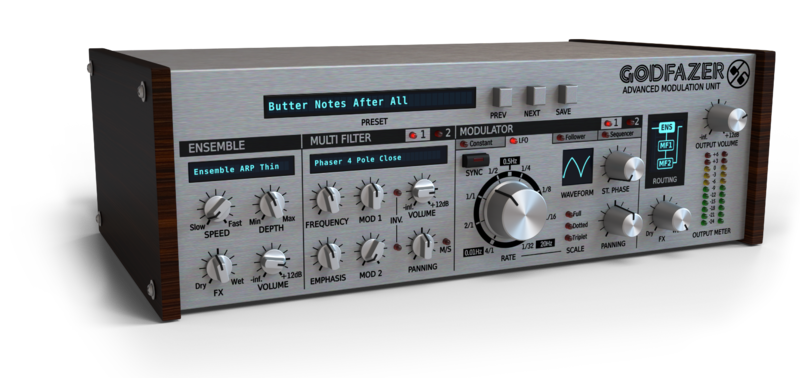
Don’t be deceived by the SilverLine format and affordability – big things sometimes come in small packages. Godfazer is an Advanced Modulation Unit that combines multiple modulations and filter types into a single, versatile plugin effect, with a spectacular choice of routing topologies.
The Swiss Army Knife of Modulation Effects
The most powerful modulation effect D16 group has ever created, Godfazer is your new go-to plugin for chorus, phasing, filtering, rotary speaker emulation and much more. Built with creative sound design at the top of the agenda, Godfazer spatially and spectrally transforms signals of all kinds with its versatile Ensemble module and two dual-modulated Multi Filters.
Vintage Devices and More
Godfazer’s Ensemble section offers a wide range of delay- and amplitude-modulating vintage device emulations, including BBD-based choruses, Solina-style ensembles and rotary speakers, as well as a variety of original tremolos, auto-panners and other models. But that’s only the beginning! Alongside the Ensemble, two identical Multi Filters each feature 40 spectacularly diverse filter types, from dual shelving EQs, low/high/band-pass models and formant filters, to an extensive selection of vintage and modern phasers.
Powerful Modulation
Bringing movement and dynamism to the Multi Filters, Godfazer’s dual Modulators each enable one of four styles of cutoff/center frequency modulation to be brought into play. Apply static offset to the left and right channels with the Constant Modulator; get things wobbling with the tempo sync-able, pannable, phase-adjustable LFO; generate a modulation signal based on input amplitude with the envelope Follower, and handcraft your own synced or free-running cyclical progressions with the 16-step Step sequencer.
Freedom of Routing
Both Modulators are routed independently to each Multi Filter, for truly complex signal blending, and the polarity of every input can be inverted at a click. The Multi Filters themselves are configurable for parallel or serial signal flow using six topology options, which also determine the position of the Ensemble within the chain.
... Of course, Godfazer also includes all the standard features of the SilverLine plugin series, including 64-bit internal processing, three quality options for real-time playback and offline rendering, a resizable GUI, and a tagged preset browser. From enhancing beats, thickening basslines and glamorizing vocals, to animating pads and bringing life to keys and FX, no modulation-based task is beyond its sonic remit.
Features
Ensemble Module Featuring:
- 22 effect types/models, ranging from Choruses and Rotary speaker emulations (including various classic devices) to Tremolo and Auto-panning effects
- Adjustable Speed and Depth for most of the effect models
2 Multi Filter Modules, each featuring:
- 40 filter types/models, ranging from Resonant Filters and Vowel Filters to EQs to Phasers (including various classic devices)
- Adjustable Cutoff / Center Frequency and Emphasis for each model
- Balance control with optional Mid / Side mode
- Independent Modulation amount control with Invert option for each Modulator
2 Modulation blocks controlling (and shared by) both Multi Filters, with 4 modulation types each:
- Constant modifier
- Independent Value offset controls for the Left and Right channels, with Link option
- LFO generator
- Adjustable Stereo Phase
- 6 LFO waveforms
- Optional Tempo sync
- Panning control
- Peak follower with Attack, Decay and Sensitivity parameters
- Step sequencer
- 16 individually adjustable steps
- Adjustable-Rate with optional Tempo sync
Additional Features:
- 6 different topologies for configuring the Multi Filter and Ensemble modules
- 64-bit internal processing
- No harmonic distortions at output
- Tag-based preset browser
- Over 100 presets
- Resizable GUI
- MIDI Learn for easy controller assignment
System Requirements
Windows
- Windows 7 - 10 (32 or 64-bit)
- CPU - Single-core 3.4 GHz SSE (Multi-core 4.0 GHz recommended)
- RAM - 8 GB (16 GB Recommended)
- Plugin Formats - VST2, VST3, AAX
Mac
- macOS 10.13 - macOS 12 Monterey (64-bit only)
- CPU - Intel 1.8 GHz / Apple M1 (Intel 2.4 GHz / Apple M1 recommended)
- RAM - 8 GB (16 GB Recommended)
- Plugin Formats - VST2, VST3, AU, AAX
Please Note: This is not a standalone program - a host application (DAW) is required to use it.


