


 Log In

Free gifts available with your purchase

The Rough One
Bold & Energetic Picked Electric Bass
UJAM introduce Virtual Bassist ROWDY – your loudmouthed, high-energy bassist with bite! If your bass has to cut through heavy drums and a wall of guitars, ROWDY is the perfect solution.
What’s new?
- 20 new styles
- 30 new presets
- 15 Finisher multi-effect modes
- MIDI Drag and Drop
- Backwards-compatibility
What You Get
- A total of 60 Styles and 1380 Phrases
- Adjustable fuzz for that extra bite
- Powerful-yet-simple sound shaping options
- Artificially intelligent articulation modelling
Powerful & Energetic
ROWDY confidently adds picked, overdriven electric bass sounds to your track, suitable for a variety of styles, from powerful punk to rock and modern metal.
Let’s Get Ready to Rumble
It can be tame, but it’s wild. With a hand-picked, heavily modified vintage bass guitar, hot amps, a fuzz box and even an octave guitar. It’s definitely a rocker and could use a shower, but we’re too scared to ask...
Frustration-free Design
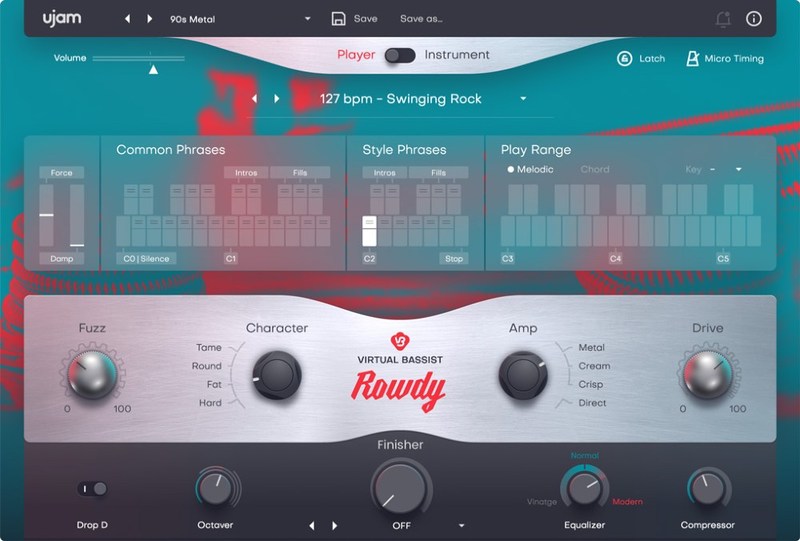
Designed with the UJAM frustration-free philosophy, ROWDY’s easy to use GUI and controls make it possible to achieve fantastic sounding and aggressive basslines in no time – no matter what your level of music production experience is.
Features at a Glance
ROWDY’s loud-mouthed, rebellious sound and angry playing style means that even seasoned bass players themselves will appreciate the ability to get great-sounding ideas down fast – with practically zero learning curve.
Player Mode
Virtual Bassist ROWDY has two distinct modes – Player Mode lets you quickly choose from one of the 60 styles and 1380 phrases with your MIDI controller, seamlessly following in an intelligently musical way whatever key or chord is being played.
Instrument Mode
The Instrument Mode is one for the keyboard wizards and opens up the entire ROWDY fretboard to be played like a traditional sampler, complete with dead notes, full stops and even slides.
Tone-Sculpting Controls
Perfect your performances and sound with ROWDY’s powerful yet simple sound-shaping controls. Choose between a DI signal and 3 separate amplifiers with separate knobs for overdrive and fuzz. The Character control gives you instant access to many useful sounds before you put the cherry on top with an octave control and a simple EQ and dynamics section.
System Requirements
Operating Systems
- Windows 8 or later (64-bit only)
- macOS 10.12 - macOS 12 (64-bit only)
- You may run them on earlier versions but UJAM doesn’t support them.
For up-to-date info on UJAM products support for VST3, AAX, and Apple Silicon, please refer to the UJAM website.
Minimum Requirements
- 4 GB of RAM
- 7 GB of Disk Space
- 1280 x 768 px Display
- Internet Connection required for download and authorisation.
Plugin Formats
- VST, AU 2
- AU 2 version is only compatible with Logic Pro X and newer.
Supported Standards
- MIDI
Additional Information
- Comes as downloadable installer files.
- Authorize by email address and password for ujam.com within the plugin.
- If you want to move your .blob files to an external drive, UJAM recommend the use of an SSD to prevent dropouts.
Reviews Summary
While it aims to provide a helpful overview, it may not capture every perspective or detail. We encourage you to read individual reviews to make an informed decision.
Users generally praise the virtual instrument for its cool, gritty sound and effectiveness in hard rock and alternative genres, noting it is great for sparking ideas. However, some reviewers caution that it can sound robotic or artificial, making it an imperfect substitute for a real bass guitar.


