Log In

Free gifts available with your purchase

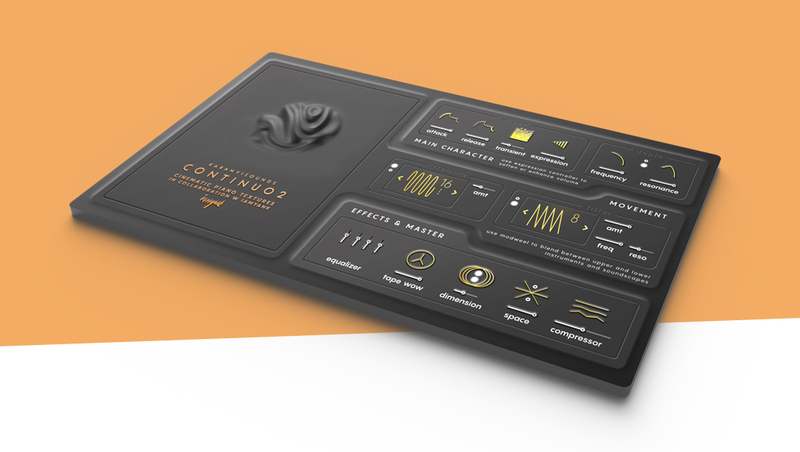
A complex-sounding cinematic piano texture Kontakt instrument for creating massive modulations, ethernal soundscapes and hybrid keyboard themes.
Continuo 2 follows the concept of its ancestor with a fresh new look, exciting features on a super intuitive interface. This Kontakt instrument collection focuses on complex-sounding cinematic textures: build massive modulations, ethereal soundscapes, hybrid keyboard themes from super quiet scores to enormous trailer tracks and electronic music. Continuo 2 is based on exceptional quality piano recordings, analog synths and various sound design tools. Created in collaboration with the multi-instrumentalist composer and sound designer iamyank.
Character Design. Creative Morphing.
Simple controls, complex sounds: meet our brand new Continuo 2 engine with a futuristic organic look! Blend between 4 heavily sound designed instruments, browse our artist presets to get inspired or create your very own hybrid sounds from scratch.
More tools. Polyrhythmic Modulation.
There are no bad choices! Twist, blend, squash, tousle, filter, sharpen, dim, wow, blur, echo, overdrive… with over 40+ new controls and special effects to play with. Now with an additional transient layer control, Prophet 5 style filters, dual pulse control and extended master chain tools.
Woods. Metals. Oscillators. - The sound sources
We sampled iamyank piano with different unconventional mic setups and playing techniques. The library contains a traditional piano, a prepared and a hand picked instruments. We enhanced the recordings with various synths such as Sequential Circuits Rev2 and Moog modular modules to give bite, depth and real analog low end to the instrument patches. Samples are recorded with analog gear and ran through cassettes and tapes to give a more organic feel. We also processed some of our patches with digital granular effects & distortion stompboxes. Also included are 80+ Artist presets from music composers and sound designers.
Features
- 80+ Factory & Artist presets
- 4 Sound Modules + 1 Transient layer
- LFO tremolo module with 8 presets
- Prophet 5 filter type LFO module with 8 presets
- 2 custom vintage reverbs
- Authentic tape machine wow control
- Master EQ, Compressor & Limiter
- 24bit / 48kHz sample rate
System Requirements
- Mac OS X 10.11 or higher is recommended *
- Windows 7 or higher
- 4 GB of RAM, 8 GB is recommended
- Kontakt 5.8.1 or higher (Free Kontakt Player is NOT supported)
- 64 bit DAW is recommended for optimized performance
- Native Access required for the activation
Important Notes:
- The FULL Version of Kontakt 5.8.1+ is required in order to use this instrument.
- You will be stuck in DEMO MODE if trying to use this instrument in the FREE Kontakt Player.

Alessandro Mastroianni
Filmscore Composer & Sound Designer
”Great source of inspiration, it has an incredible quality which will prove useful in the toolkit of any media composer and sound designer.”
Attila Áts
Trailer & Filmscore Composer
”The sounds are original, exciting, organic… Instantly became one of the go-to libraries in my workflow!”