Log In

Free gifts available with your purchase

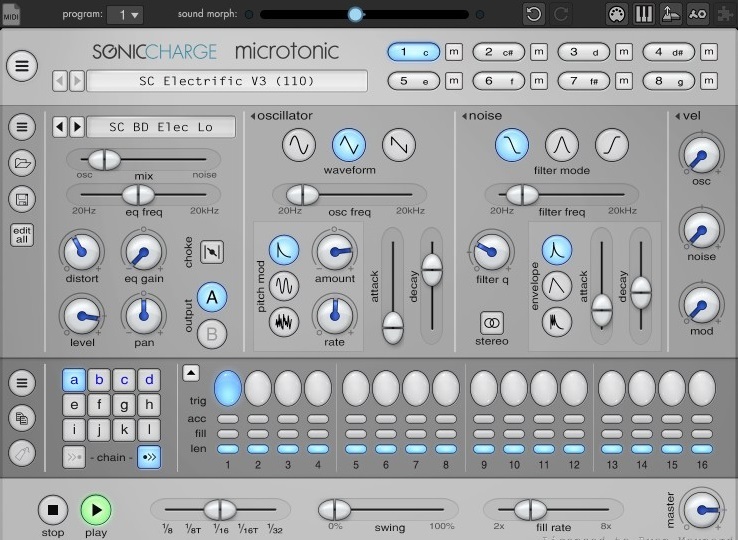
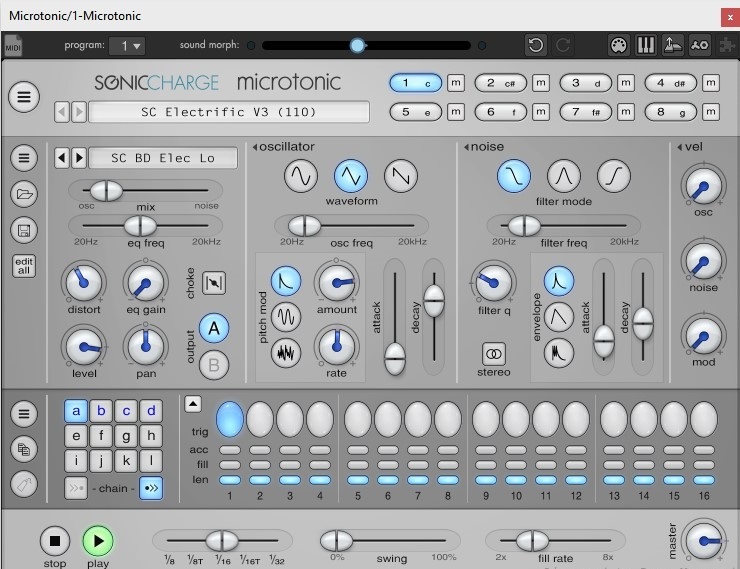
Sonic Charge Microtonic is a VST / AU plug-in for Windows and Mac featuring a unique drum and percussion synthesizer combined with a pattern based drum-machine engine.
You can use Microtonic as a sound module to play drum sounds from your MIDI keyboard or sequencer, or you can use the built-in pattern engine to play drum patterns in sync with your sequencer. The sound of Microtonic is 100% synthetic and rendered in real-time. No samples or pre-rendered waveforms are used.
Sonic Charge Microtonic was created by Magnus Lidström. Magnus is known for his work with Propellerhead Software and XLN Audio. In particular, he was the brain behind the highly acclaimed Malström synthesizer introduced in Reason 2.0.
Microtonic is thoroughly unlike anything you have heard or worked with so far.
Features
- Eight-channel drum and percussion synthesizer.
- Pattern-based drum-machine engine, synced to the host.
- 100% synthetic sound, rendered in real-time. No samples!
- Over-sampled oscillators and sample-accurate triggering.
- Extremely low CPU utilization, less than 5% on any low-end system.
- Easy to use interface with context menus, popup hints etc.
- Plenty of creative editing options like morphing, smart alteration and randomization.
- Comes bundled with loads of factory sounds and patterns.
System Requirements
Windows
- Windows 7 or later
- 2GHz Pentium IV processor or equivalent
- A host that supports 32-bit or 64-bit VST 2.4 plugins
- 60MB free disk space
- Formats: VST 2.4
macOS
- macOS 10.13 High Sierra or later
- Intel or Apple Silicon processor
- A host application that supports 64-bit VST 2.4 or AudioUnit 2 plugins
- 60MB free disk space
- Formats: AU, VST 2.4
Lenny Dee
Producer / DJ / Label Owner / Big Shot Magazine Singles Reviewer Lenny Dee is one of NYC's earliest techno and house pioneers. He produced classic UK chart-hitting techno with Frankie Bones (as Looney Tunes), Victor Simonelli (for Nu Groove and Def Mix) and Tommy Musto.
Sonic Charge Micro Tonic is one of thee best drum synths you can get for the Price. it delivers a big sound with flexible programming. It is really great for EDM production and sound design work. I reviewed this product for Big Shot Mag when it was released many years ago, and I must say i still use this product. It has with stood the test of time for a reason. It rocks!
Sonic Charge - Microtonic Pros - Huge range of sonic possibilities. Powerful sound. Great drum presets. Versatile sequencer. MIDI keyboard mode Cons - No output effects. Verdict - Not a huge update, but then MicroTonic was already - and continues to be - one of the best beatbox...
Read More