Log In

Free gifts available with your purchase

Motion Has Evolved.
Introducing ELYSIUM, an inspiring synthesizer that combines tonal rhythms with beautiful sounds to present a "utopia of possibility".
With an entirely new way to create striking pulses, beautiful organic arpeggios, evolving pads, and one-of-a-kind hybrid instruments, Elysium simply cannot be replicated by any other synth on the market.
A Playground of Movement
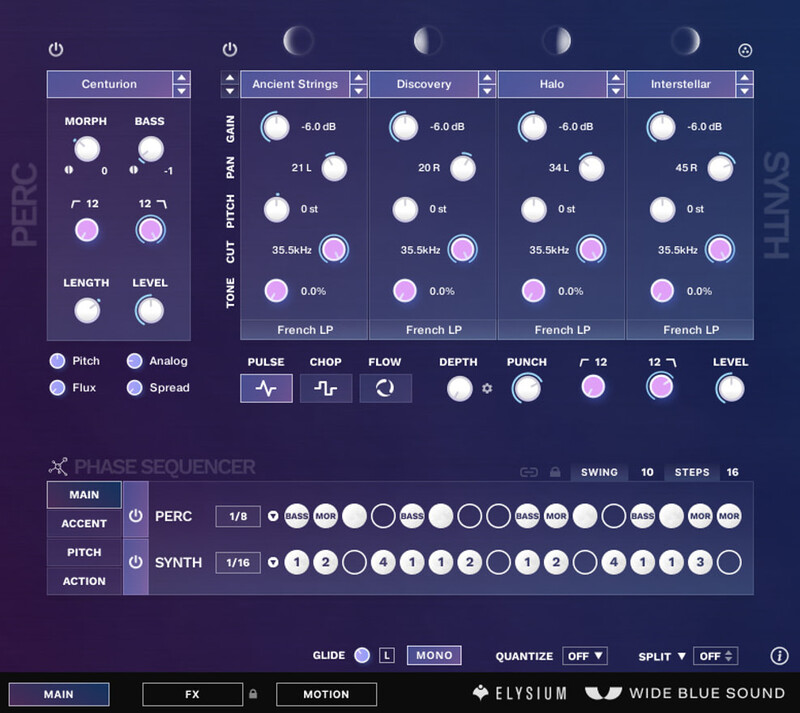
Some of the biggest synths end up being preset synths, with features built for the patch designers instead of the users. Elysium is different.
Enter a galaxy of macro knobs, generators and fun ways to create movement, where even your most basic patches sound more alive than they would in any other synth.
Elysium’s groundbreaking, critically-acclaimed UI was designed to give you the most power and flexibility possible with the least amount of resistance.
Sound Comes First.
After years of rigorous design, Elysium skillfully combines live+hybrid instruments with the most iconic synths of all time.
Rich, Acoustic Instruments
Gamelans, pianos, mallets, a beautiful string section recorded at a church in New York, and much more.
Run it through Elysium’s acclaimed sequencer or play on your own.

Modern Synths & Bass
Wide Blue Sound sampled some of the most sought-after synths in history, collecting the best sounds for both producers and composers.

Beautiful, Lush Ambiences
Run hundreds of iconic synths through the Pulse-Chop-Flow Engine and find yourself lost in mesmerizing pulses, sweet leads, and meditative pads.
Sound Browser
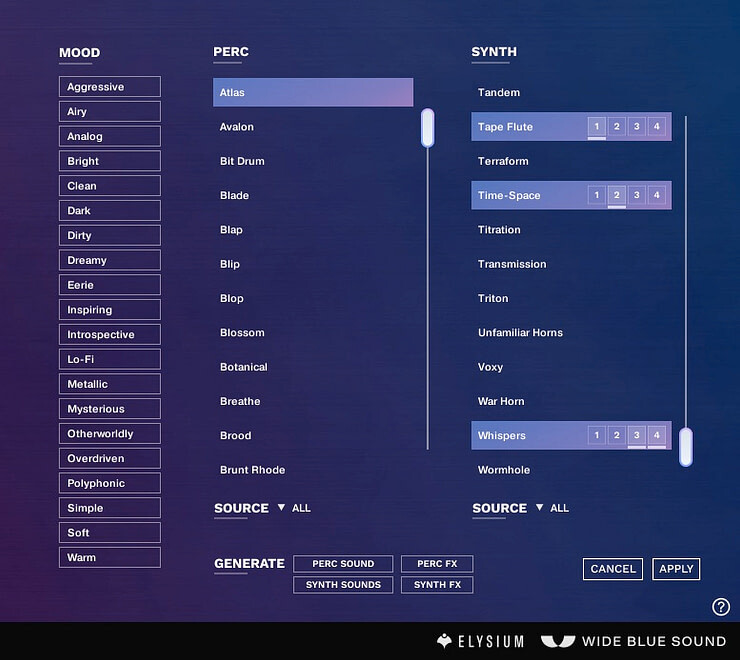
- Preview the entire pitch range of a sound before loading them into your patch. So if you want a great bass, you can preview all sounds in their bass range before committing.
- Tag-based browser to find sounds quickly.
- Generate mood-based sound combos and FX chains with one click.
- Cancel button allows freedom for experimentation because you can always revert back to what you had before opening the Browser.
Deep sampled.
Every sound source is multi-sampled.
And more importantly, even the atmospheres are mixed to work from bass to the highest range. Engage your listeners with thunderous lows, or bliss them out with zen-like highs.
The Most Powerful FX Section - FX are sound design too.
That’s why Wide Blue Sound created arguably the most robust and fun FX section ever seen in a synth, bar none.
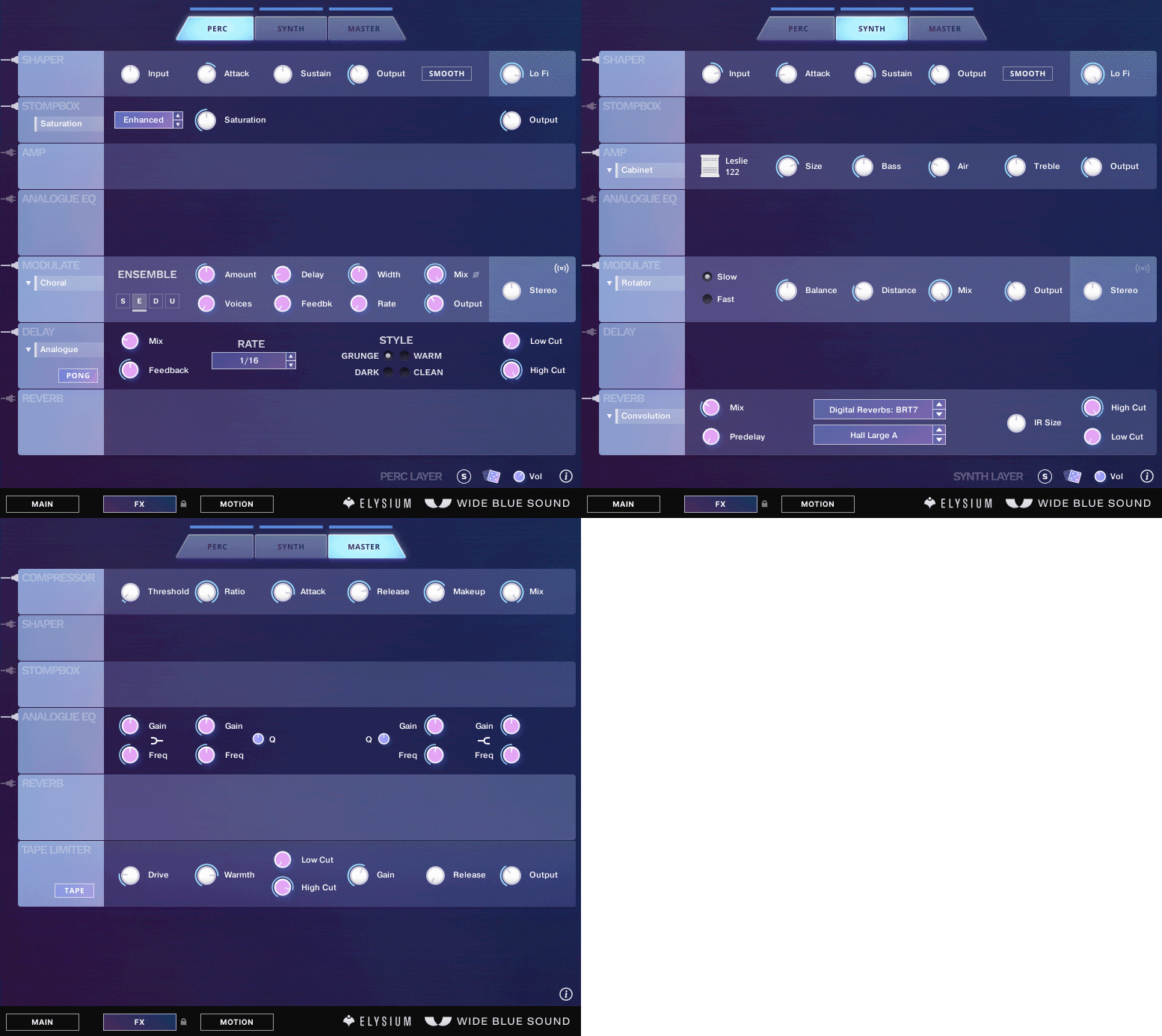
- Run the show with 31 electrifying stompboxes, amplifiers, adventurous mod and chorus-based effects, saturated delays, reverbs, and more.
- 300 effect presets (not including Convolution Reverb presets), ranging from the extremely practical to things you’ve probably never heard in your life.
- Incredibly diverse Convolution Reverb Library with 600+ reverbs in 27 reverb categories — from 9 world-class reverb units like the famous Bricasti M7, EMT 250 and Lexicon 480, to the most ethereal and otherworldly sounds imaginable.
- Add to the mix funky harmonic plates, household items and actual samples of other live instruments… you could get lost exploring these alone for hours. Try running one of the hybrid mallets sounds through a piano impulse… song intro: done.
Generate Sounds and FX
In 2015 Wide Blue Sound pioneered “Intelligent Randomize” for you to make new patches, which gave you great starting points instead of dead-ends.
In 2020, generating sounds is no longer random.

From the Sound Browser or FX Pages, use the Generate buttons to combine thousands of hand-crafted sounds and FX presets to generate something brand new, uniquely yours, and human-approved.
Infinite inspiration at the click of a button.
Set Your Sound in Motion
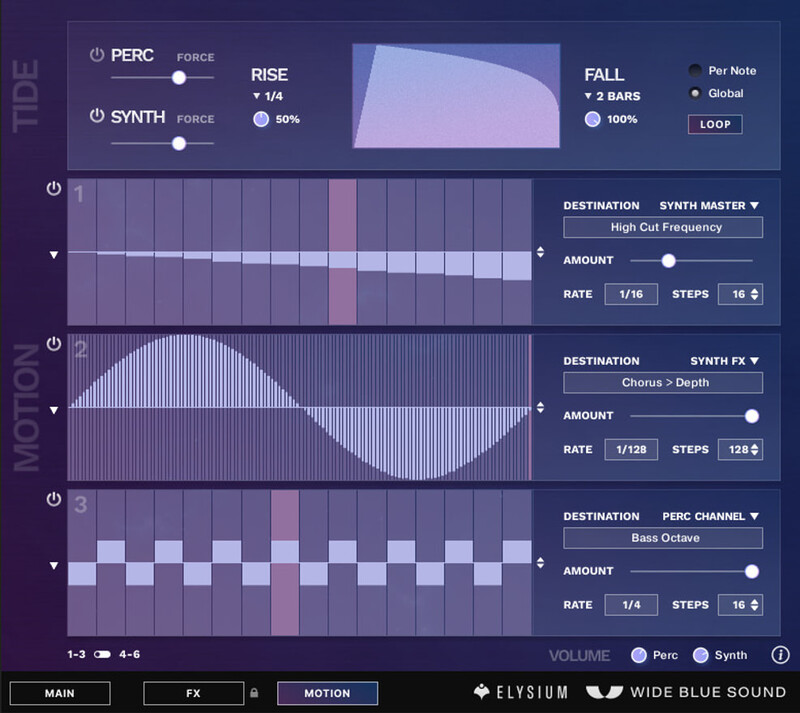
- Rise and Fall with Global Tide: Create multi-bar swells or rhythmic LFOs
- 6 elegant, one-click sequencers to automate any parameter in the entire synth, including the ability to change the Perc layer’s Morph and Bass sounds on every step.
- With six sequencers and over 130 modulation destinations, you’ll never run out of creative ways to add motion. Use them to add more evolution, or turn the resolution up and use them per-cycle as an LFO.
Features
- 3.54 GB (Compressed).
- Hundreds of deep-sampled sound sources.
- Perc layer with up to 3 sound sources at once (Main, Morph and Bass).
- Multi-mode high-cut and low-cut, Length control.
- Perc layer advanced evolution controls (Analog, Flux, Spread).
- Synth layer with up to 4 sound sources at once.
- 11 filter types, both traditional, character/saturation filters and bespoke creative filter types.
- Synth layer triple engine mode (Pulse, Chop Flow).
- Phase Sequencer with up to 16 steps, swing, and per-step Sound Selector, Accents, Pitch, and Action Controls (double/triple hit, and various attack/sustain controls).
- Innovative Sound Browser with full-range sound preview, mood and source tags. Cancel button to undo changes.
- Generate panel for algorithmically creating mood-based sound selections + new effect chains.
- FX section with access to 31 stompboxes, amps, modulation effects, delays, reverbs, 600+ convolution presets, EQ, algorithmic Generate FX chain, and more.
- Motion Page with all-new Global Tide, 6 Motion Sequencers with easy access to 130 mod destinations, one-click generate+editing functionality, and more.
System Requirements
Mac
- macOS 10.12, 10.13, 10.14 or 10.15 (latest update), i5, 4 GB RAM
- 64-bit only, Stand-alone, VST, AU, AAX
Windows
- Windows 7, Windows 8, or Windows 10 (latest Service Pack), Intel Core i5 or equivalent CPU, 2 GB RAM
- 32/64-bit, Stand-alone, VST, AAX
A DAW or NKS Keyboard/Controller are not required to use Kontakt Player or Elysium.


- Requires Kontakt or Kontakt Player 5.6.6 or higher.
- Compatible with Mac & PC.
Note: This product is compatible with the FREE Kontakt Player 6.4.2+.
Sample Sound Review
A Music Industry blog about sample library reviews, virtual instruments, and audio plugin deals for all electronic musicians & composers.
"The presets in ELYSIUM are simply mind-blowing and inspirational right out of the box."
GearNews
The hottest news and rumours from the worlds of guitars, synths, music tech and live sound.
"Wide Blue Sound has fused tonal rhythms with beautiful sounds to give us a utopia of possibility in ELYSIUM".
Music Radar
Music Radar is an online blog with up to the minute news and reviews for all music makers.
"ELYSIUM can create sounds that no rival can replicate".