


 Log In

Free gifts available with your purchase
Upgrade note: This is an upgrade for customers who already own BOTH Weiss Compressor/Limiter AND Weiss MM-1. Products purchased within the Volume Bundle are not eligible for this upgrade. The full version and the following upgrades are also available:
- Weiss DS1-MK3
- Weiss DS1-MK3 (Upgrade from Weiss MM-1)
- Weiss DS1-MK3 (Upgrade from Weiss Deess)
- Weiss DS1-MK3 (Upgrade from Weiss Deess and Weiss MM-1)
- Weiss DS1-MK3 (Upgrade from Weiss Compressor/Limiter)

The Gold Standard in Mastering
Mastering compression, limiting, and de-essing without compromise. Every mastering engineer’s fondest dream is about to come true. Softube's plug-in is a line-by-line code port of the legendary Weiss DS1-MK3 mastering processor — the unit no serious mastering engineer can do without.
The DS1-MK3 brings unparalleled mastering quality into the DAW-based studio with new features and workflows and makes the very best in mastering dynamics more affordable than ever.
Purchase of the DS1-MK3 also includes the intelligent Weiss MM-1 Mastering Maximizer plug-in, the Weiss Deess de-essing plug-in and the Weiss Compressor/Limiter plug-in.
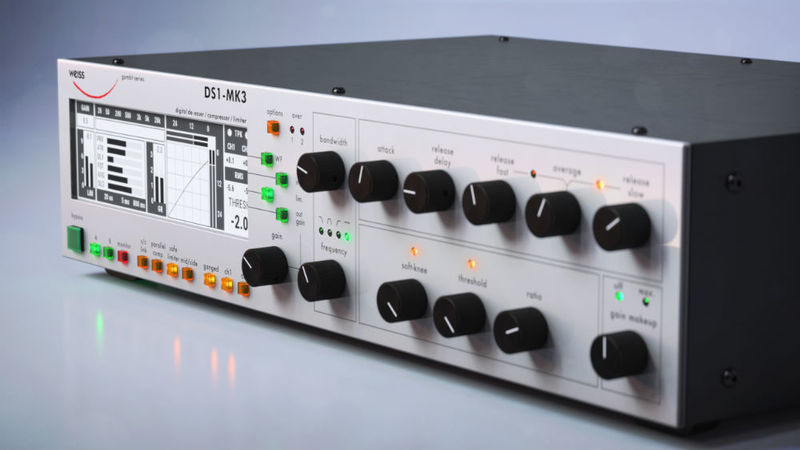
Gold-Standard
Since its launch in the 1990s, the Weiss DS1 has become an absolute gold-standard unit, indispensable in mastering studios around the world despite a premium price tag. Its transparency, unparalleled versatility, and exceptional sound quality make it a must-have, heard (or rather not heard) on pretty much any major record you’d care to mention from the last twenty years. And in that time updates and improvements by Weiss have led to the near-perfection of the DS1-MK3.
And now for the first time ever, it is available as a plug-in from Softube, offering more flexibility than ever in a modern DAW environment, at a fraction of the cost.
What is the Weiss DS1-MK3?
This digital compressor/limiter/de-esser performs tasks no analogue unit ever could, across a wider range of settings. World-renowned mastering engineer, Bob Katz, author of Mastering Audio (hailed by Sound on Sound magazine as ‘the definitive work on mastering’), and three times Grammy winner, described the original hardware unit as ‘impeccable’, saying ‘it is the most transparent, refined, flexible, and least “digital-sounding” dynamics processor I have ever used.’
Working in collaboration with Weiss Digital Audio, this latest addition to the already rich and desirable Softube product range has been almost three years in development. Porting the code perfectly, line by line, from the original unit so that the plug-in sounds identical was just one task. Recreating the workflow and characteristic broad and usable functionality that made the Weiss such a legend was another.
Running at 32 bit/192 kHz (an upgrade on even the hardware original) the plug-in opens up the absolute pinnacle of sound quality to everyone. And with two all-new advanced limiter algorithms in addition to the Weiss original, nothing touches this processor for sheer excellence. Mastering like the masters is open to all for the first time, with all the loudness, clarity, and precision, and none of the drawbacks.
An Improvement on a Legend
The plug-in DS1-MK3 works at resolutions of up to 32 bit/192 kHz (an upgrade on the original hardware). And because it's a plug-in, you can run it on multiple tracks at once, at no extra cost.
De-ess your mids and sides independently. Compress with variable soft-knee settings to take you from gentle levelling all the way to aggressive crushing. And limit with simply the best, most transparent, brick wall available — including two all-new advanced limiter algorithms in addition to the Weiss original, the second of which is designed for true peak limiting.
Features
- Officially licensed and endorsed by Daniel Weiss himself.
- Not an emulation, but a line-by-line code port of the original digital hardware.
- Exactly the same processor as the $10,000 original, at a fraction of the cost.
- Three processors in one; de-ess, compress, and limit, with the industry-standard tool.
- Processes at resolutions of up to 32 bit/192 kHz for exceptional sound quality.
- Advanced metering - waveform view.
- Featuring all-new presets from Bob Katz.
- Truly versatile de-essing. Choose your own filters, adjust frequency, and tailor the process to your needs working in stereo or mid-sides.
- Digital compressor can operate at speeds no analogue unit ever could and offers you total control.
- Two brand-new limiter algorithms included, as well as the Weiss original.
- Run multiple instances of this legendary unit on the same mix at no extra cost.
- Nothing sounds as clean, as transparent, as good. That’s why the hardware is in every major mastering studio in the world.
System Requirements
- macOS Big Sur 11, Monterey 12, Ventura 13
- Windows 10 (64-bit), Windows 11
- Softube account
- iLok account
- Computer with AU, VST, VST3, and/or AAX-compatible DAW host software
- Internet access (for downloading installers and managing licenses)
Supported CPU Families
- Apple macOS computers with Intel Core i3/i5/i7 or Apple silicon (M1 or newer) CPU. Apple silicon is supported natively.
- Windows computers with quad-core Intel Core i3/i5/i7 or AMD quad-core processors with SSE 4.2 support.
- Other Intel processors (Celeron, Pentium, and Xeon) are compatible if they support SSE 4.2 instructions.
Supported Host Software (DAW)
Any 64-bit VST, VST3, AU, or AAX (Pro Tools 11.0.2 or higher) compatible host application should work. However, due to plug-in host differences between DAWs—and our rigorous standards—Softube only officially test their plug-ins and instruments in the most recent versions of Pro Tools, Logic Pro, Cubase, Ableton Live, Studio One, and Reaper. Softube plug-ins are not tested regularly in non-listed systems. They will likely work if the system requirements are met. However, the manufacturer cannot guarantee a solution for issues in unsupported systems.
Softube strongly recommend using VST3, as some of their plug-ins have features that are not present in the older VST format. Supported sample rates: 44.1, 48, 88.2, 96, 176.4, and 192 kHz, in both mono and stereo. The most recent maintenance release of your DAW application is recommended. AAX DSP is not currently in active development. TDM/VENUE/RTAS are no longer supported. See Legacy Installers.
Important Note: Make sure that you always use the latest iLok License Manager. It is not included in the Softube installer but can be downloaded from www.ilok.com


