/ Expansion Packs / KorgEternal
Sinevibes

KorgEternal

5.0 (4 Reviews)
$19.00
KORG Eternal - Main Image
KORG Eternal - Video 1 gallery thumbnail
KORG Eternal - Video 2 gallery thumbnail
KORG Eternal - Image 2
Buy Now
Product information

Eternal is a barber-pole flanger. Unlike a traditional flanger which has its tone repeatedly go up and down, a barber-pole flanger goes upwards or downwards in a seemingly endless fashion. To accomplish this unique effect, Eternal employs a thoroughly calibrated low-frequency oscillator with six output signals which modulate and crossfade three flangers – and they do this in a very special way. Since these oscillators have a “through-zero phase” design, Eternal can go from downwards to upwards motion and back completely seamlessly.

This plugin is part of the Sinveibes KorgFX Collection.

Features

  • Studio-grade DSP algorithms, calibrated specifically for KORG’s hardware platform
  • Individually chosen mapping for every plugin parameter, providing a very natural feel
  • Built-in lag filters for noise-free, ultra-smooth parameter adjustment
  • Optimized for maximum performance and stability on each individual device type

System Requirements

  • Korg Prologue
  • Korg Minilogue XD
  • Korg Nu:Tekt NTS-1

Important Note: This product is a plugin for Korg Prologue, Korg Minilogue XD and Korg Nu:Tekt NTS-1. It is only compatible with these hardware synthesizers.
Installation Instructions

Before You Start ⚠️

In order for the effect plugins to function correctly, you must make sure that your Korg synthesizer has the latest available firmware update and that after installing it you also perform the panel update and voice update procedures. 

If you install the firmware update but do not complete the panel and the voice updates, this can negatively affect other aspects of your instrument’s operation, not just compatibility with third-party plugins. When you power your synthesizer on, the main screen will warn you if such additional updates are required. Please refer to your Korg product's user manual for how to check the firmware version installed on your synthesizer - and visit www.korg.com to download the latest version. The download package will also contain the instructions for doing the panel and voice updates.

Plugin Installation

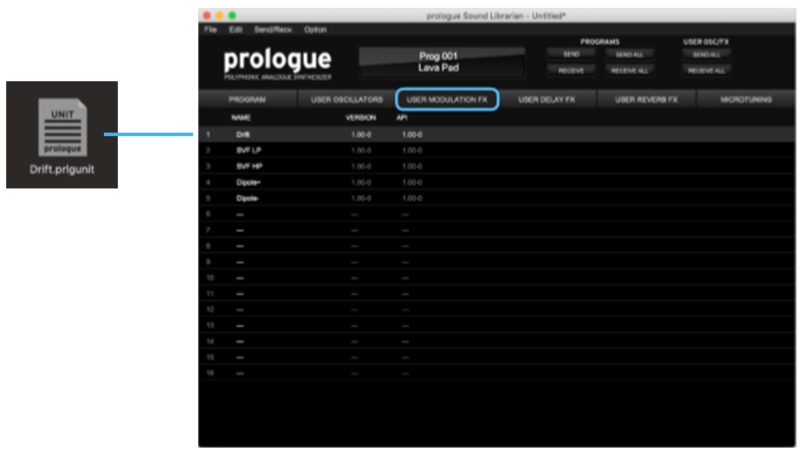
1. Download the .zip file from within your Plugin Boutique User Account > Double-click it to extract the contents.

2. Connect your Korg synthesizer to your computer via MIDI or USB-MIDI and launch the Librarian app.

3. Switch to the tab according to the target plugin group:

  • USER MODULATION FX
  • USER DELAY FX
  • USER REVERB FX

4. Drag and drop the plugin file onto the slot where you would like to install it.

5. Press the SEND ALL button in the USER OSC/FX toolbar section.

Your Korg FX Plugin is now installed and ready to use within your Korg Synthesizer.

Bundle & Save

Sinevibes Korg Complete Collection
$379.00
KorgFX Collection
$229.00

Plugin Boutique Rewards

Discover the most rewarding loyalty programme among all plugin retailers.

  • Free Loopmasters Samplepacks
  • Discounts on products and courses
  • Extra Virtual Cash claimed immediately at checkout
Find out more

Follow us:

X (Twitter) Facebook YouTube Instagram
Logo Logo

Plugin Boutique Limited, Part of the Beatport Group LLC.

Copyright © 2011-2025 Plugin Boutique. All rights reserved