Log In

Free gifts available with your purchase

Dynamic Tremolo Wildness
BLEASS Dragonfly is a completely new approach to tremolo effect which brings new sonic possibilities to all music producers. Make your synths, voices or any melody "vibrate" in correspondence with its own frequencies, or with external basses and Ieads! Just like in Billie Eilish’s song “Xanny”, Dragonfly helps you achieve the same effect as when the voice gets modulated by heavy bass.
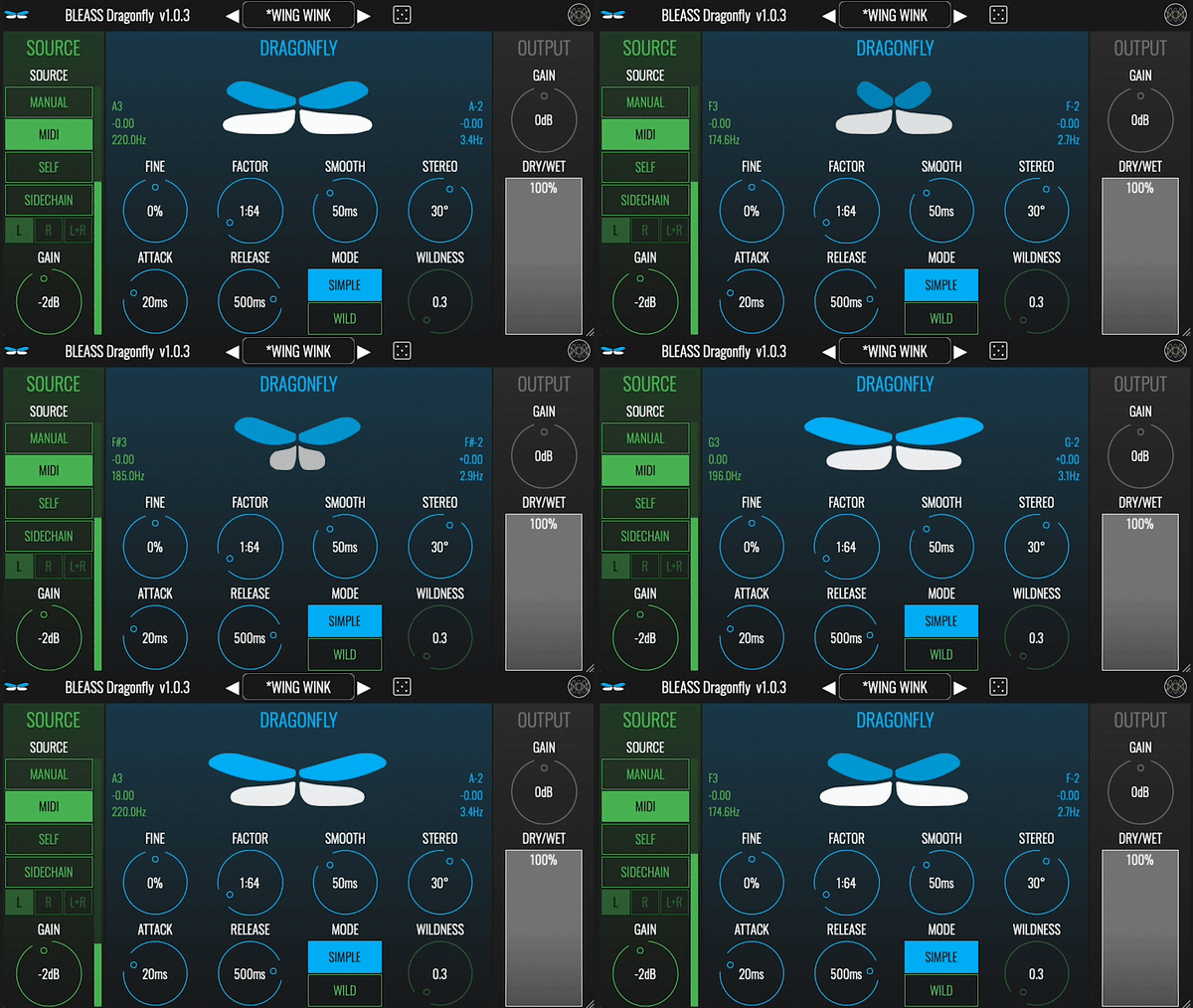
BLEASS Dragonfly automatically syncs the tremolo effect applied on a track using various triggers.
First, you can use the pitch tracking module on either the input audio track (“self mode") or a sidechained audio track ("sidechain mode”). You also can use the MIDI input to trigger Dragonfly with accuracy: the tremolo will automatically sync with the notes’ frequencies. Finally, a manual mode allows you to set a fixed frequency.
Then you can finetune your settings by adjusting the fine, factor, smoothness, stereo, attack & release. The “Wild” mode applies a waveshaper to the signal to produce a subtle sauration. The final tremolo effect rate is mirrored by the flapping wings of the Dragonfly.
Source Stage
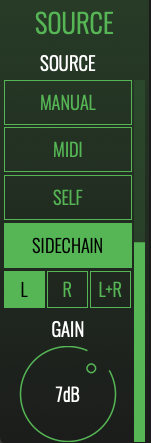
- Manual - Tremolo rate is set by the Rate knob. Tremolo amplitude is set by the Amplitude knob.
- MIDI - Tremolo rate corresponds to the rate of the lowest MIDI note received by the plugin. Tremolo amplitude corresponds to the velocity value of this note.
- Self - Pitch tracking on the input signal gives the tremolo rate. Tremolo amplitude matches the input signal’s amplitude.
- Sidechain - Pitch tracking on the sidechain signal gives the tremolo rate. Tremolo amplitude matches the sidechain signal’s amplitude.
- Source Channel - Sets the channel to be analysed for SELF and SIDECHAIN modes.
- Amplitude - Sets tremolo amplitude in MANUAL mode.
- Gain - Sets the input gain in MIDI, SELF and SIDECHAIN modes.
Dragonfly Stage
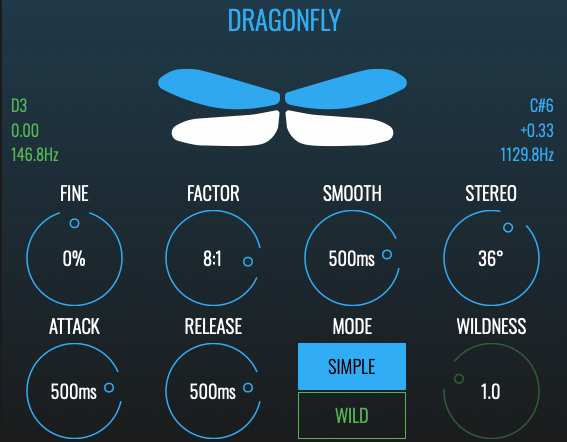
- Rate - Sets tremolo rate in MANUAL mode.
- Fine - Offsets the detected pitch value by +/- 0.5 semitone in MIDI, SELF and SIDECHAIN mode.
- Factor - Detected or set rate is multiplied by this factor to give the final tremolo rate.
- Smooth - Sets the smoothing duration of rate variations.
- Stereo - Sets phase difference between left and right channels.
- Attack - Attack duration of the effect.
- Release - Release duration of the effect.
- Mode - SIMPLE is a basic tremolo. WILD uses complex waveshaping for warm and saturated effect.
- Wildness - Sets waveshaping strength in WILD mode.
- Visualisation - Dragonfly wings are animated to match the rate and amplitude of the effect. The green label on the left indicates the input MIDI note and rate. The Blue label on the right indicates the applied MIDI note and Rate.
Mix Stage

- Gain - Output gain of the effect.
- Dry / Wet - Dry / Wet balance.
System Requirements
PC
- Windows 8 and later (64-bit only)
- VST3
Mac
- macOS 10.9 and later (64-bit only) (including macOS 11 Big Sur and M1 processors)
- VST3 / Audio Unit
Format
- BLEASS Dragonfly is not a standalone product, it requires host software.
- BLEASS Dragonfly is compatible with all VST3 / Audio Unit compatible DAWs.