Log In

Free gifts available with your purchase
A Revolutionary Musical Sound Design Tool
Sonicsmiths present a new tool for composers and sound designers. Based in the Native Instrument's Kontakt engine, The Foundry is a sound design creation tool, drawing from over 18,000 samples, 19+ GB of sample content (12+ GB compressed), and trillions of ways to manipulate and combine the sounds. Never settle for presets again; The Foundry creates original patches using the groundbreaking AARE algorithm.
Features
AARE – Adjective Assignable Randomizer Engine
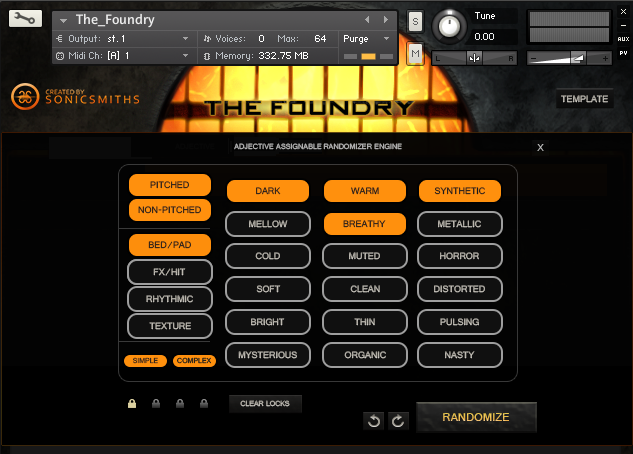
Instead of having to search through thousands of presets for a specific sound, we have designed a randomizing engine that creates a new patch for you based on simple adjectives. For example, if you want a Dark, Pulsing, Mysterious sound, select these adjectives, press a randomizing button, and The Foundry will generate new patches based on the parameters you select.
3-Mode Step Sequencer
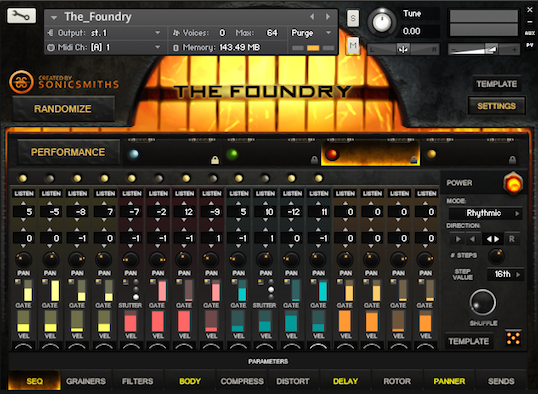
Rhythmics and FX sound sets can create unique and quickly-designable rhythms, or, along with tonal beds/textures, can create amazing lead lines and creative chordal patterns.
4-Way Morphing Engine
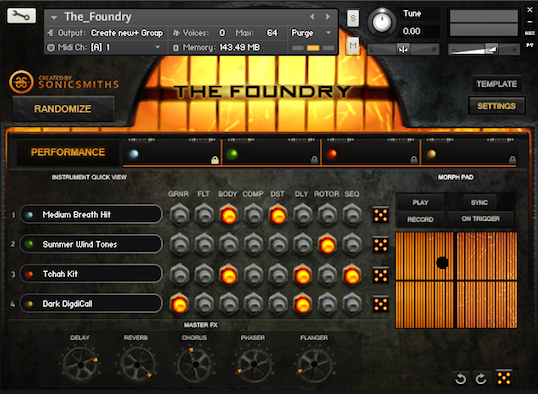
You can load up to four different “core” sounds into The Foundry. Each of these sounds has independent processing, manipulation, and can be morphed via the X-Y Pad Designer, key range, velocity, or CC.
Use the X-Y Pad Designer to create, save, and sync playback to your own modulatable pathways.
The Foundry has 4 different groups to select from: Beds and Pads (tonal sustained layers), Textures (atonal, moving material), FX (single one-shot hits, FX, and short articulated instruments), and Rhythmics (sonic “kits”). These groups range from Non-pitched to Pitched, and Simple to Complex.
Other Features
- Template Mode - Make any sound Pulse, create Drops/Rises, or instantly put The Foundry into other modes such as Long Release, Hard Attack, etc.
- Body Designer - With over sixty different body types, you can manipulate each of the “core” sounds by sending them through different material types, such as tubes, bricks, glass, dog bodies, and more!
- 6 Modulators assignable to Filters, Pitch, Amplitude, and Surround Panning allow for a wide range of stuttering, pulsing, frequency modulation, and many standard synthesis techniques.
- Graining Synthesis - You can take most of the patches in the library and add the granular synthesis effect, with stretching, panning, and many other ways of manipulating the sound.
- Surround Mode - Set all four sounds to go out different channels, as well as pan in surround.
- Unique Reverb Selections including Swaps, Churches, Studios, etc.
- Fully Adjustable Filters, Distortion, Compressors, Delays, Panning Rotators, Surround Routing Abilities and many more creative tools.
System Requirements
- 13.2 GB Free Hard Drive space
- 1.5 GB Free RAM (4 GB total) (Average patch range is between 50-500 MB)
- Kontakt Player (free) v5.4.1+
- Kontakt Compatible Digital Audio Workstation (Ableton, Cubase, Pro Tools, Logic, Digital Performer etc.)
- In Standalone: External Audio Card such as RME/UAD/Focusrite (etc.)
The Foundry is a third-party library, based in Native Instruments' Kontakt Engine. In general, whatever is listed on NI's Kontakt website for the current version will be the machine requirements for The Foundry. Big Fish Audio highly recommend running The Foundry on a computer with SSD drives for optimal performance.
Mac
- Mac OS X 10.8+ and higher (Intel only) (M1 Mac not supported).
- Mac Pro 2010 six-core or higher.
- iMac/Macbook i5 – 2013 or higher.
Windows
- Windows 7 / 8 / 10.
- 3rd Generation Intel i5/7 processors, or AMD FX-8350 Eight-Core processor.