Buy Hillman, get a free gift with purchase:
Vintage Combo Synth
Inspired by the past, designed for the future
Hillman is a synth-like instrument inspired by old combo-organs, string machines, and similar vintage gear. It has 4 voices per note, each with selectable waveform (transistor:ish, tube:ish, sine and special plasma), octave switch and a level control.
The sound is generated with an analog approach but does not use samples or sampled wavetables. Hillman also has an intuitive ADSR envelope control, FX section with Chorus, Phaser & Reverb, and comes with many built-in presets.
Anatomy
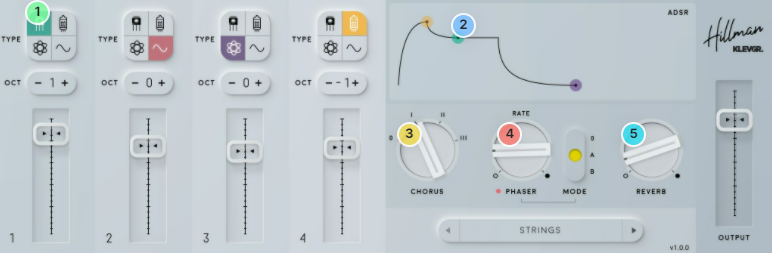
1. Pick a color - Up to four voices per note, with individual waveform for each voice.
2. Back the attack & decay, OK! - An intuitive ADSR control for any envelope needs.
3. Join the chorus - Smooth ensemble chorus with 3 different modes,
4. Phase yourself - 4-pole phaser with 2 different modes.
5. Room service - One-knob space solution
Features
- 4 voices per note
- Each voice has a selectable waveform (transistorish, tubeish, sine and special plasma) + octave switch and level control
- ADSR Envelope control
- Smooth ensemble chorus with 3 different modes
- 4-pole phaser with 2 different modes
- Lush reverb which ranges from small room to churchlike halls
- Rich collection of built-in presets
System Requirements
- macOS 10.10 or later (optimized for the M1-processor)
- Windows 7 SP1 or later
- AU, VST-2, VST-3, AAX

Please Note: Pana is used as the example:
Mac
License Redemption
1. Navigate to https://klevgrand.com/redeem > Paste your 16 digit redemption code found in your Plugin Boutique User Account > Click 'Submit!'.
2. Your redemption code has been accepted > Scroll down to Step 2.
3. Click either 'Sign in' if you already have a Klevgrand account, or 'Create new account' if you do not > Fill in your personal details > Click 'I'm ready'.
4. Your account has now been created.
5. Navigate to your email inbox and locate the activation email that you should have received from Klevgrand > Click 'Let me in!' to activate your account.
6. Create a password for your account > Click 'Enter Klevgrand'.
7. Your software and serial number is now available within your Klevgrand account > Click the Apple logo to download the installer file.
Installation
1. Launch the pana_x_x_x_macOS.dmg installer file.
2. Double click the KLEVGR. logo to launch the installer.
3. Click 'Continue'.
4. Click 'Continue'.
5. Click 'Agree'.
6. Click 'Install'.
7. Enter your system password > Click 'Install Software'.
8. Click 'Close'.
9. Navigate back to your Klevgrand My Account page > Click on the serial number to copy it to your clipboard.
10. Launch your DAW > Create a new audio track > Insert Pana onto the channel > Paste your serial number into the box.
Your software is now activated and ready to use within your DAW
Windows
License Redemption
1. Navigate to https://klevgrand.com/redeem > Paste your 16 digit redemption code found in your Plugin Boutique User Account > Click 'Submit!'.
2. Your redemption code has been accepted > Scroll down to Step 2.
3. Click either 'Sign in' if you already have a Klevgrand account, or 'Create new account' if you do not > Fill in your personal details > Click 'I'm ready'.
4. Your account has now been created.
5. Navigate to your email inbox and locate the activation email that you should have received from Klevgrand > Click 'Let me in!' to activate your account.
6. Create a password for your account > Click 'Enter Klevgrand'.
7. Your software and serial number is now available within your Klevgrand account > Click the Windows logo to download the installer file.
Installation
1. Unpack the pana_x_x_x_win.zip installer file > Launch the pana_x_x_x_win.exe file.
2. Click 'I accept the agreement' > Click 'Next'.
3. Click 'Next'.
4. Click 'Next'.
5. Click 'Next'.
6. Click 'Install'.
7. Click 'Finish'.
8. Navigate back to your Klevgrand My Account page > Click on the serial number to copy it to your clipboard.
9. Launch your DAW > Create a new audio track > Insert Pana onto the channel > Paste your serial number into the box.
Your software is now activated and ready to use within your DAW