Buy Modley, get a free gift with purchase:
Multi-FX Delay
A delay playground with endless capabilities
Modley is a modulation delay with effect insert capabilities, which lets you design the whole delay signal with several carefully selected effect modules to create unique signal flows.
The idea behind Modley is to push the boundaries of what a delay effect is capable of – only your imagination sets the limits! While Modley sure can be used to do all the traditional tricks - Stereo delay, Tape delay, Short slapback delay, etc., its true potential lies within the variety of unexpected effect modules that can be applied.
New in v1.1
- New Bitcrusher insert effect
- New Stereo width control insert (Stereoid)
- New Feedback mode, controls the behaviour of loop insert effects
- The Filter insert now features a bandpass type
- The Pitch insert now has a range knob
Anatomy
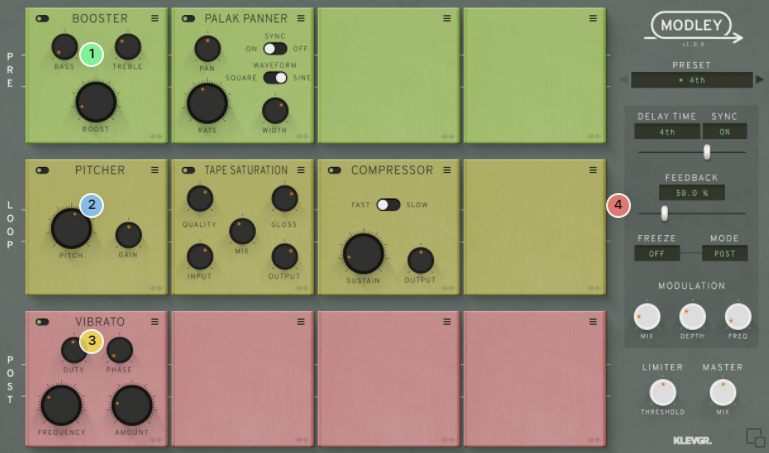
1. Pre-pare for the loop - The first row is the Pre rack – all effects inserted here will process the incoming audio before entering the Loop rack.
2. Loop the loop - This is where the fun really starts. The inserted effects will process the audio from left to right, and if the feedback control (4) is set to anything above 0, that amount of the loop output will be re-routed back to the loop input.
3. Post-traumatic stress - Same as the Pre rack, but this rack is positioned after the loop rack in the chain.
4. Only positive feedback, please - This controls how much fun you want.
Features
- 15 different effect modules – Panning modulation, Phaser, Distortion, Tape Saturation, Pitch Shifter, Delay (!), Reverb and much more.
- Time sync.
- Global modulation of the delay.
- Built-in limiter.
- Freeze function, with pre- or post-loop processing.
- Lots of presets to kickstart the creative flow.
- Dry/wet mix
System Requirements
- macOS 10.10 or later (optimized for the M1-processor)
- Windows 7 SP1 or later
- AU, VST-2, VST-3, AAX

Please Note: Pana is used as the example:
Mac
License Redemption
1. Navigate to https://klevgrand.com/redeem > Paste your 16 digit redemption code found in your Plugin Boutique User Account > Click 'Submit!'.
2. Your redemption code has been accepted > Scroll down to Step 2.
3. Click either 'Sign in' if you already have a Klevgrand account, or 'Create new account' if you do not > Fill in your personal details > Click 'I'm ready'.
4. Your account has now been created.
5. Navigate to your email inbox and locate the activation email that you should have received from Klevgrand > Click 'Let me in!' to activate your account.
6. Create a password for your account > Click 'Enter Klevgrand'.
7. Your software and serial number is now available within your Klevgrand account > Click the Apple logo to download the installer file.
Installation
1. Launch the pana_x_x_x_macOS.dmg installer file.
2. Double click the KLEVGR. logo to launch the installer.
3. Click 'Continue'.
4. Click 'Continue'.
5. Click 'Agree'.
6. Click 'Install'.
7. Enter your system password > Click 'Install Software'.
8. Click 'Close'.
9. Navigate back to your Klevgrand My Account page > Click on the serial number to copy it to your clipboard.
10. Launch your DAW > Create a new audio track > Insert Pana onto the channel > Paste your serial number into the box.
Your software is now activated and ready to use within your DAW
Windows
License Redemption
1. Navigate to https://klevgrand.com/redeem > Paste your 16 digit redemption code found in your Plugin Boutique User Account > Click 'Submit!'.
2. Your redemption code has been accepted > Scroll down to Step 2.
3. Click either 'Sign in' if you already have a Klevgrand account, or 'Create new account' if you do not > Fill in your personal details > Click 'I'm ready'.
4. Your account has now been created.
5. Navigate to your email inbox and locate the activation email that you should have received from Klevgrand > Click 'Let me in!' to activate your account.
6. Create a password for your account > Click 'Enter Klevgrand'.
7. Your software and serial number is now available within your Klevgrand account > Click the Windows logo to download the installer file.
Installation
1. Unpack the pana_x_x_x_win.zip installer file > Launch the pana_x_x_x_win.exe file.
2. Click 'I accept the agreement' > Click 'Next'.
3. Click 'Next'.
4. Click 'Next'.
5. Click 'Next'.
6. Click 'Install'.
7. Click 'Finish'.
8. Navigate back to your Klevgrand My Account page > Click on the serial number to copy it to your clipboard.
9. Launch your DAW > Create a new audio track > Insert Pana onto the channel > Paste your serial number into the box.
Your software is now activated and ready to use within your DAW