


 Log In

Free gifts available with your purchase

Amp Simulator
Now includes Brusfri Noise Reduction
In Stark 1.2.0, a special version of Klevgrand's award-winning noise reducing plugin Brusfri is seamlessly integrated. Super-effective on noisy guitar pickups, preamps or fans (especially the rotating ones)!
30 new ways to break the rules
Stark is a fully-fledged guitar/bass/instrument rig for all your tone-shaping needs. It has a unique and flexible amplifier simulation with 12 different amp models, an award-winning unique built-in noise reduction, 10 different speaker cabinets, six room types, and a pedal board with four slots and 17 different FX pedals to choose from. The modules are processing audio separately (and optionally), which makes it possible to combine different amplifiers with different cabinets and rooms.
What separates Stark from other amp simulators is that the Cab, Amp and Ambience modules are built on Klevgrand’s very own algorithms that doesn’t involve any convolution or FFT analysis. This approach renders a more natural response to dynamics over the whole frequency spectrum, plus the ability to fine-tune each profile in ways that just isn’t possible when using convolving methods.
From version 1.2, a special version of Brusfri – Klevgrand’s highly advanced audio noise reducer, is now an integrated part of Stark. When only the noise is playing, a simple push on the ear is all you need – once the noise is “learned”, Brusfri will instantly reduce your background noise.
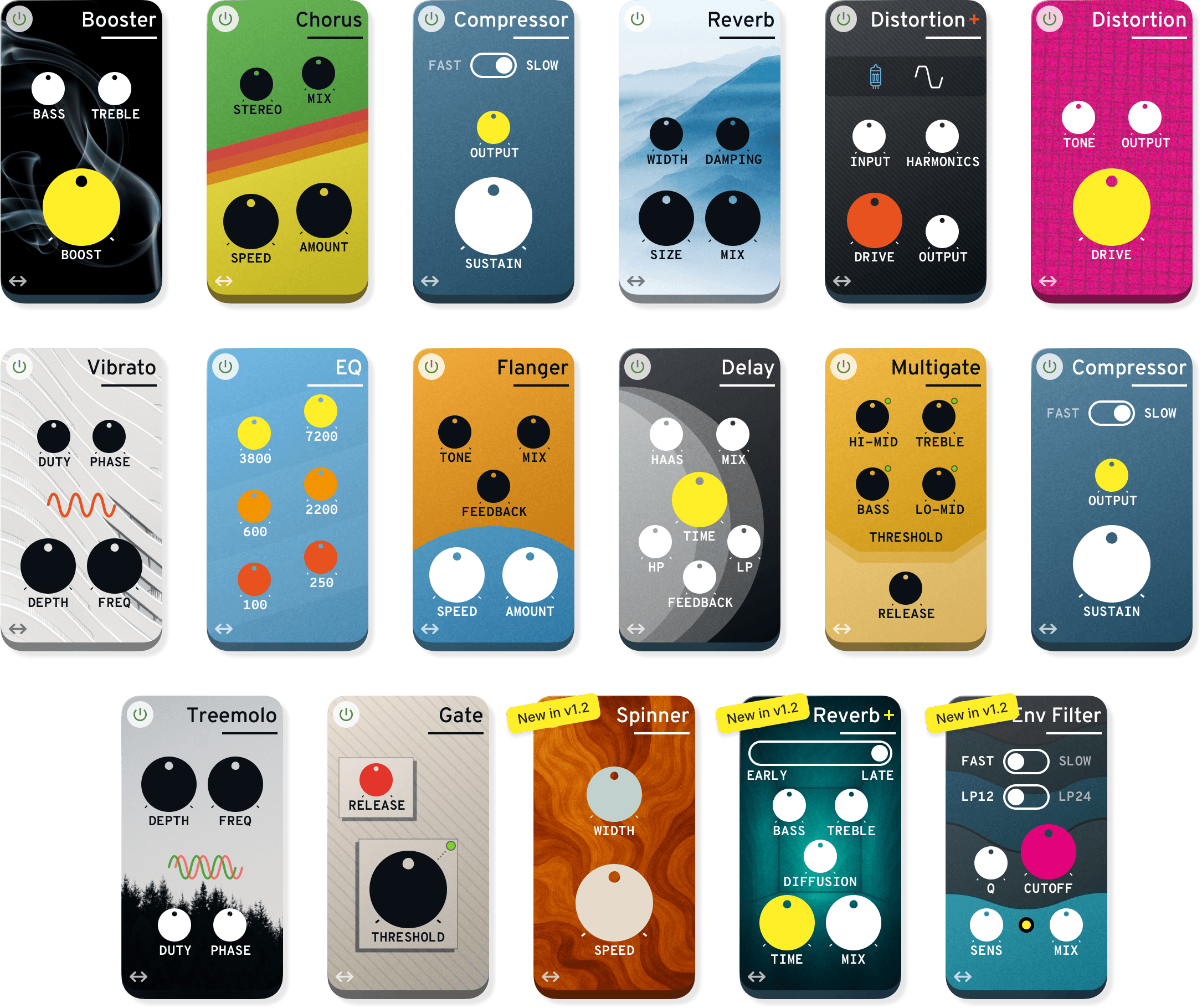
The 17 different effects lets you shape your tone into whatever you like, from clean and slightly saturated tones, to more dreamy soundscapes, djent:y thunders and playful escapades.
Included is also a large collection of presets, covering many different genres and styles. To quickly get started, explore the “Song starter” category and just start playing.
Features
- 12 high-quality amp models, with both clean and overdrive channel
- 10 amp cabinets of various sizes and sound
- New Noise reduction from award-winning plugin Brusfri included
- Six room types, each with three different sizes and variable decay time
- FX board with four slots
- 17 different FX pedals available (distortion/overdrive, modulation, EQ, dynamics, delay, reverb etc.)
- New Three new FX pedals: Spinner (rotary effect), Envelope Filter and a brand new Reverb
- Plenty of factory presets covering most genres and styles
- New 30 brand-new “Song starter” presets featuring the new FX pedals
- Ultra low latency
- New Bypass switch for the Amp and Cab sections
Pedalboard Smorgasboard
From bread-and-butter effects to more off-the-menu flavours, the 17 included pedals offers a complete tone-shaping kit.
Anatomy
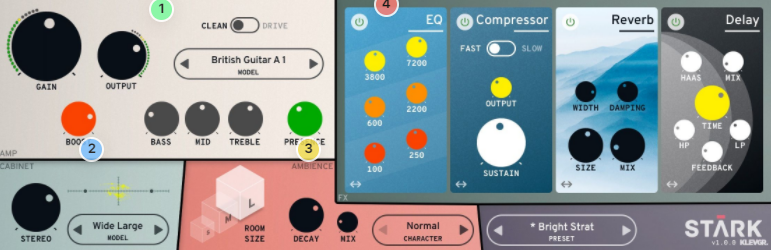
1. Very amportant - The Amplifier module offers 12 different amplifier profiles. It has both a clean mode and an overdrive mode, an equalizer functionality (including presence), and a booster controlling the end-stage amplification saturation.
2. Take a cab - The Cabinet simulation consists of 10 different cabinets of various sizes and sounds. This module also offers a stereo-width knob that simulates the distance between two microphones put in front of the cone.
3. Plenty of rooms - The Room simulation offers six different kinds of rooms, where each room size can be changed between Small, Medium, and Large. There’s also a decay parameter controlling the reflectivity of the walls and a dry/wet mix.
4. Step on it - The Pedalboard contains four FX slots where any of the 14 included effects can be inserted. The order of the pedals can easily be changed using drag and drop.
System Requirements
- macOS 10.10 or later (optimized for the M1-processor)
- Windows 7 SP1 or later
- AU, VST-2, VST-3, AAX



























