Log In

Free gifts available with your purchase
Finest Orchestra Vibraphone
This Vibraphone is a fine orchestra Yamaha vibraphone - it has a range of 4 ½ octaves.
There are three groups of articulations available. “Mallets” consists of open and muted articulations, which are natural to the Vibraphone. Cinematique Instruments added a bowed articulation, achieved by stroking the metal bars with a bow, which results in a sound with a beautiful, slow attack. Finally, they recorded some prepared articulations, which are achieved by placing coins, spoons, spatulas, washers and respectively fold paper on the metal bars. With the Solo Vibraphone, Cinematique Instruments came out with an extremely versatile vibraphone instrument providing regular mallets as well as bowed and prepared sounds and a silky and organic sound.
3 Articulation / Playing Technique
- Mallets: consists of open and muted articulations, which are natural to the Vibraphone.
- Bowed: achieved by stroking the metal bars with a bow, which results in a sound with a beautiful, slow attack.
- Prepared: achieved by placing coins, spoons, spatulas, washers and respectively fold paper on the metal bars. The prepared articulations can be played apart from each other or mixed
Extreme Versatile
Providing regular mallets as well as bowed and prepared sounds and a silky and organic sound
Additional FX
Onboard fx such as Octaver, chorus and low res (bit crusher) expand the options of the instrument
Powerful Arpeggio
Tiny but effective. The 8 step sequencer with a voicing engine per step lets you easily create inspiring patterns.
Several Reverb Types
Vibraphone is equipped with several reverb types including our favourite 'Infinite' type.
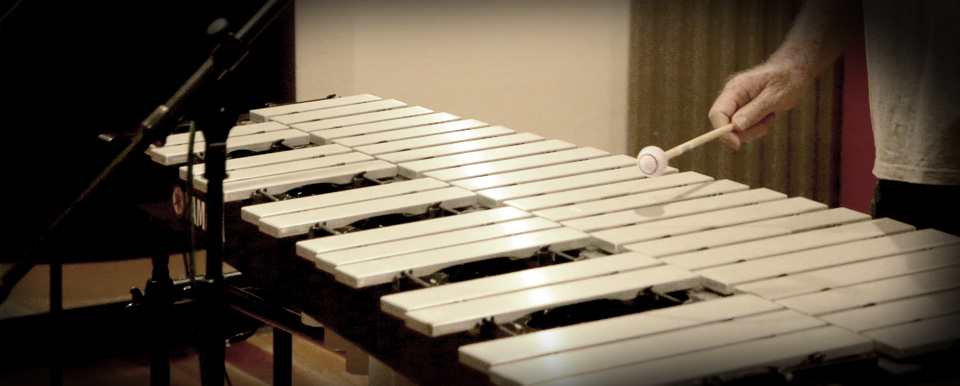
The Vibraphone is a percussion instrument very similar (and at the same time very dissimilar) to the Marimba. Its tone is produced by metal bars that are arranged like the keys on a piano, and resonator tubes underneath them. More advanced in comparison to the Glockenspiel, it features a tremolo driven by a motor, and a pedal to either let the metal bars ring or dampen them.
During their stay in Australia, Cinematique Instruments recorded a Vibraphone in cooperation with Michael Askill, one of Australia's finest percussionists, using his playing and our recording technique. The Vibraphone captured has a range of 4 ½ octaves and has been recorded with close-up condenser microphones such as the Schoeps MK4 to achieve a rich and defined stereo sound with no room, so you can add one afterwards. They mostly recorded 4 round-robin groups with up to 4 velocity layers. Articulations: There are three groups of articulations. The first group called “Mallets” consists of open and muted articulations, which are natural to the Vibraphone. With the button „Pedal“ set to enabled, the instrument will play muted by default, unless the sustain pedal (CC 64) is pressed, which is when it switches to open. With the button on „Hold“, only open notes will be played and you are able to adjust an overall length.
Besides the regular articulation, they also added a bowed articulation, achieved by stroking the metal bars with a bow, which results in a sound with a beautiful, slow attack.
Finally, they recorded some prepared articulations, which are achieved by placing coins, spoons, spatulas, washers and respectively fold paper on the metal bars. The prepared articulations can be played apart from each other if you chose a single articulation, or mixed if you chose „Custom“. By using the „Assign“ button and then choosing an articulation, you can set a specific key to play that articulation; meanwhile, if you press „Random“, a random articulation will be assigned to each key.
With the Solo Vibraphone, Cinematique Instruments came out with an extremely versatile vibraphone instrument providing regular mallets as well as bowed and prepared sounds and a silky and organic sound.
Features
- One Solo Vibraphone instrument
- Lots Of Different Playing Techniques
- Approximately 1200 Samples
- 600 MB of compressed data
System Requirements
- The FULL Version of Kontakt 5.6.8 or higher is required.
Important Notes:
- The FULL Version of Kontakt 5.6.8+ is required in order to use this instrument.
- You will be stuck in DEMO MODE if trying to use this instrument in the FREE Kontakt Player.