Log In

Free gifts available with your purchase
Product information
User Interface Designer
Sonic Experience Reimagined
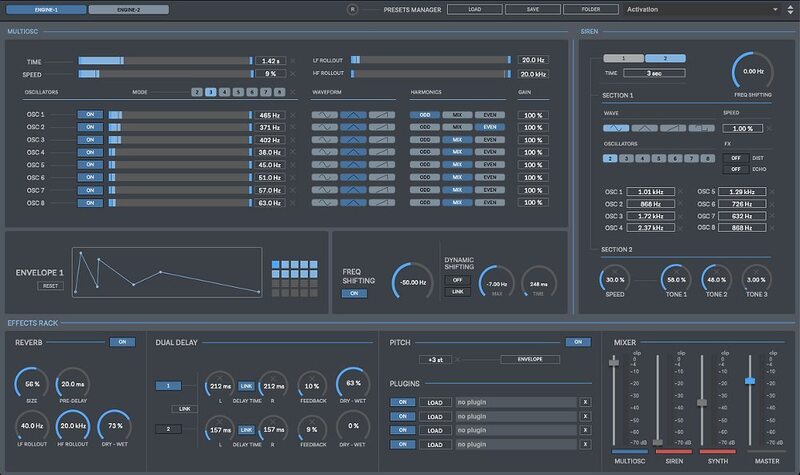
Spacelab is a 64-bit standalone software developed for creating high-quality & high-tech user interface & user experience sounds for games, apps, films, music & multimedia projects.
A user-friendly tool to design your own buttons, clicks, notifications, slides, warnings, sirens, alarms, alerts, menu, popup, hover, accept & deny, beep sounds and much more. Build impactful interactions, feedback for user actions and personalized brand recognition sounds.
Multi-Oscillator
- The Multiosc section includes up to 8 Oscillators (Sinus, Triangle & Saw Waveforms)
- Harmonics Selection
- Envelope
- Frequency Shifting
Siren-Alarm
- A dedicated section to create Sirens (police, ambulance, ..), Alarms & Alert Sounds
- Up to 8 Oscillators
- Distortion
- Echo
- Frequency Shifting
Synth
- Includes 3 Oscillators, 2 FM Synthesis Generators & a Sub-Bass Generator
- XY Pad
- 2 Envelopes
- Frequency Shifting
- Keyboard Routing
Random Playback
- Trigger random values for the selected parameters
- Looped playback creates endless sound variations in one click
- Set min/ax values for random playback
Effects Rack
- Includes built-in reverb, dual delay, pitch shifting (+envelope) & 4 plugin slots
Recording
- Record in WAV & AIFF up to 192 kHz / 32-bit
MIDI
- Control Spacelab using your MIDI device
Presets
- Includes over 100 presets to start with
- Save & Load the whole session data
Also Included: Spacelab User Interface SFX

- Get over 100 SFX included for free
- All SFX were created using Spacelab
- 125 MB file size
Features
- 2 Audio Engines
- Multi-Oscillators Section
- Dedicated Siren-Alarm Section
- Synth Section
- Random Playback
- XY Pad
- Built-In Reverb
- Built-In Dual Delay
- Pitch Shifting & Envelope
- Master Plugins
- Recording
- Presets Manager
- MIDI Control Spacelab via a MIDI Device
- Spacelab User Interface 100 SFX included for free
System Requirements
Mac
- macOS 10.11.6 or later (Intel / Apple Silicon supported) (64-bit only)
- 4 GB RAM recommended
Windows
- Windows 8 or later
- 4 GB RAM recommended
Installation Instructions