


 Log In

Free gifts available with your purchase

Expand in style
A good gate/expander is an indispensable tool in any mixing or live situation. FabFilter Pro-G offers everything you could wish for: perfectly tuned algorithms, complete control over the side chain and channel linking, excellent metering and great interface design.
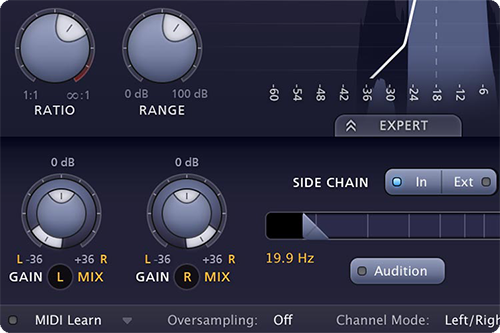
Ultra-flexible side chain routings
Apart from excellent sound, FabFilter Pro-G also provides very flexible routing. You can choose between mono, stereo or mid/side processing and in expert mode, external side chain input is available with completely customizable channel linking and routing.
Clear and precise metering
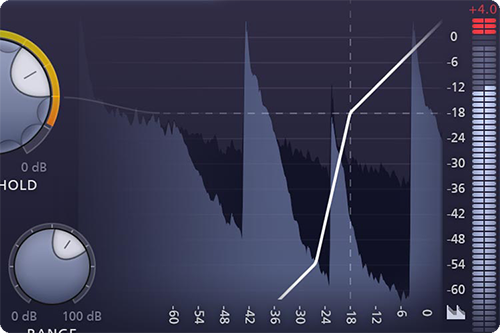
FabFilter Pro-G combines smart input/output level meters with a real-time level display and transfer curve. Everything was specifically designed to give clear feedback on the current gate/expander settings and processing, letting you set them up easily.
FabFilter goodies
Of course, you also get all the usual FabFilter goodies: perfectly tuned knobs, MIDI Learn, Smart Parameter Interpolation for smooth parameter transitions, an excellent help file with interactive help hints, SSE optimization and much more.
Features
- Six meticulously tuned expander/gate algorithms, including upward expansion and ducking
- Program dependent attack and release curves
- Low CPU usage
- Adjustable range, hold time and knee settings
- Optional look-ahead time up to 10 ms
- Precise and helpful metering, including a real-time level display
- Expert mode that offers highly customizable side chain options
- Mono, stereo or mid/side processing
- Up to four times linear-phase oversampling
- Zero-latency operation mode
- MIDI triggering: open the gate/expander with your MIDI keyboard
- External side chain option
- Separate dry/wet level settings
- Easy to set up for common gating / expansion scenarios with the included factory presets
- GPU-powered graphics acceleration
- Double-click text entry of parameter values
- Stereo and mono plug-ins available
- Supports common Pro Tools hardware control surfaces
- MIDI Learn
- Undo/redo and A/B comparison
- Smart Parameter Interpolation
- Extensive help file with interactive help hints
System Requirements
Mac
- macOS 10.12 or higher (Intel or M1 Apple Silicon processor) (64-bit only)
- VST2, VST3, AU, AAX Native
Windows
- Windows 11, 10, 8, 7, or Vista (32 or 64-bit)
- VST2, VST3, AAX Native
Formats
All FabFilter plug-ins are available in VST, VST3, Audio Units, AAX Native and AudioSuite formats.
Drumsound & Bassline Smith
Drum & Bass Artist
"We use FabFilter Pro-G on literally EVERY project we work on in the studio. We absolutely love the animated compression display!"
FabFilter has expanded it 'Pro' range of mixing plug-ins with Pro-G, a feature-packed VST/AU/RTAS noise gate/expander. The interface is in line with FabFilter's other Pro-series plug-ins, with undo/redo, pop-up help balloons, well-categorised presets and A/B comparison. Pros: Slick inter...
Read More


