/ Kontakt Instrument / Fire Strings
Loot Audio

Fire Strings

$99.00
Fire Strings Main Image
Fire Strings - Kontakt Library - Launch Video gallery thumbnail
Fire Strings - Engine Walkthrough gallery thumbnail
Fire Strings - Core Content Walkthrough gallery thumbnail
Fire Strings - Snapshots Video gallery thumbnail
Fire Strings UI
Fire Strings Effects
Fire Strings Matrix
Buy Now
Product information

Ignite Your Creativity

Fire Strings is a hybrid, scoring and music production tool for cinematic composers and producers. It comes with 6GB of custom-recorded sounds inside an extremely powerful engine powered by Native Instruments Kontakt sampler.

The library consists of a highly curated collection of cinematic sounds created from recordings of electric violin and guitars recorded through high-end analog signal paths (Neve, API, Universal Audio, Manley) and put through extensive sound design processes by a team of sound designers.

Over 140 sounds including sustains, textures and grooves are included.

The Engine

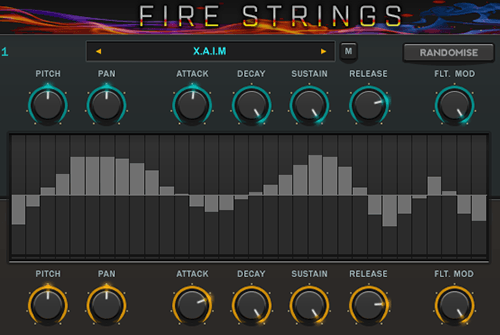
Each sequencer has advanced controls which allow you to change the speed, number of steps, direction, offset, fade-in, nudge and loop individually per sequencer. Each sequencer also has copy/paste functions, randomisation and built-in presets.

Fire Strings is an incredibly advanced instrument for Kontakt. Combine two sound sources and rhythmically swap between each sound or create rich evolving soundscapes with gradual modulation. There are also presets per sequencer so you can quickly select pre-built tools to add rhythm and variation instantly.

The 11 effects per sound can be controlled randomly or in positive or negative directions at the press of a button. The amount of control here is unprecedented and opens up a vast world of sound design capabilities.

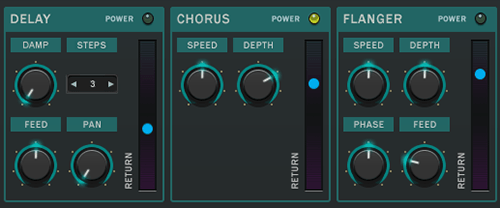
An additional 8 global send and insert effects allow for even further sound manipulating possibilities.
Content

The library content is broken down into three main categories:

  • Tonal - This section of the library contains electric violin sustains and textures both of a traditional and extended nature. We dug very deep to push well beyond common technique. Here you’ll find everything from standard sustains and tremolos to the extremely jarring spectral scrubs, harmonics, trills, wild microtonal bends and vibrato.
  • Risers - Risers offers a collection of long, tension-building glissandos played with a variety of bowing and fingering techniques, perfect for developing climaxes.
  • Rhythmic - The rhythmic content consists of dozens of tonal, tempo-synced electric guitar grooves that serve as the perfect starting point for a cue. All grooves are mapped across several octaves and are freely transposable.
Features

  • 129 Snapshots
  • Custom GUI
  • 11 FX Sequencers Per Sound
  • 60 Custom Impulse Responses
  • Requires Kontakt 5.7.3 Full Retail Version (Not compatible with free Kontakt player)
  • 800 + Samples

System Requirements

Important Notes:

  • The FULL Version of Kontakt 5.7.3+ is required in order to use this instrument.
  • You will be stuck in DEMO MODE if trying to use this instrument in the FREE Kontakt Player.
Installation Instructions

Please note: Pulse Downloader is required to install this software. El Dorado: Legato Ambient Guitar has been used as an example.

Mac

1. Visit the Pulse Downloader website by clicking the 'Download' link in your Plugin Boutique account or by clicking HERE, and download the correct installer for your system (either 'OS X or later' or 'M1 System').

2. Open the downloaded file and run the installer 'Pulse-XX.X.X.dmg'.

3. Drag 'Pulse' to 'Applications'.

4. Log in to your Pulse account, or create a new account by clicking 'Register' at the bottom of the window.

5. If registering, input your email and password, agree to the terms of use and click 'Register'.

6. Click the '+ Add a Product' button located in the top right-hand corner of the window.

7. Copy and paste your serial number from your My Account page, click 'Install Now', then click 'Redeem'.

8. Select a location for Pulse to download the software by clicking the file icon on the right-hand side of the window.

9. Select the location you would like your software to download and install to.

10. Click 'Download and Install'.

11. The instrument is now downloading.

12. Once the instrument has finished downloading, open Kontakt, then open the 'Files' tab and navigate to the location that you downloaded the Kontakt Library to. Then click and drag the .nki file into the empty window.

Your Kontakt instrument is now installed and ready to use.

Windows

1. Visit the Pulse Downloader website by clicking Download in your Plugin Boutique account or by clicking HERE, and download using the 'Download for Windows link.

2. Open the downloaded file and run the installer 'Pulse Web Setup X.X.X.exe'.

2. Log in to your Pulse account, or create a new account by clicking 'Register' at the bottom of the window.

3. If registering, input your email and password, agree to the terms of use and click 'Register'.

4. Click the '+ Add a Product' button located in the top right-hand corner of the window.

5. Copy and paste your serial number from your My Account page, click 'Install Now', then click 'Redeem'.

6. Select a location for Pulse to download the software by clicking the file icon on the right-hand side of the window.

7. Select the location you would like your software to download and install to.

8. Click 'Download and Install'.

9. The instrument is now downloading.

10. Once the instrument has finished downloading, open Kontakt, then open the 'Files' tab and navigate to the location that you downloaded the Kontakt Library to. Then click and drag the .nki file into the empty window.

Your Kontakt instrument is now installed and ready to use.

Plugin Boutique Rewards

Discover the most rewarding loyalty programme among all plugin retailers.

  • Free Loopmasters Samplepacks
  • Discounts on products and courses
  • Extra Virtual Cash claimed immediately at checkout
Find out more

Follow us:

X (Twitter) Facebook YouTube Instagram
Logo Logo

Plugin Boutique Limited, Part of the Beatport Group LLC.

Copyright © 2011-2025 Plugin Boutique. All rights reserved
