Buy PSI Snare, get a free gift with purchase:
Please Note: This product requires the full version of Kontakt. It will not work with the free version of Kontakt Player.
Different Tones and Effects in One High Quality Drum
PSI Snare is a 1.02GB, 5596 sample, Multi-sampled Snare Drum, playable in the full version of Kontakt 4.0.2
There is a simple concept behind the PSI Snare – Rather than going down the normal route of superficially recording a range of snares, Loot Audio's focus was to capture the huge amount of different tones and effects that can be created on one high quality drum. In fact, they wanted to offer the user all the flexibility and sound shaping possibilities of owning a real snare.
The wide range of hits and tunings means The Snare is capable of working in many different musical styles, it works like a dream as a replacer/enhancer snare in drum mixes where the original recording of the snare left something to be desired. It can also be programmed very creatively using its powerful editing controls and its ability to use the controls either in Global or Local mode.
Deeply Sampled
The success of their previous instrument ‘The Clap’ alerted us to the usefulness and desirability of an instrument that does one job, but does it very well!
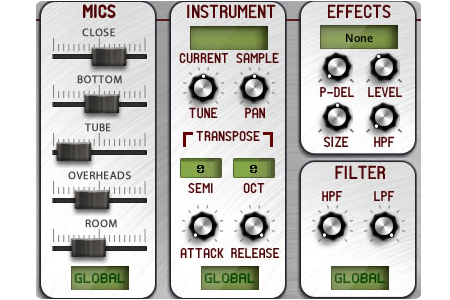
The end result features 35 different playing styles and tunings with up to 56 velocity layers recorded in 5 mic positions:
'Close'(Mono), 'Bottom' (Mono), Tube (Mono), 'Overhead' (stereo) and 'Room' (ambient stereo).
The 35 Hits include 6 tunings, Muted Snares, Open Snares, Hands, Buzzes, Flams, Brushes, Hot Rods, Rim Shots and Rim Clicks.
Studio 2 - Live Room
The Instrument was recorded in the revered Studio 2 live room of Paper Stone Studios, Nottingham, England, using purely audiophile quality signal paths.
With a great live room, isolation booth and amp side rooms Studio 2 is Loot Audio's primary tracking space. Studio 1 has an outstanding hybrid mix/mastering setup. It combines the best 'in the box' processing with analogue outboard eqs and compressors.
Features
- 5596 Samples
- Improved velocity sensitivity at lower velocity levels for a more solid dynamic response
System Requirements
- 1.02GB of disk space
- Full Kontakt 4.0.2 and above

![]()
Important Note: Full version of NI Kontakt 4.0.2 and above is required.
Please Note: Pulse Downloader is used to download the software and must be installed.
Mac
1. Visit the Pulse Downloader website by clicking the El Dorado: Legato Ambient Guitar 'Download' link in your Plugin Boutique User Account or by clicking HERE, and download the correct installer for your system (either 'OS X or later' or 'M1 System').

2. Open the downloaded file and run the installer 'Pulse-XX.X.X.dmg'.
3. Drag 'Pulse' to 'Applications'.
4. Log in to your Pulse account, or create a new account by clicking 'Register' at the bottom of the window.
5. If registering, input your email and password, agree to the terms of use and click 'Register'.
6. Click the '+ Add a Product' button located in the top right-hand corner of the window.
7. Copy and paste your serial number from your My Account page, click 'Install Now', then click 'Redeem'.
8. Select a location for Pulse to download the software by clicking the file icon on the right-hand side of the window.
9. Select the location you would like your software to download and install to.
10. Click 'Download and Install'.
11. The instrument is now downloading.
12. Once the instrument has finished downloading, open Kontakt, then open the 'Files' tab and navigate to the location that you downloaded the Kontakt Library to. Then click and drag the .nki file into the empty window.
Your Kontakt instrument is now installed and ready to use.

Windows
1. Visit the Pulse Downloader website by clicking the El Dorado: Legato Ambient Guitar 'Download' link in your Plugin Boutique User Account or by clicking HERE, and download using the 'Download for Windows' link.

2. Open the downloaded file and run the installer 'Pulse Web Setup X.X.X.exe'.
2. Log in to your Pulse account, or create a new account by clicking 'Register' at the bottom of the window.
3. If registering, input your email and password, agree to the terms of use and click 'Register'.
4. Click the '+ Add a Product' button located in the top right-hand corner of the window.
5. Copy and paste your serial number from your My Account page, click 'Install Now', then click 'Redeem'.
6. Select a location for Pulse to download the software by clicking the file icon on the right-hand side of the window.
7. Select the location you would like your software to download and install to.
8. Click 'Download and Install'.
9. The instrument is now downloading.
10. Once the instrument has finished downloading, open Kontakt, then open the 'Files' tab and navigate to the location that you downloaded the Kontakt Library to. Then click and drag the .nki file into the empty window.
Your Kontakt instrument is now installed and ready to use.


