Buy German Log Drum, get a free gift with purchase:
Please Note: This product requires the full version of Kontakt. It will not work with the free version of Kontakt Player.
Premium Pentatonic Logdrum
The German Log Drum is a 356MB virtual instrument. Each note of Loot Audio's 8 note pentatonic Logdrum has been meticulously sampled at 6 velocity levels, then turned into a chromatic instrument within Kontakt. The instrument used was a Schlagwerk 8 note Oak Log Drum in Bb major pentatonic (F2 G2 Bb2 C3 D3 F3 G3 Bb3)
Loot Audio recorded it with center, stereo and room microphones, and played it with timpani felt beaters (soft and hard) as well as with the hand.
Buzzrolls
Buzz rolls are also included (2 octaves above the clean hit) and various percussive hits are found an octave below. Buzz rolls are where the beater is allowed to come to a natural rest on the note. Loot Audio included this feature for round robin possibilities and creative options!
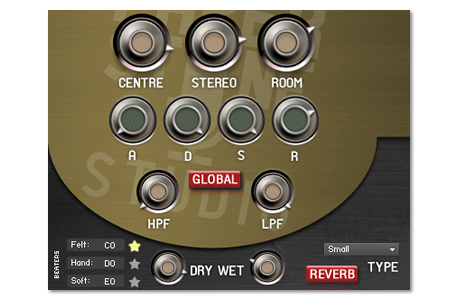
Features
- 1188 samples at 24bit 44.1 KHz
- 3 Microphone Positions
- Quick switch articulations
- Original user interface and advanced custom scripting engine
- GLD Full.nki (All articulations and dynamic keyswitching)
- GLD Felt.nki (‘lighter’ version with just the Felt articulation loaded)
- GLD Soft.nki (‘lighter’ version with just the Soft articulation loaded)
- GLD Hand.nki (‘lighter’ version with just the Hand articulation loaded)
- Improved velocity sensitivity at lower velocity levels for a more solid dynamic response
System Requirements
- 356MB of disk space
- Full Kontakt 4.2.3 and above

![]()
Important Note: Full version of NI Kontakt 4.2.3 and above is required.
Please Note: Pulse Downloader is used to download the software and must be installed.
Mac
1. Visit the Pulse Downloader website by clicking the El Dorado: Legato Ambient Guitar 'Download' link in your Plugin Boutique User Account or by clicking HERE, and download the correct installer for your system (either 'OS X or later' or 'M1 System').

2. Open the downloaded file and run the installer 'Pulse-XX.X.X.dmg'.
3. Drag 'Pulse' to 'Applications'.
4. Log in to your Pulse account, or create a new account by clicking 'Register' at the bottom of the window.
5. If registering, input your email and password, agree to the terms of use and click 'Register'.
6. Click the '+ Add a Product' button located in the top right-hand corner of the window.
7. Copy and paste your serial number from your My Account page, click 'Install Now', then click 'Redeem'.
8. Select a location for Pulse to download the software by clicking the file icon on the right-hand side of the window.
9. Select the location you would like your software to download and install to.
10. Click 'Download and Install'.
11. The instrument is now downloading.
12. Once the instrument has finished downloading, open Kontakt, then open the 'Files' tab and navigate to the location that you downloaded the Kontakt Library to. Then click and drag the .nki file into the empty window.
Your Kontakt instrument is now installed and ready to use.

Windows
1. Visit the Pulse Downloader website by clicking the El Dorado: Legato Ambient Guitar 'Download' link in your Plugin Boutique User Account or by clicking HERE, and download using the 'Download for Windows' link.

2. Open the downloaded file and run the installer 'Pulse Web Setup X.X.X.exe'.
2. Log in to your Pulse account, or create a new account by clicking 'Register' at the bottom of the window.
3. If registering, input your email and password, agree to the terms of use and click 'Register'.
4. Click the '+ Add a Product' button located in the top right-hand corner of the window.
5. Copy and paste your serial number from your My Account page, click 'Install Now', then click 'Redeem'.
6. Select a location for Pulse to download the software by clicking the file icon on the right-hand side of the window.
7. Select the location you would like your software to download and install to.
8. Click 'Download and Install'.
9. The instrument is now downloading.
10. Once the instrument has finished downloading, open Kontakt, then open the 'Files' tab and navigate to the location that you downloaded the Kontakt Library to. Then click and drag the .nki file into the empty window.
Your Kontakt instrument is now installed and ready to use.


