/ Kontakt Instrument / Sequencer One
Loot Audio

Sequencer One

5.0 (2 Reviews)
$15.00 $21.00

28% off until Dec 06

Loot Audio Sequencer One
Loot Audio Sequencer One - SeqOne vs SeqDrum gallery thumbnail
Loot Audio Minipoly Pro - Old Image
Buy Now
Product information

Please Note: This product requires the FULL version of Kontakt. It will NOT work with the FREE Kontakt Player.

Digital Recreation of the Classic Sequencer Drum

Sequencer One is a digital recreation of an 8-step CV/Gate sequencer classic: The rare Sequencer Drum, produced by EHX during the early eighties. It's a little silver, black and green metal box with only one single square analogue oscillator, eight steps and a few simple controls for pitch, decay and speed rate.

It was originally named Sequencer Drum because it had to be triggered/started with the hit of a drumstick on its trigger pad.

Classic Sounds
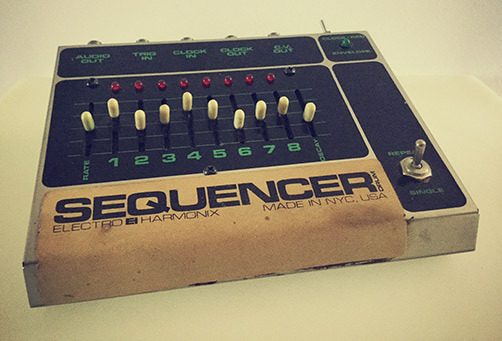
At first sight, the Sequencer Drum looked much like a toy instrument, whereas it was in fact capable of producing complex percussive synth patterns, deep bass sounds and wild roaming arpeggios. Its tonal range spread over eight octaves, and it sounded amazing.

Now, over 35 years later, Loot Audio is bringing this little box back to life as a soft Kontakt synth. Loot Audio changed its name to Sequencer One (because you don’t really need a drumstick anymore) and added some cool and useful features, all the while keeping its original minimalistic approach and iconic sound.

System Requirements

  • Full Kontakt 5.8.1 and above

Important Note: The FULL version of Kontakt 5.8.1 and above is required.

Installation Instructions

Note: FameBoy is used as the example.

Mac

Installation

1. Download your software from your Plugin Boutique User Account.

2. Unpack the contents by double-clicking the .zip file.

3. Open Kontakt > Navigate to the folder titled 'Fame Boy'.

4. Click and the .nki file into the main Kontakt window to load the patch.

Your Kontakt Instrument is now installed and ready to use in Kontakt.

Windows

Installation

1. Download your software from your Plugin Boutique User Account.

2. Unpack the contents by double-clicking the .zip file.

3. Open Kontakt > Navigate to the folder titled 'Fame Boy'.

4. Click and drag the .nki file into the main Kontakt window to load the patch.

Your Kontakt Instrument is now installed and ready to use in Kontakt.

Plugin Boutique Rewards

Discover the most rewarding loyalty programme among all plugin retailers.

  • Free Loopmasters Samplepacks
  • Discounts on products and courses
  • Extra Virtual Cash claimed immediately at checkout
Find out more

Follow us:

X (Twitter) Facebook YouTube Instagram
Logo Logo

Plugin Boutique Limited, Part of the Beatport Group LLC.

Copyright © 2011-2025 Plugin Boutique. All rights reserved