Buy Volt , get a free gift with purchase:
Volt is a 4.6 GB library of high quality synthesizer sounds and comes with 130 snapshots.
Volt ships with a wide variety of sounds ranging from: pads and strings, atmospheric synth textures, bass, leads, arpeggiator synths, abstract fx and textures, MIDI clocked pulsing synths and atmospheres.
Volt is suitable for most types of electronic music production from Ambient, Abstract, Chill-Out and EDM. Volt would also be perfect for writing killer breakdowns in your next EDM club hit.
During the making of the presets Loot Audio realised just how versatile Volt is. A whole cinematic soundtrack suitable for modern film scoring could easily be created using Volt, it also excels at creating atmospheres and mood.
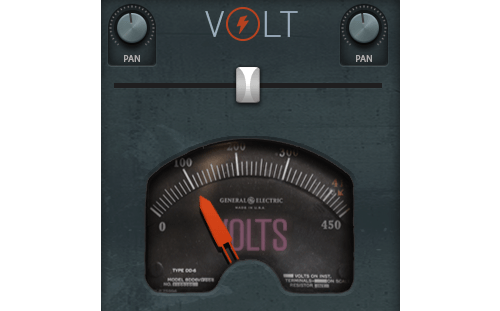
VOLT METER
Volt has a special Volt Meter dial that is the centre of the action. Most of the controls on the front panel can be controlled by the movement of the Volt Meter.
Simply select from the front panel which controls are to be controlled by Volt Meter and then select the depth/range of the control
Moving the voltmeter will then control those active dials. You can also assign the Volt Meter to your Modwheel or any other external controller dial and control many dials with the Volt Meter.
Most of the included snapshots have already been set up to respond to the Volt Meter - Give it a whirl and experiment.
It is easy to create stunning patches with Volt, and by clicking the Volt symbol in the centre of the interface you can randomise patches and let the chaos of the universe play a hand in the sounds you make.
System Requirements

![]()
- Full Kontakt 6.6.0 or above
Please Note:
- Pulse Downloader is used to download the software and must be installed.
- El Dorado: Legato Ambient Guitar is used as an example.
Mac
1. Visit the Pulse Downloader website by clicking the El Dorado: Legato Ambient Guitar 'Download' link in your Plugin Boutique User Account or by clicking HERE, and download the correct installer for your system (either 'OS X or later' or 'M1 System').

2. Open the downloaded file and run the installer 'Pulse-XX.X.X.dmg'.
3. Drag 'Pulse' to 'Applications'.
4. Log in to your Pulse account, or create a new account by clicking 'Register' at the bottom of the window.
5. If registering, input your email and password, agree to the terms of use and click 'Register'.
6. Click the '+ Add a Product' button located in the top right-hand corner of the window.
7. Copy and paste your serial number from your My Account page, click 'Install Now', then click 'Redeem'.
8. Select a location for Pulse to download the software by clicking the file icon on the right-hand side of the window.
9. Select the location you would like your software to download and install to.
10. Click 'Download and Install'.
11. The instrument is now downloading.
12. Once the instrument has finished downloading, open Kontakt, then open the 'Files' tab and navigate to the location that you downloaded the Kontakt Library to. Then click and drag the .nki file into the empty window.
Your Kontakt instrument is now installed and ready to use.

Windows
1. Visit the Pulse Downloader website by clicking the El Dorado: Legato Ambient Guitar 'Download' link in your Plugin Boutique User Account or by clicking HERE, and download using the 'Download for Windows' link.

2. Open the downloaded file and run the installer 'Pulse Web Setup X.X.X.exe'.
2. Log in to your Pulse account, or create a new account by clicking 'Register' at the bottom of the window.
3. If registering, input your email and password, agree to the terms of use and click 'Register'.
4. Click the '+ Add a Product' button located in the top right-hand corner of the window.
5. Copy and paste your serial number from your My Account page, click 'Install Now', then click 'Redeem'.
6. Select a location for Pulse to download the software by clicking the file icon on the right-hand side of the window.
7. Select the location you would like your software to download and install to.
8. Click 'Download and Install'.
9. The instrument is now downloading.
10. Once the instrument has finished downloading, open Kontakt, then open the 'Files' tab and navigate to the location that you downloaded the Kontakt Library to. Then click and drag the .nki file into the empty window.
Your Kontakt instrument is now installed and ready to use.


