


 Log In
The Best MIDI & Music Theory Plugins
Our Guide To The Best MIDI & Music Theory VST Plugins
We’ve compiled the best MIDI and music theory VST plugins for producers available on Plugin Boutique.
The world’s most famous plugins are usually instruments and effects, helping with Mixing Skills and providing Easy Methods for Synthesis. From the likes of super synths like Pigments 5 and Diva, through FabFilter and Soundtoys effects, there’s a lot of love for audio plugins. But there’s a third category of plugin that can be infinitely more creative than an instrument or effect: the humble MIDI Plugin.
The workflow with MIDI plugins is simple and requires just a touch of signal routing inside your DAW. All the magic happens within the plugins themselves, where you’re able to generate and pick apart melodies, chords and riffs with ease, making them enormously useful as music theory tools. While most DAWs have their own basic step sequencers, arpeggiators and chord generators, third-party developers offer more complex MIDI VSTs that are capable of intelligently generating MIDI sequences tailored to the key, tempo and style of your project.
With the right MIDI plugin at your fingertips, inspiration is just around the corner. In this article, we’ll take a look at seven of the best MIDI and music theory VST plugins for producers available on Plugin Boutique.
Plugin Boutique Scaler 3
If you’ve ever found yourself struggling to develop harmonic ideas, Scaler 3 will provide the creative assistance you need. Building on the huge success of its predecessor, this comprehensive music theory workstation has evolved into a fully fledged composition and production environment. With multi-track composition in the new Arrange View, third-party plugin hosting, and even a standalone mode, there’s not much Scaler 3 can’t do.
Scaler analyses your MIDI and audio data to detect keys, scales, and chords, then suggests progressions and voicings that fit your music. From there, you can layer multiple tracks, preview your ideas using Scaler’s in-built instruments, or take inspiration from a wide range of artist and mood-based chord sets.
In fact, the action doesn’t stop at harmony – Scaler 3 is capable of outputting entire phrases, riffs, and melodies based on real human performances. You can perfect your sounds directly within Scaler by hosting third-party synths and effects, then shape your mix with built-in level, pan, and gain controls.
It’s not just the big new features that shine, though. The user interface has been refined to feel more intuitive and responsive, making it quicker to capture ideas and experiment with new directions. Scaler 2 fans will feel right at home, while newcomers will find it easy to get started.
Whether you’re an existing user ready to upgrade or a producer looking for a powerful harmonic assistant, Scaler 3 opens up a new world of musical possibilities.
Audiomodern Chordjam

Most of us have experimented before with one-finger chords: those times where you use one finger to play one note, a whole complex-sounding chord comes out of the instrument, and you feel like Stevie Wonder, whether or not you have any idea what you’re doing. You might have used a feature like this on a synth, but Chordjam takes the concept and puts it into an entire plugin.
Giving it the finger
Once you’ve got an initial chord going, you can customise the notes in it, including using inversions to push notes higher or lower, or changing the velocities to vary randomly within parameters you choose. Chordjam also has a sequencer so you can program multiple chords and play them even rhythmically. The plugin makes it a breeze to come up with interesting chord progressions and new harmonic ideas.
Pitch Innovations Fluid Chords
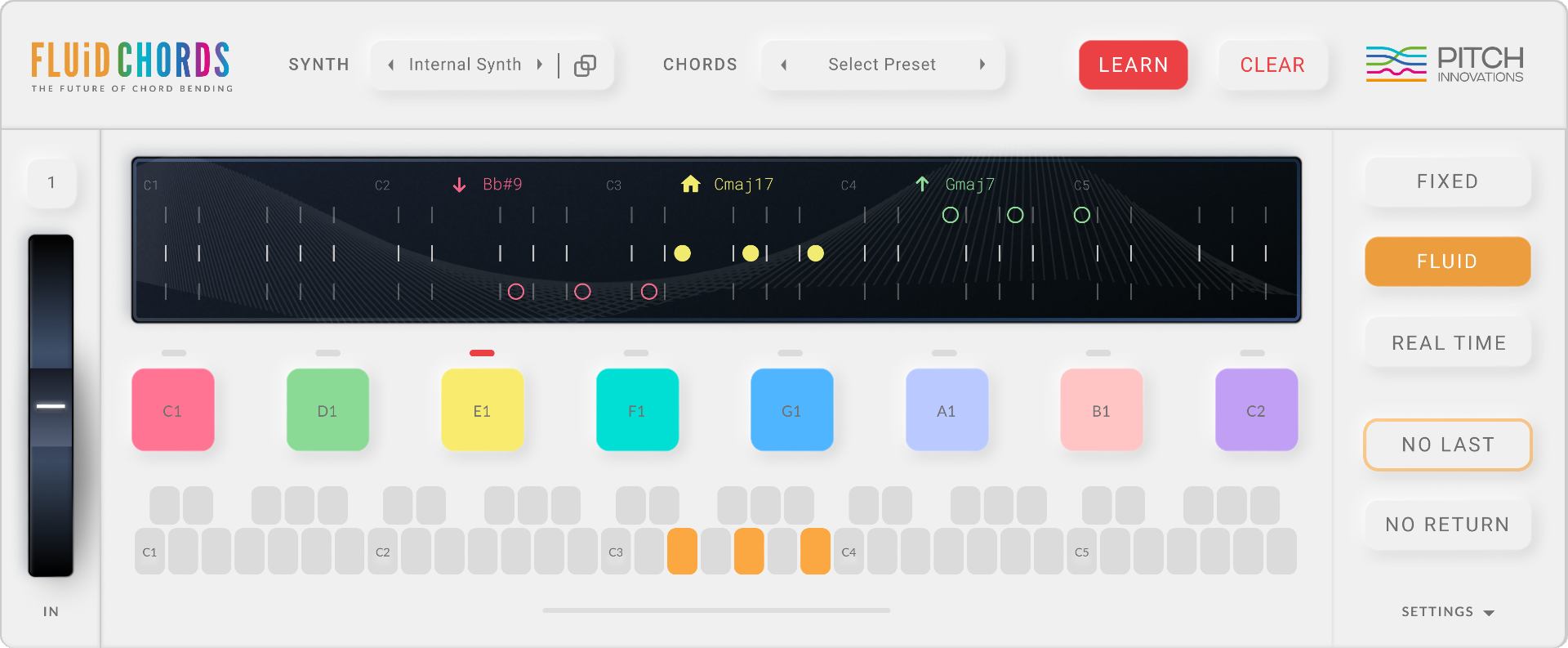
The Ultimate Pitch-Bending MIDI Chord Plugin
The key feature in Fluid Chords is that it allows you to scale lock your pitch bend function on your MIDI device. It’s a simple but progressive idea that shakes up the traditional pitch-bending model and creates the potential for the kind of unique pitch FX that you might hear in a Hans Zimmer score. Fluid Chords is compatible with any MPE-enabled synthesizer, which means you can load up instruments like Pigments into the plugin and get cool-sounding chord bends straight away. You can also integrate presets from other MIDI generating plugins by using the Learn feature, giving you a way to lay out chord progressions to bend between.
The Future of Chord Bending
Normally, using a pitch bend wheel to move a group of notes causes each note to move incrementally at a unified rate. In other words, all the notes move the same amount, at the same time. If you want to pitch shift a full chord to another chord though, some notes will need to move further or fewer distances than others, a problem which Fluid Chords solves. Pitch Innovations’ intelligent chord bending wizardry targets chords instead of pitches, meaning pitch shifting a six-note chord into a five-note chord won’t leave you with an extra note that’s off-key.
510K SEQUND

This next plugin has a feature list as long as your arm, including some features not found on any other products in this list. 510K’s Seqund is a polyrhythmic sequencer, capable of generating unpredictable and exciting melodies with just a few clicks of the mouse. The sequencer gives you control of a huge number of parameters, including Gate, Length, Hold, Chance, Pitch A, Pitch B, Probability A/B, Transpose, Octave and three lanes of assignable MIDI controller data.
Two pitch lanes
Seqund’s main USP is its two pitch lanes, enabling you to set up a main melody, plus a secondary melody which can be used for variations or B sections. You can set each pitch lane’s length independently, for ever-evolving melodic polyrhythms. You can even switch pitch lanes on a per step basis, giving you high-resolution control of the plugin’s MIDI output.
EVAbeat Melody Sauce 2

Make Easy MIDI Melodies
Writing masterful melodies is easy with Melody Sauce 2, a supercharged music production assistant that delivers immediate results. The AI-powered plugin mirrors the way top producers build melodic phrases and has an accessible user interface that saves on clutter and goes big on efficiency. To generate a melody all you need to do is give the MIDI plugin some guidance on things like key, speed, octave and groove and then jump into the Creation Mode section of the plugin, which is where things get really interesting.
Style Points
With a Style Mode that features over 300 style settings, you can instruct the plugin to generate melodies that suit the genre you’re working in, whether it’s house, techno, pop, trap, hip hop or reggaeton. Although Melody Sauce 2 is a MIDI plugin that you can route to other instruments, it boasts a sound engine of nearly 100 sounds and three built-in FX which means you can hear your melodies straight out of the box. Once you’ve landed on something you like, simply drag and drop your MIDI melodies inside your DAW, or do some tweaking using Melody Sauce 2’s Advanced Editor section.
SongWish reMIDI 4

reMIDI, pronounced more like “remedy”, is a very interesting plugin built for working with MIDI notes and chords. The idea is something like taking the philosophy of sampling and applying it to MIDI. How exactly? Well, once you’ve set the plugin you’re working with to be fed notes by reMIDI, things can get started.
Remixing for MIDI composition
Choose a song in reMIDI’s browser, and when it’s loaded, you can playback slices of the MIDI along the timeline, similar to chopping up and re-arranging audio, but this time for the notes themselves – or at least the data generating them. reMIDI also comes with an editor to help take something you’ve found in the loaded MIDI and make adjustments to it before using it further.
WaveDNA Liquid Music

When it comes to shopping for comprehensive suites of MIDI plugins, WaveDNA’s Liquid Music ought to be high up on your list. The plugin offers an extremely unique approach to writing melodies, whereby you draw the shapes you want to hear and the software makes sure the output remains in key with your project. If that doesn’t manifest inspiring new ideas right away, Liquid Music’s highly intelligent algorithm can suggest harmonic matches, chord progressions and melodic combinations that are sure to get the creative juices flowing.
Five layers
Where this plugin really stands out from the rest, though, is in its handling of what it calls “Layers”. By treating Sketch, Key, Chords, Voice, and Rhythm as independently adjustable Layers, you can make anything from subtle rhythmic changes to drastic voicing or key conversions, without impacting the other elements. This allows you to create exciting new variations and harmonies that are guaranteed to work with the rest of your composition, and you can even save your own presets or settings in custom banks for future use.
Mozaic Beats Chord Prism 2
This is a plugin that starts as one-finger chord generator, but moves on much further than that as well. You can sequence chords and chord progressions, make chord stabs repeat, and play with velocity as well.
iZotope Stutter Edit 2
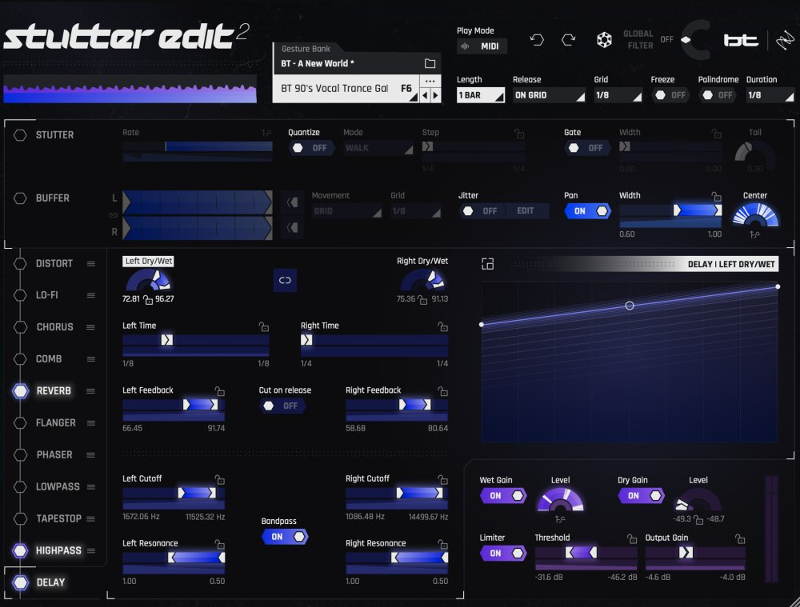
Create Amazing MIDI Effect Chains
Stutter Edit 2 is an ingenious multi-effects plugin designed by electronic music producer BT in collaboration with iZotope. The plugin builds upon the ‘stutter effect’ that he helped to pioneer in electronic music (from which Stutter Edit 2 takes its name), whereby small fragments of audio are rhythmically repeated in combination with other effects – a previously laborious technique that can now be recreated in seconds. With Stutter Edit 2 you can create a unique chain of effect events instead of static settings, which can be called up using MIDI input. In other words, you can sequence or play complex stutters at the touch of a button!
Custom Editing
You can use Stutter Edit 2 in either Auto or MIDI mode, with the former syncing to the internal clock of your DAW and the latter reacting to incoming MIDI notes. The plugin has a large bank of ‘gestures’, which are the effect events we spoke about previously, including cinematic rises, exciting transitions and club filter sweeps. There’s a handy purple bar that gives you a visual representation of what’s happening to your audio, and you can customise gestures for length, release, direction and more, as well as editing modulation curves in the TVM (Time Variant Modulator) grid that affect the stutter itself.
zplane deCoda
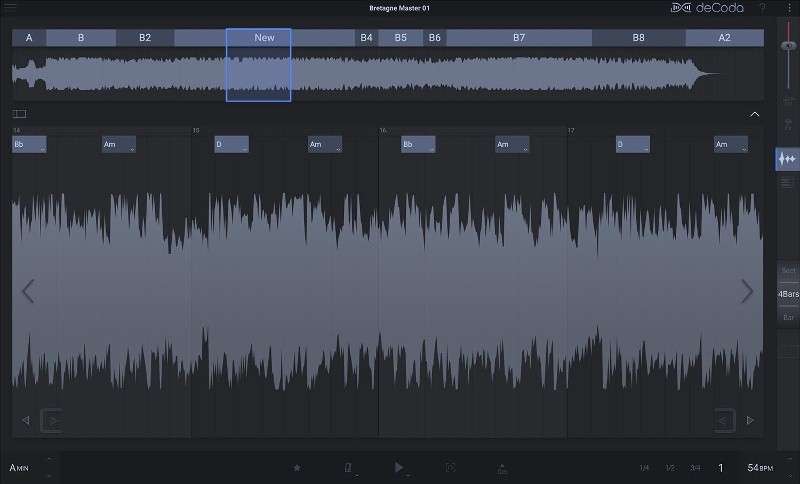
An Audio to MIDI Music Theory Plugin
Have you ever wished you could listen to a piece of music and immediately identify the key, tempo and chords? Well, now you can, with the help of zplane’s music theory MIDI plugin deCoda. deCoda is a song deconstruction tool that analyzes any audio file and breaks it down so that you can learn and understand the music quickly and comprehensively. Inspired and informed by professionals in the music and recording industry, deCoda will recognise the sections of a song and divide it up for you to easily navigate through, allowing you to explore verses and choruses, or beats and bars.
Practice Makes Perfect
Whether you want to learn how to play a song or jam along with it, deCoda is the perfect tool for music practice. Highlight any instrument in the mix with Focus mode, listen to it solo’d and then remove it to practice with the backing track only. zplane’s time-stretching algorithm, élastiquePro, means you can slow things down or speed them up to fit your playing ability, and even change the key. You can also add a metronome to the track that will play in 4th, 8th or 16th beats, and view and export the melodic content of the track as MIDI for transcription elsewhere.
Audiomodern Playbeat 4
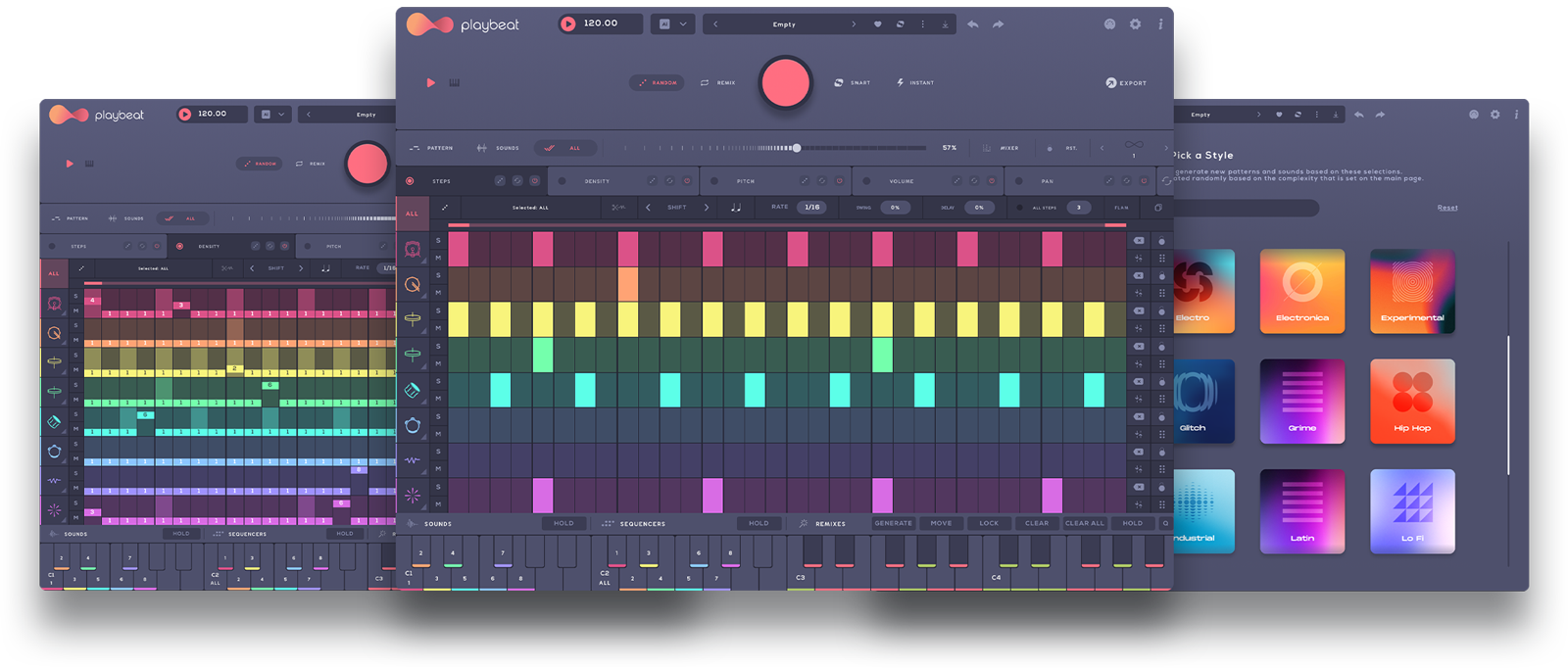
The Best MIDI Plugin for Making Beats
In the software realm, step-sequencing is a MIDI-based tool that divides a measure of music into a predetermined number of note values called ‘steps’. Audiomodern’s groove machine Playbeat 4 makes use of not one, not two but eight totally independent internal sequencers capable of combining all sorts of parameters including volume, panning, pitch-shifting and more. Select sounds from Playbeat 3’s bank of kit presets or load any audio file of your choice, and start programming better beats instantly.
Intelligent Grooves
Playbeat 4 makes rhythmic pattern creation easy, but it doesn’t wrestle all the creative control away from you. The way you choose to use it matters, especially as the plugin now works off Audiomodern’s brand new SMART algorithm, which learns your preferred patterns through daily usage and then adapts generated patterns to better fit your personal style. What’s more, you can also map MIDI output routing, meaning you can feed in any other piece of software or hardware from your own collection, as long as it accepts MIDI.
W. A. Production Instacomposer 2
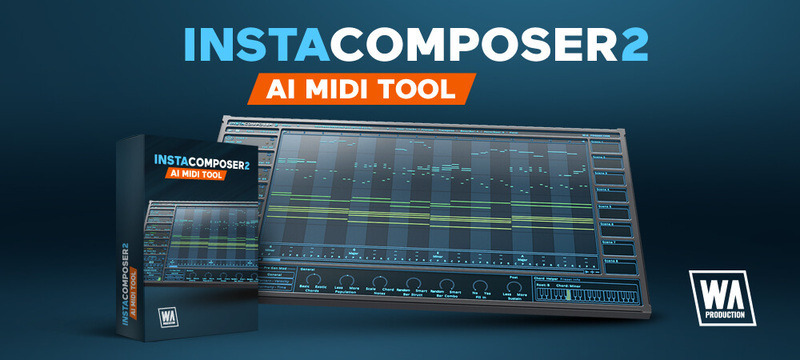
Whether we like it or not, the power and potential of AI is making waves in the music production world right now. From Sonible’s Smart mixing plugins to iZotope’s RX audio restoration software, AI has huge potential to streamline the music production process. In the case of Instacomposer, AI is used to generate MIDI based on maths as well as music theory, all while staying within the tempo and key of your project.
Five tracks
Instacomposer’s pièce de résistance is its ability to simultaneously generate five tracks of MIDI, each with their own settings so you can independently determine factors such as probability, note density, strumming and more. MIDI can then be adjusted all within the confines of the plugin, or you can drag it out into your DAW if you want to work in a more familiar environment.
Other articles
Recreating a Classic Analogue Mix Chain with Plugins
Digital audio production is the modern standard, yet it lacks the colour and life of classic analogue hardware. Learn how to breathe life into your mix bus As music production has overwhelmingly shifted to the digital domain over the last few decades, producers and artists now face the reality that working purely in the box often creates cold, dry, harsh, and lifeless recordings. That’s why many producers are turning to analogue-simulating software to breathe life and warmth of classic hardwa
Analogue Emulation Plugins: A Buyer’s Guide for Mixing with Character
These VSTs are some of the top choices to turn your DAW from a cold, sterile piece of software into a warm, colourful, lived-in studio setup Music software has come a long way, and while we used to use technology to remove imperfections and small problems in the real-world studio, today we actively use it to put these things back into our music. The number of analogue emulating plugins that are out there is truly astounding, with each one doing a slightly different thing on your mix channe
The Best Music Software Deals This Week [Live List]
As the music production landscape evolves week by week, so does the opportunity to save on powerful creative tools. New plugin releases, flash sales on VSTs and limited-time deals on music software can appear from any angle, making it harder than ever to keep track of what’s worth your attention. Whether you're looking for the latest bundles on offer, or even deals on exciting virtual instruments, it's as important as ever to stay up to date on what we have to offer. That’s where our live gui
Aaron Suiss Builds Self-Actualization From Diva’s INIT Patch
Presets are a staple in modern music production, and Aaron Suiss is refreshingly open about using them for some of the biggest layers in his latest release, “Self-Actualization,” which recently spent a week in the Beatport Hype Charts. While the bass and pad began as Plug Hugger presets inside u-he Diva, the star of the show is the arpeggiator. After auditioning several options that lacked the emotional depth and power the record needed, Suiss built the arp entirely from scratch using an INIT


