


 Log In
VPS Avenger: 9 Ways To Get The Most Out Of It

Ideas to up your game if you own it already; reasons to check it out if you don’t.
Vengeance-Sound’s VPS Avenger is a synth of extremes. It’s got seemingly infinite potential to generate any sound you could imagine, it’s capable of practically anything you can dream up, and it’s even got a whole drum machine inside.
Maybe even more notable is the fact that Avenger is now available as a rent-to-own plugin. You can get it right here on Plugin Boutique for £15.50 per month, stop your subscription when you want, and you’ll own the whole synth after 12 payments.
In light of that, and to celebrate all things Avenger, here’s our list of some of it’s greatest unsung features. And throughout, we’ve got pearls of wisdom from Avenger’s creator, top sound designer Manuel Schleis.
1. Take advantage of flexible signal routing
Most synths have oscillators that are piped straight into filters, envelopes and a few effects. But VPS Avenger isn’t most synths. Instead, it gives you ultimate flexibility to choose where your signal goes once it’s come out of the oscillators.
For example, one oscillator could be sent through the usual combination of filter, envelope and effects; but the next one could be sent through an arpeggiator, two different effects, then shapers, filters and loads more. It’s all done in the routing panel to the right of the oscillator module.
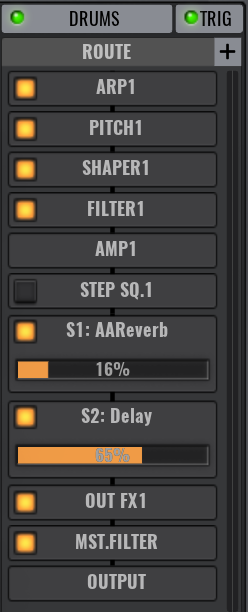
This lack of a fixed architecture encourages you to use VPS Avenger to its fullest potential as a workstation-level instrument. You could even sequence an entire track here if you wanted, triggered by just a few notes. But then again, you can always just take the standard approach of plumbing oscillators into filters and through effects.
Manuel Schleis, Vengeance-Sound’s main man, has this advice about signal routing: “use modulations of modulation slots! Let an LFOcontrol the filter cutoff, then use any other controller you like (for example modwheel, velocity or aftertouch) to control the LFO-to-Cutoff assignment in the mod matrix. For example, drag and drop the modwheel directly into the LFO-to-Cutoff assignment and set this depth to 100. Now you can control the intensity of the LFO/Cutoff movement with your modwheel!”
2. Harness the power of 35 effects
Not all synths have effects onboard, and when they do, there’s usually a solid selection of workaday sound processors… but VPS Avenger takes things further with a range of 35.
Throughout categories including Reverb/Delay (seven effects), Modulation (ten effects), Distortion (seven effects), Dynamic (eight effects) and Stereo (three effects), there’s plenty to choose from and even multiple places to put them: on one of four insert chains, a send chain, and a master chain, each with eight slots.
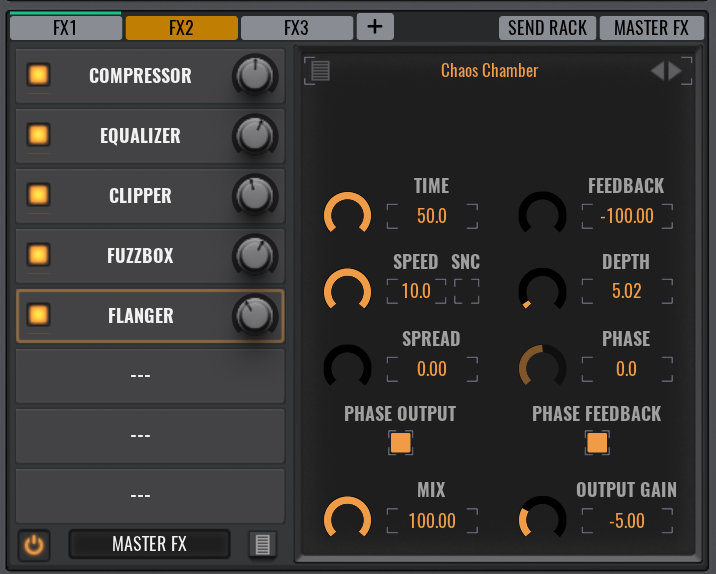
Vengeance’s Manuel Schleis gives us some insider advice: “ You can route one FX bus into another FX bus, so you can theoretically have 40 FX in a row (+8 parallel Send FX). Try routing the Send FX bus to an Insert FX bus. It means you could apply effects to the Reverb and Delay signals only: for example a phaser, chorus, bitcrusher or even a Trancegate!”
3. Use the FFT Editor to manipulate common waveforms
You may have seen FFT and ‘partial’ editors in additive synths. These let you control the levels of individual harmonics to create a unique waveform shape. Well Avenger has one of these as standard, and it’s called the ‘Editor’.
With this, you can take ‘the usual’ waveforms like squares, triangles, sawtooth and so on, and finely tune them to create variations, by altering the levels of the sliders throughout the FFT Editor.
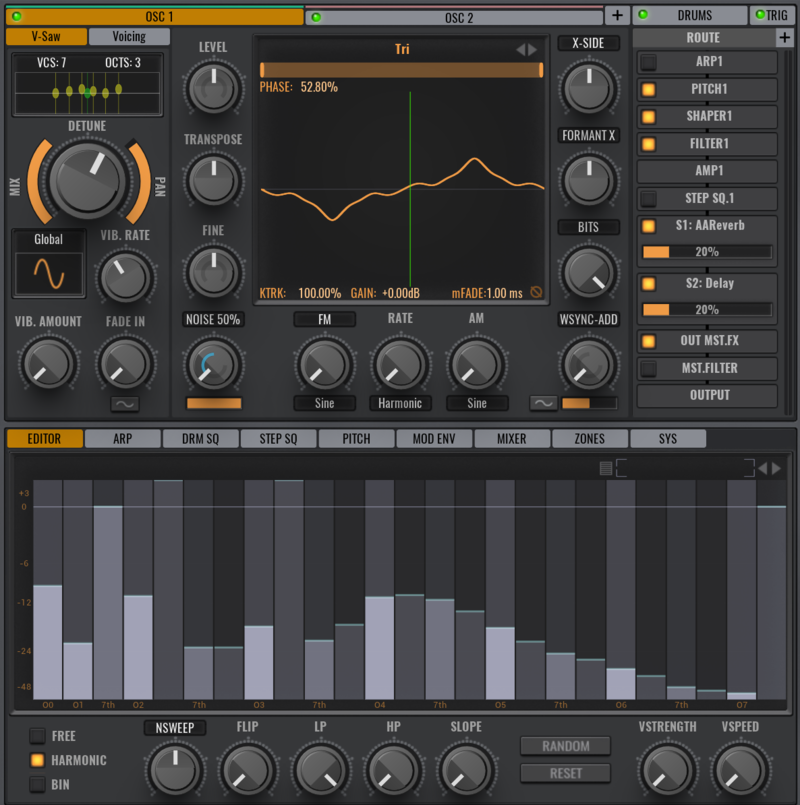
Vengeance’s Manuel Schleis has this advice for getting the most out of the FFT Editor: “What I love to do is use the FFT inside an FM pair. Create two oscillators – a sine and a saw – and assign OSC2 as a FM modulator for OSC1 in the FM menu. Apply a bit of FM depth. Now go to the FFT Editor of OSC2 and remove all FFT bands except the lowest one. You can now carefully re-add other bands to get different FM flavours. Don’t use the higher bands, they have less effect. You can also go to Bin mode to access all 256 bands for more detailed editing.”
4. Make super-powerful saws in a sec
Supersaws are saw waves that are detuned and spread across the stereo field. Avenger takes the concept and applies it to a whole section of the oscillator module, meaning that you can instantly apply the treatment for super-wide, super-thick supersaws. But you can also apply it to any waveform you’ve got loaded.
You can detuning, panning and vibrato controls, plus a selection over the number of voices that are at play and the octaves they span.
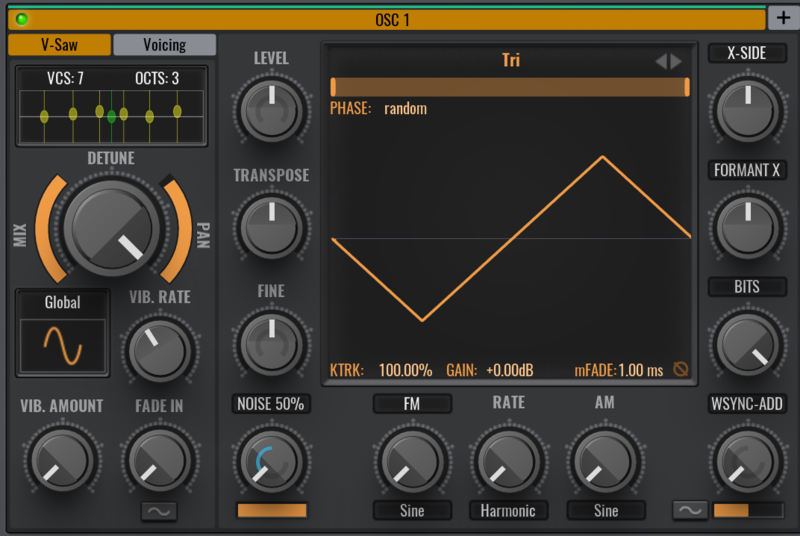
Manuel Schleis of Vengeance-Sound cuts to the chase with these sharp tips: “To create more distinct supersaws, don’t use much detune – rather go to the vibrato settings and change it from Global to Independent. Each supersaw wave now has its own vibrato modulation.”
“The supersaw combines with the Chorder module on the next tab. That means you can multiply your supersaws. Having just one oscillator with a 7x Supersaw and a 4x Chorder, it means you’re playing 35 voices with one note! Imagine that eight times – with eight oscillators and playing chords!”
5. Incorporate beats with the drum machine oscillator
Alongside the other wide variety of oscillator types in Avenger, there’s one that provides you a whole drum machine, stocked with samples. This works well thanks to Avenger’s flexible signal routing, that we mentioned earlier, and the step sequencer, which we’ll get to soon.
Each drum kit has its own drum sequence too, but they’re not tied together – you can mix and match for more flexibility.
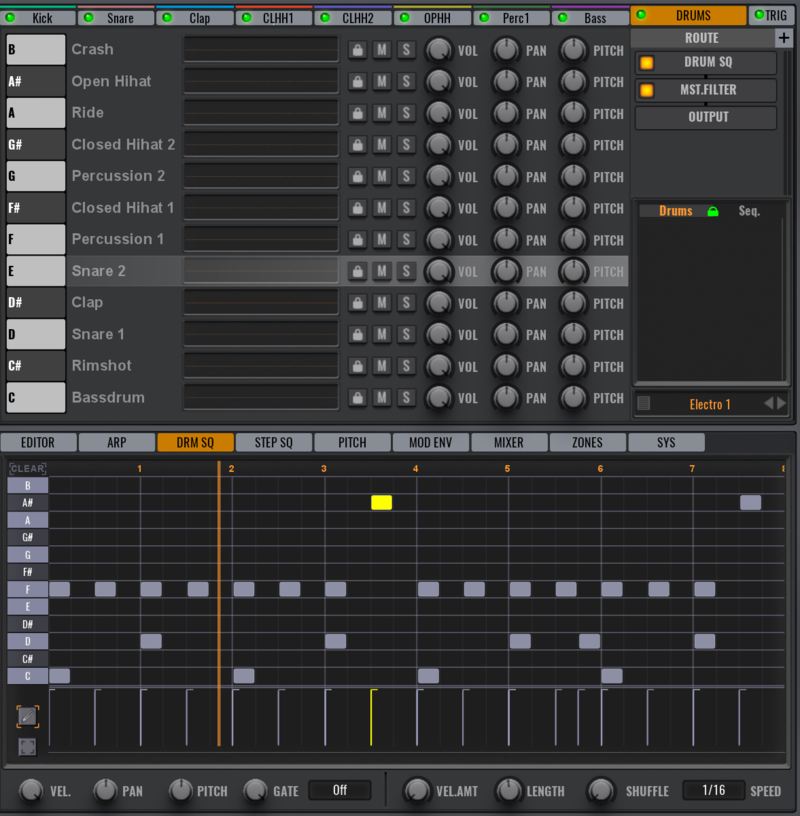
The man who made it happen, Manuel Schleis, says this: “Remember, that (depending on your DAW) you can activate multi-out in your DAW to access each drumslot output in your DAWs mixer separately. Each Drumslot can also be routed internally to its own FX Bus too.”
6. Get the unexpected with the random modulator
Even with so much power available in Avenger, it’s still possible to add something more analogue to a patch. With the Random modulator, and thanks to the modulation matrix and its routing potential, you can create some chaos at any point in a patch.
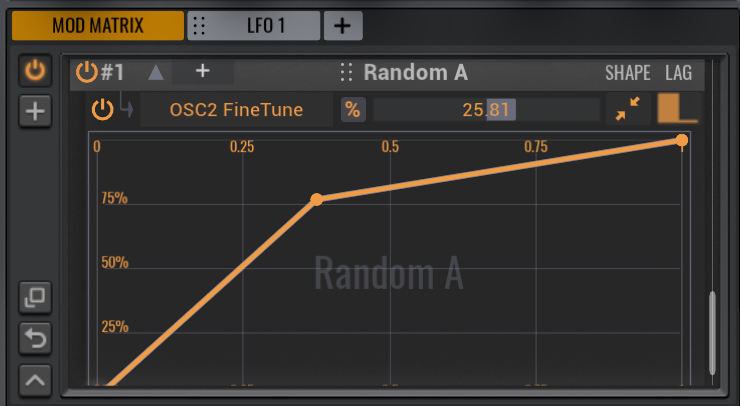
Manuel Schleis of Vengeance-Sound gives us some more ways to roll the dice: “The bread-and-butter Random source can be found directly above the keyboard. But inside the modmatrix you have more: Random generators A, B, C and D; and also Bi-Polar Random generators A, B, C and D. These all generate different values. Try them on panning, cutoff, pitch or start offsets, or even on depths in other mod matrix entries. You can restrict the random results even more with the Shape control inside the mod matrix.”
7. Try out some actual additive synthesis
That FFT Editor is capable of some serious sculpting, but if you want to try out some ‘proper’ additive synthesis, you’ll need to choose the right waveform sources to start with.
These can be found in the oscillators’ waveform selection menus, under VA-Shapes >> Factory Thin & Real >> Even Freqs.
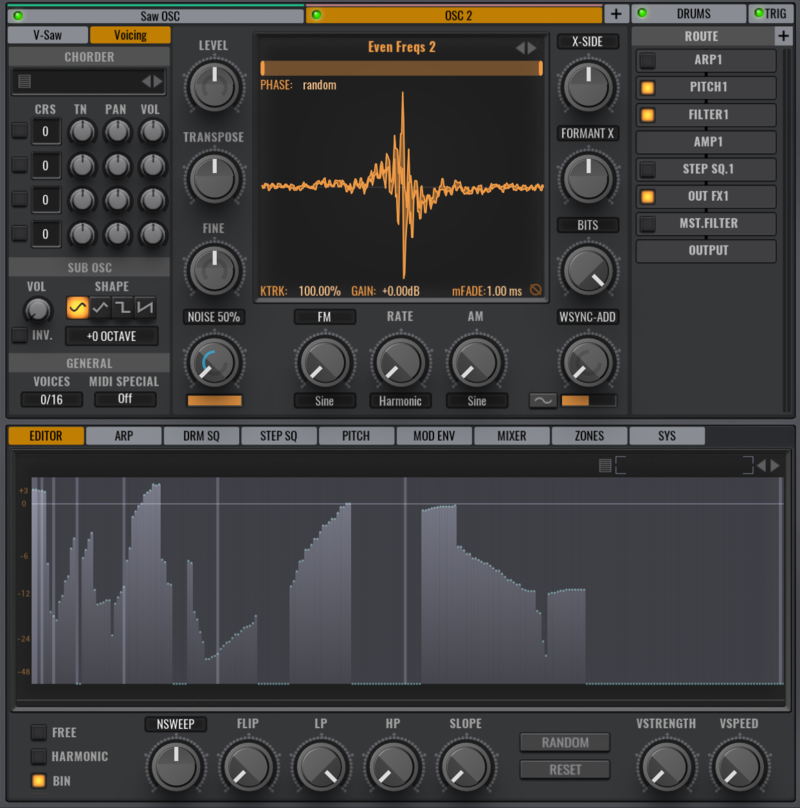
And, thanks to the Bin view, conjuring unique new sounds gets even deeper, as Manuel from Vengeance-Sound tells us: “I usually go into the Bin view of the FFT, delete all bands except the fundamental, and start re-adding the bands. Remember that Wavetables in Avenger can also make use of the FFT, so you have kind of a ‘motion’ instead of a static waveform right from the beginning. You can also randomize all bands with the Randomize button, and then ‘shift’ all bands up or down by applying a modulation to the NSweep knob. This is reminiscent of the sound of a phaser… but can also sound totally different. For beginners, there are many pre-made FFT settings, which you can load via the browser in the upper right corner of the FFT.”
8. Step sequence your way to anything
You can imagine that Avenger’s step sequencers are powerful for controlling pitch, but as modulators in their own right, you can actually link them up to anything you like. Obvious destinations include a filter cutoff, for example, while more out-there destinations include Chorder note tunings, and the depths of other modulation routings in the matrix.
With the ability to call up eight step sequencers, should you want to, and the ability to set the length independently for each, Avenger’s sequencers can also perform polyrhythms, set to different lengths that only sync back up once in a while.
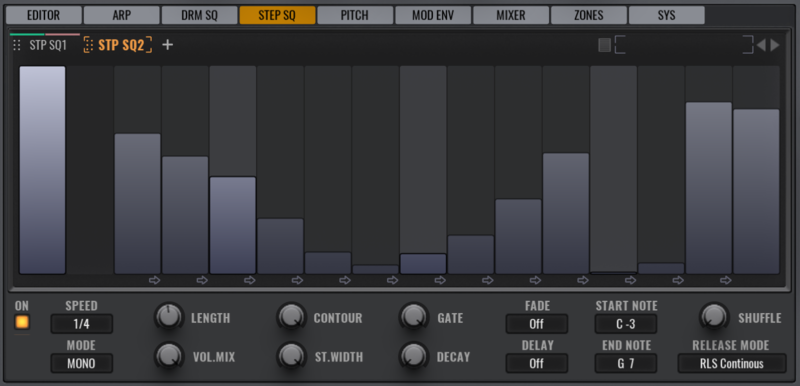
Vengeance’s Manuel Schleis with his tips: “I often use (slow) Step Sequencers to expand the lengths of ARPs beyond their limitations. Just automate a step sequencer to turn the volumes of OSC1 down and OSC2 up after a pattern has played.”
“But the main purpose I use them most is for internal control over ‘if and when’ a modulation or a patternswitch should take place inside a complex preset. You also could do your own chaotic ARP Pattern order (ABCD), when modulating the switching of these patterns via the step sequencer.”
9. Command chords with the Multiloop oscillator
The Multiloop oscillator uses Avenger’s ability to detect the MIDI chords being played, and switches between a sample set of 24 samples (12 major, 12 minor), meaning that you can, to some extent, play a folder of multivoiced samples using MIDI.
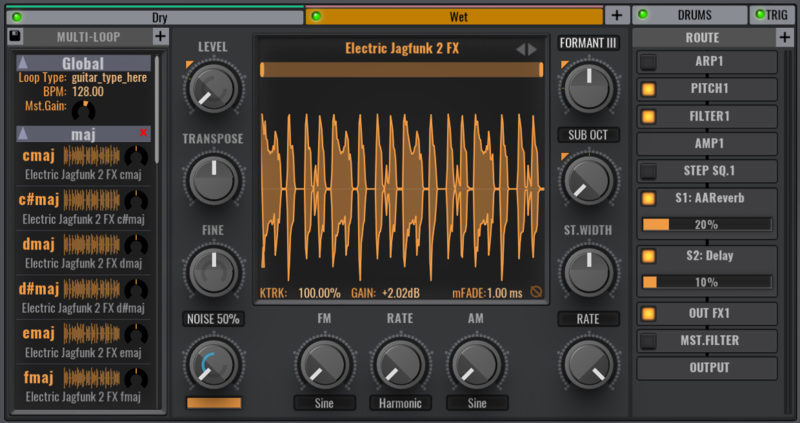
Manuel Schleis says that “It’s not that hard to create your own multiloops. Just go to the OSC selection menu and double click on Multiloop to create an empty one. Now you need to assign WAV loops from your hard drive to each of the possible chord slots. You can also add 7th, sus2/4 and other chords, or just simply 5ths if you have no major/minor material – it can get very complex here.”
Other articles
ESEA Heritage Month: 5 Artists You Should Know About
Founded in September 2021 by besea.n (Britain's East and South East Asian Network), ESEA Heritage Month celebrates the culture, history, and contributions of East and Southeast Asian communities across the UK. To mark the month, we’ve partnered with ESEA Music, a UK-based, community-led non-profit founded in 2021 to empower ESEA artists and music professionals, to spotlight five incredible independent artists shaping the UK music landscape. Jeremine Chan Malaysian Chinese • Multi-Genre / E
Aaron Suiss Builds Self-Actualization From Diva’s INIT Patch
Presets are a normal part of modern production, and Aaron Suiss is pretty open about using them for some of the biggest layers in his latest release, “Self-Actualization,” which spent a week in the Hype Charts on Beatport. The bass and pad began with Plug Hugger presets inside u-he Diva. But the star of the show was the arpeggiator, which he created from INIT after the options he auditioned just didn’t bring the emotional depth and power the record needed. Created with Enzo Vood and released
Synth Month Sale: The Best Deals on Synth VSTs & Bundles
It’s September, and that only means one thing for all you producers out there – it’s Plugin Boutique’s Synth Month, the ultimate synth plugins sale! Across the month, you can buy synthesizers at massive discounts. Expect big savings on the best software synths, from characterful vintage synth emulations all the way through to cutting-edge modern sound machines. Not only that, but you’ll be able to pick up some deliciously discounted synth bundles that can’t be missed. To celebrate, we
Free VST Plugins You Should Actually Get
[Article Last updated: 12 September 2026] – There are a lot of free plugins out there, and you can sometimes feel overwhelmed by the paradox of choice. Thankfully, we've done the hard work, so you don't have to. Here’s a carefully curated list of the best free plugins that pretty much any music producer can benefit from. We even update this list approximately weekly to keep you informed of the new free plugins arriving on the scene. We’ve been especially considerate of plugins with a wi


