


 Log In
Choose one FREE gift with your purchase
Introducing our improved free gift offering at Plugin Boutique - a new way for you to get more value when you spend more.
Depending on the value of your order, you'll unlock access to different gift tiers and be able to choose from a selection of free products available at your spending level. Our gift lineup is updated regularly, so be sure to check back often for the latest additions.
Make any paid purchase and choose the following:
Moogerfooger MF-109S Saturator by Moog
Spend at least £79 / €79 / $79 / ¥12480 to unlock:
Synthesizer V Studio 2 Core by Dreamtonics
Spend at least £99 / €99 / $99 / ¥14980 to unlock:
Melodyne 5 Essential by Celemony
How it works:
- Add more products to your cart to unlock more free gifts to choose from.
- Once you’ve unlocked your desired free gift, choose the gift and proceed to the checkout.
- If you use virtual cash to bring your order total below the minimum required spend for your chosen free gift, your order will be unaffected.
- If you use a coupon code to bring your order total below the minimum required spend for your chosen free gift, the gift will be removed from your cart. We’ll make you aware of this so that you can remove the coupon, or go back to the cart to choose a different free gift.
If you have any questions, feel free to reach out to our Customer Care team here.
Important notes:
- Rent To Own plans are not eligible for the free transaction gift.
- Limited time only.
- If you already own the product/s in this offer, we are unable to provide an alternative product.
- You cannot exchange your copy of this product for another product.
- You cannot resell your copy of this product.
- You are eligible to claim 1x copy of the product in this promotion.
- You can only claim 1x free product per transaction, but, in the case of multiple free gifts, you can redeem this offer in separate transactions until all free gifts are obtained.
Moogerfooger MF-109S Saturator
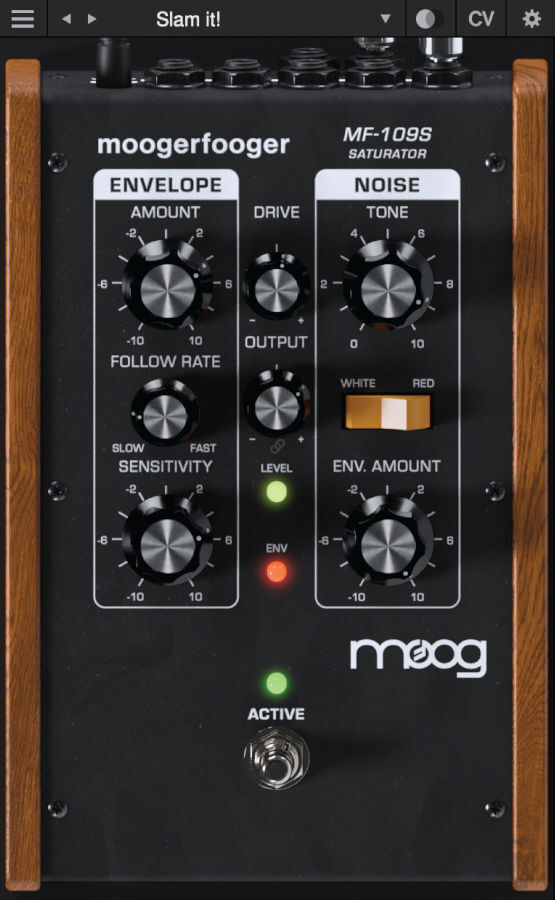
The MF-109S Saturator is a new software-only effect which emerged out of the development of the Moogerfooger Effects Plug-ins.
A major component of each Moogerfooger is its input drive stage, which is able to add warmth, distortion, and crunch to a sound. During beta testing, it became clear that users wanted dynamic control over the drive circuit of the Moogerfoogers, so the MF-109S was born.
The MF-109S Saturator is able to move from tight, dynamic overdrive and analog saturation to smooth compression and expansion by pairing a wide-range envelope follower with bipolar control over the unique drive circuit of the Moogerfooger Effects Plug-ins. Further, it models the noise generator circuit of the Minimoog Model D and allows for control of both noise generator level and noise tone with switchable filter type. The MF-109S Saturator's envelope follower and noise CV outputs and multiple CV inputs allow it to speak with all of the other Moogerfooger Effects Plug-ins.
Synthesizer V Studio 2 Core

Create Expressive AI Vocals
Synthesizer V Studio 2 Core delivers professional vocal synthesis tools in a streamlined, DAW-ready plugin — powered by the same engine as Synthesizer V Studio 2 Pro.
This ground-breaking software works with real vocals, recorded and licensed from real singers, utilising AI technology to synthesize custom expressions from them.
What You Can Do with Synthesizer V Studio 2 Core:
- Write melodies and lyrics directly onto MIDI notes
- Shape pitch naturally with control points and curves
- Add expressive vibrato and vocal character
- Create unison and choir textures
- Convert recorded vocals to MIDI
- Produce in multiple languages using cross-lingual synthesis
- Use it directly inside your DAW as an Inst or ARA plugin

The Easy Way to Begin
With Melodyne 5 Essential, you edit your vocals using the basic functions for pitch and timing. Musical, quick and easy. And if you need more, you can always upgrade, paying only the difference.
Features
- Grammy Award-winning technology.
- Exceptionally musical and intuitive note-based way of working.
- The algorithms Melodic (with Sibilant Detection), Percussive and Universal.
- Melodyne's Main Tool for editing pitch and timing.
- The Chord Track and Chord Grid with automatic chord recognition.
- Full compatibility: VST 3, AU, AAX, stand-alone.
- Integration via ARA Audio Random Access (depending on the DAW).
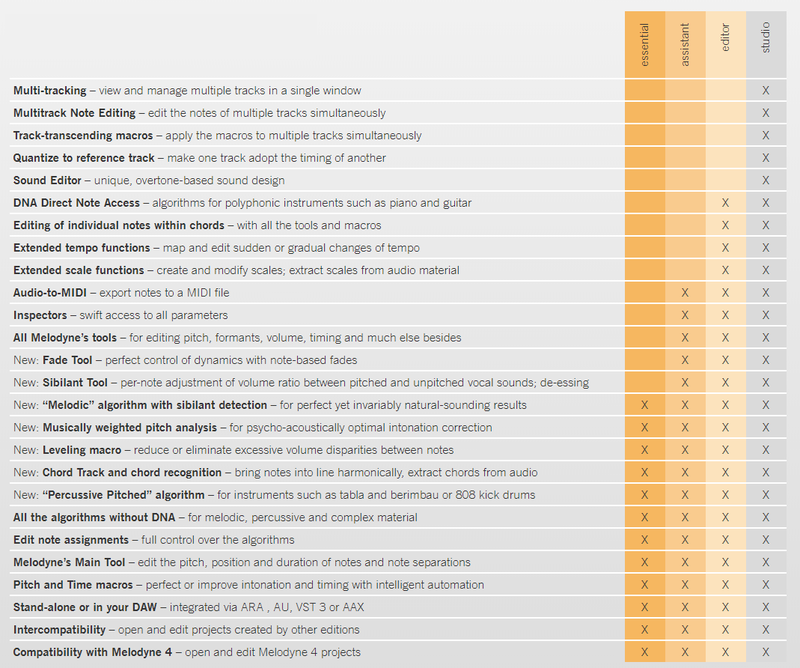
Important Note: Not all functions listed on this page are available in Melodyne Essential. Please see the table below for a full comparison.
Melodyne Studio, Editor, Assistant & Essential Compared
New in Melodyne 5
New technologies, for better results in less time. Thanks to the fundamentally improved “Melodic” algorithm, Melodyne makes your vocal editing even better than before. With perfect, natural corrections at the press of a key. Thanks to the Chord Track, you can adapt notes with lightning speed to suit the song – chord recognition included.
All this is new:
- The ability to edit pitched and noise-like components separately with the “Melodic” algorithm.
- More musical analysis of pitch deviations.
- The Chord Track and Chord Grid for pitch editing, chord recognition.
- An additional algorithm (“Percussive Pitched”) plus other algorithm improvements.
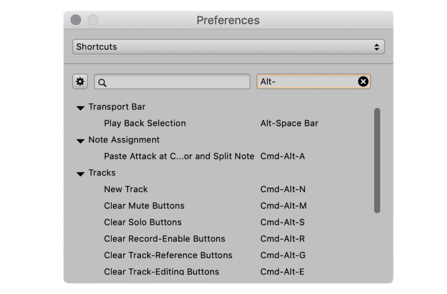
- Search functions for keyboard shortcuts, saving of shortcut sets.
Vocals, Now Even Better
Melodyne heightens its core competence. The “Melodic” algorithm used for vocals can now distinguish the unpitched, noise-like components of a note – i.e. voiceless consonants (such as sibilants like “s”) and breath sounds – from its pitched components. Even when they coincide. And although all pitch and timing changes are implemented in a tried-and-tested manner as far as the pitched components are concerned, different rules that emulate accurately the natural behavior of the human voice govern the handling of sibilants. So now when you are working with Melodyne, you obtain the highest possible sound quality and most natural-sounding results automatically.
Modelled on Human Hearing
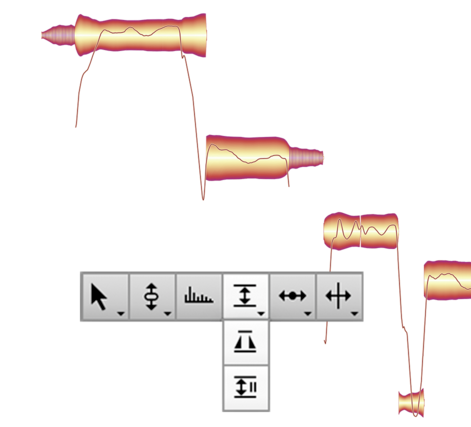
Why do some notes sound out of tune and not others? Fluctuations in pitch contribute to the quality of a vocal performance because it is through them that passion and emotional complexity find expression. They give it, in other words, its human dimension. But for their contribution to be a positive one, the nature, scope and precise timing of such fluctuations is of crucial importance.
A note doesn’t necessarily sound sharp or flat just because it isn’t “spot on” mathematically. Just particular, often very brief segments of the note annoy us. Sometimes at the beginning, sometimes at the end, sometimes somewhere in between. It is these crucial segments that have to be perfectly in tune; if they are, the note will sound right to us. The presence of any fluctuations before or after to such segments doesn’t trouble us – to the contrary, Celemony feel they add life to the performance and sound natural.
Melodyne now identifies these problem areas precisely, and the offset shown in the Note Inspector is calculated from the pitch of each note at the crucial moment only – not its entire lifetime. As a result, double-clicking (to set a note’s offset to zero) now yields precisely the right musical result. Also the macro profits from this new, even more musical approach: Each individual note is pitched to perfection. Yet everything still sounds natural and alive

The Chord Track and Chord Grid
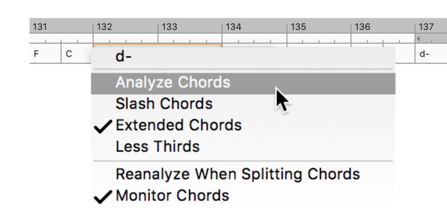
Work better with chords, adapt notes quickly. Melodyne 5 offers you a chord track that is linked to the Pitch Grid in the Note Editor. This makes working with chords far more enjoyable and harmonies more transparent. Because you can see at any time which pitches are compatible with the current chord and can adapt the notes accordingly with lightning speed. This is helpful when you’re altering chords, and if you want to match any sample harmonically to your music, it works like a dream.
Autopilot for chords. Melodyne’s chord recognition technology is so advanced, it can consider tracks apart or together – even the entire mix – and identify the chords formed when their notes are combined. It analyses your recordings fast and reliably and fills in the Chord Track automatically. This makes working with chords even easier.
Further Algorithm Improvements
- “Percussive Pitched” This new algorithm was developed especially for instruments like tabla, berimbau or 808-kick, the notes of which – though percussive in character – still have a recognizable pitch.
- “Robust Pitch Curve” With this new option, you can obtain better sound quality when editing certain signals, such as those with a great deal of reverberation. When it is activated, the monophonic algorithms employ a pitch curve that has been slightly smoothed out.
- “Complex” This algorithm playback type has been improved and can now be used just as flexibly as the playback type “Tonal” concerning the formants.
Other improvements
- Better keyboard shortcuts. New search function for keyboard shortcuts, the saving of personalized shortcut sets has been improved.
- No more “.mdd” files. Melodyne’s detection data, which was previously saved to separate “.mdd” files, is now stored in the audio files themselves, making file directories clearer and the sharing of projects easier.
What Is Melodyne?
Note-based Audio Editing
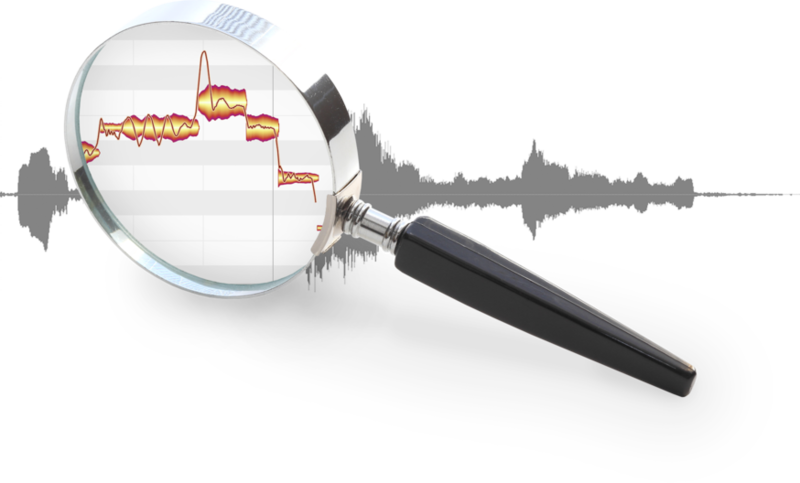
Melodyne grants you unrivalled access to all the musical details in your recordings and samples – note by note. This is made possible by a sophisticated analysis that delves deeply into your recordings and samples, and recognizes and understands the musical relationships within them: the individual notes and their characteristics, the scales, keys and chords, the timing, the tempo, the tone colour. And with Melodyne, you can edit all these things intuitively. With vocals, but every type of instrument as well – including polyphonic ones, such as the piano and guitar.
Notes and Tools
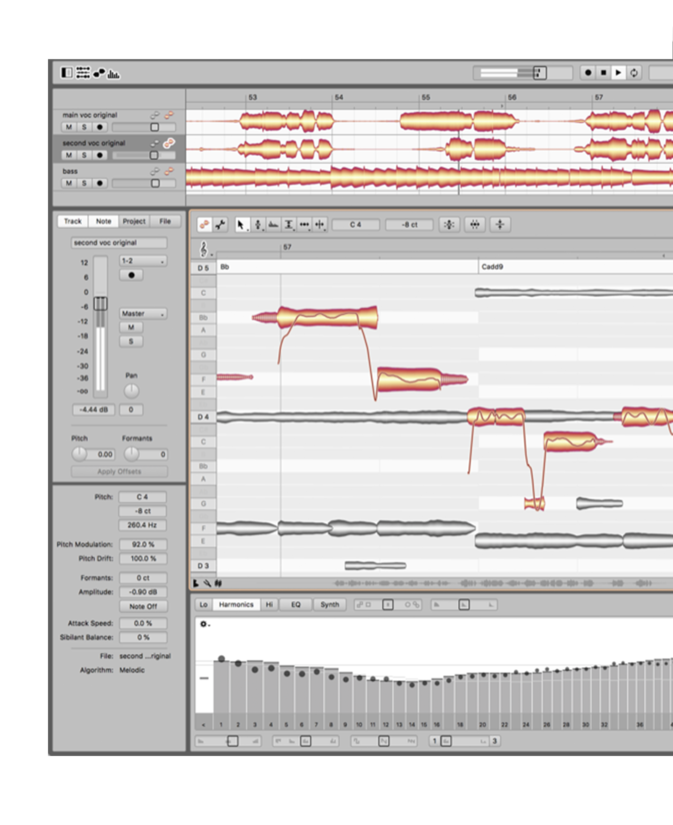
In Melodyne, notes are represented by blobs. By manipulating these with Melodyne’s powerful tools, you can edit (among other things) the pitch, vibrato, volume, sibilants, length, timing and formants of each note. In this way, you can enhance in a musical yet straightforward manner the intonation, phrasing, dynamics and timbre of a performance. While ingenious algorithms ensure your editing’s almost always inaudible, sensitive, natural.
- Notes instead of waveforms. With Melodyne, you see the notes in your recordings and samples, and can manipulate and modify them at will. Even with polyphonic instruments like the piano and guitar.
- Tools and macros. Edit intonation, melody and harmony, but also rhythms and grooves, dynamics, formants and much more. Using intelligent macros or – with great precision – by hand.
- All that counts musically. Melodyne also recognizes chords, keys, tunings and tempos. And the editing functions for these important musical parameters are just as comprehensive as for the notes themselves.
- Compatibility and user-friendliness. Melodyne can be operated via ARA or as a plug-in directly in a DAW. Or even as a stand-alone program. Its flexible interface adapts perfectly to the requirements of each situation.
Important Note: The new Fade tool and Sibilant tool are NOT included in Melodyne Essential.
Please see individual product pages for System Requirements information.
Click here for guidance on claiming your transaction gift.
Other articles
Unmissable Bundle Deal from Girls Make Beats – Sharing Spotlight
Play it forward with our latest Sharing Spotlight deal – come away with a great deal and give to a good cause while you do so. We are continuing our support for music-making communities with Sharing Spotlight, an initiative that highlights organizations working toward diversifying the music industry. We do this by offering a bespoke bundle of discounted plugins curated by our featured organization. When you purchase through its unique link, 15% of each sale goes towards supporting that comm
Recreating a Classic Analogue Mix Chain with Plugins
Digital audio production is the modern standard, yet it lacks the colour and life of classic analogue hardware. Learn how to breathe life into your mix bus As music production has overwhelmingly shifted to the digital domain over the last few decades, producers and artists now face the reality that working purely in the box often creates cold, dry, harsh, and lifeless recordings. That’s why many producers are turning to analogue-simulating software to breathe life and warmth of classic hardwa
Analogue Emulation Plugins: A Buyer’s Guide for Mixing with Character
These VSTs are some of the top choices to turn your DAW from a cold, sterile piece of software into a warm, colourful, lived-in studio setup Music software has come a long way, and while we used to use technology to remove imperfections and small problems in the real-world studio, today we actively use it to put these things back into our music. The number of analogue emulating plugins that are out there is truly astounding, with each one doing a slightly different thing on your mix channe
The Best Music Software Deals This Week [Live List]
As the music production landscape evolves week by week, so does the opportunity to save on powerful creative tools. New plugin releases, flash sales on VSTs and limited-time deals on music software can appear from any angle, making it harder than ever to keep track of what’s worth your attention. Whether you're looking for the latest bundles on offer, or even deals on exciting virtual instruments, it's as important as ever to stay up to date on what we have to offer. That’s where our live g


