Log In
Free gifts available with your purchase
Born of the imagination of legendary keyboardist Jordan Rudess and the software engineering excellence of French audio developer BLEASS, SampleWiz 2 is a unique and powerful S&S (sample & synthesis) instrument. BLEASS SampleWiz 2 combines modern features such as granular and cloud sample engines, MPE, with the satisfying, rapid workflow of classic hardware samplers.

With SampleWiz 2, BLEASS has distilled the phenomenal breadth and depth of Jordan’s expertise and experience into an intuitive synthesizer that will unleash your sonic imagination, inspiring both your musical and sound design creativity.
With just a few swipes of your finger, or a couple of clicks of your mouse, you can easily capture any sound or import any sample – a few more swipes/clicks will transform your sound into a playable, characterful synth voice. And with full support for MPE Slide and Pressure, SampleWiz 2 allows you to create nuanced and deeply expressive performances.
Creating original sounds with BLEASS SampleWiz 2 is as easy and fun as it is to load and play presets. The UI has been carefully designed to give a natural, intuitive workflow, with delightfully simple import of sounds, and a comprehensive suite of tools for chopping, granularizing, modulating, and adding effects to your sound designs. These are distributed across six tabs:
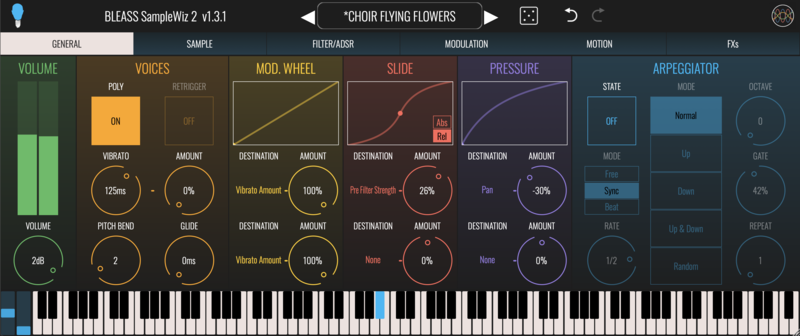
General Tab
Set the basic synth properties, such as voices, glide, MPE modulation targets, and arpeggiator.

Sample
Capture and edit samples and loop points, and configure the granular engine.

Filter/ADSR
Configure SampleWiz 2’s overdrive processor and multi-mode filter, and set up ADSR envelopes for amp and filter cutoff.

Modulation
BLEASS SampleWiz 2 has a pair of freely assignable LFOs (Low Frequency Oscillators) and a third ADSR envelope. Each source can be assigned to up-to two destinations.

Motion
BLEASS’ unique Motion Sequencer generates rhythmic movement and repeating patterns of modulation values that can be assigned to any two modulation destinations.

FXs
Sweeten your sound and add some final polish with delay and reverb processors.
System Requirements
PC
- Windows 8 and later
- VST3 (64-bit) / AAX
Mac
- macOS 10.9 and later (64-bit only) (including macOS 11 Big Sur and M1/M2 processors)
- VST3 (64-bit)
- Audio Unit
- AAX
Format
- BLEASS SampleWiz 2 is not a standalone product, it requires a host software
- BLEASS SampleWiz 2 is compatible with all VST3 / Audio Unit / AAX compatible DAWs and supports M1/M2 Chips.