


 Log In

Free gifts available with your purchase

Please Note: This is a crossgrade for owners of any full Bloom product. The full version of Bloom Vocal Choir is also available.

A Choir at Your Fingertips
Bloom Vocal Choir presents you with a platform to piece together your own choir and dive deep into vocal harmony. Choral music has spanned centuries. From early classical composers like Vivaldi and Bach through to modern musicians like Nils Frahm, Jon Hopkins and Hans Zimmer, vocal choirs have weaved their way throughout music as emotive harmonies and melodies.

Excite Audio sampled a wide range of different vocal registers from deep baritones through to the highest soaring sopranos. The in-built sequencer allows you to stack multiple vocalists to create interweaving harmonies no matter your music theory knowledge, giving you all the beauty of the human voice in one dynamic instrument.
What Can Bloom Vocal Choir Do?
- Sequence lush choral performances, harmonised phrases and cinematic textures.
- Keep samples in key and in time with your project without breaking your creative flow.
- Get your ideas rolling with 250 presets crafted by professional sound designers.
- 8 banks of phrases cover every vocal register and add value to any scoring toolkit.
- Dial in your perfect sound by using three distinct effects and four unique macros.
- Personalise the instrument completely by importing your own samples.
Sound Sources
Excite Audio’s team of professional sound designers and producers created over 250 presets organised into 8 different categories:
- Basic (BA) - Simple presets built from a single section of the choir.
- Drones (DRN) - Long, sustained notes.
- Experimental (EXP) - Abstract, sound design-focused, unique creations.
- Full Ensemble (FE) - Full choir ensembles using all vocal registers - soprano, alto, tenor & bass.
- High (HI) - Choir samples & sequences in higher registers, built from sopranos & altos.
- Low (LO) - Choir samples & sequences in lower registers, built from tenor, baritone & bass.
- Melodic (MLD) - Samples pitched in a scale across 2 octaves.
- Rhythmic (RHY) - Focused on rhythmic/percussive/glitchy vocal chops.
How it Works
Start in your desired tempo, choose a sample bank or preset, and trigger one of 14 bpm-synced samples spread across two octaves. White notes set off choir samples and loops, while black notes alter properties like playback speed and pitch and trigger sequences and effect modulation.
Four powerful macros control a specialised chain of effects, fine-tuned to the diverse samples that form Bloom Vocal Choir.

The Main Page
There are eight banks of sounds to choose from - organised into easy to find categories, and the sounds in each bank can be dragged onto any of the 14 white notes.
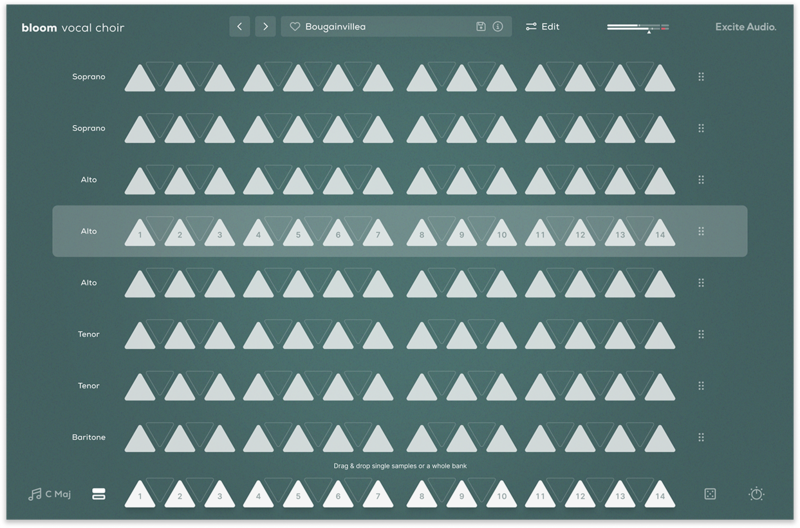
Audition and Load Samples & Banks
The Edit Page: Sculpt Your Sound
The Edit page is the central hub for refining and making the library of samples your own. Adjust start and end points, manipulate playback speed and direction, and tweak the timbre with pitch and formant controls.
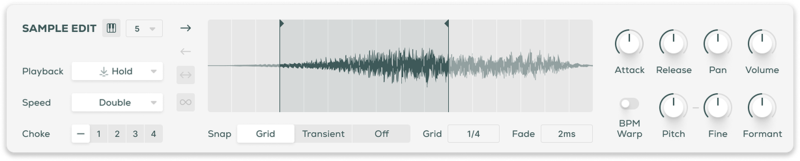
Sample Edit Section
Import Your Own Samples
Make the Bloom instrument your own with the ability to drag and drop audio files into it. You can do this via the waveform view on the edit page or any empty slot on the banks page. Set the key and BPM of your samples to make them integrate seamlessly with the Bloom engine.
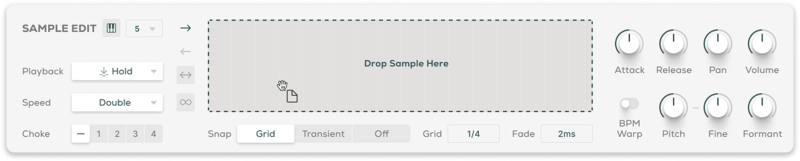
Sample Import
Sequencing Reimagined
Unlike traditional sequencers, the Bloom Sequencer is designed for triggering and layering one-shots and looping sequences, allowing for endless rhythmic creation. In the modulation section, automate pitch, volume, and filter settings as well as three effects to add depth and dimension to your music.
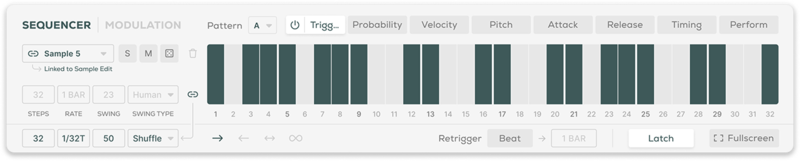
Sequencer Section
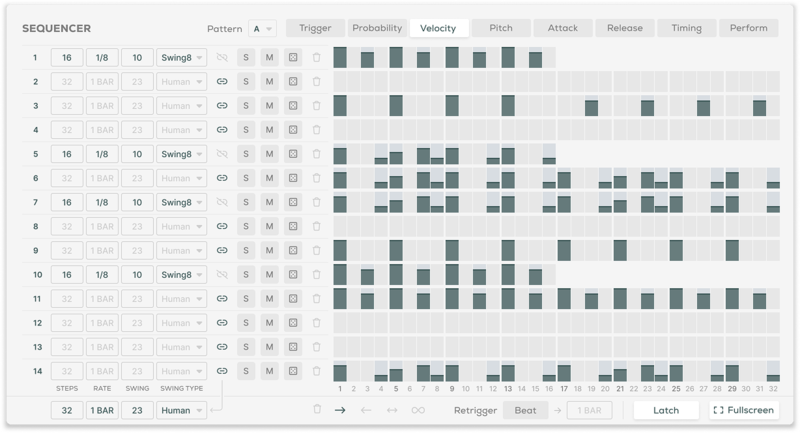
Sequencer in Fullscreen Mode
Bloom Vocal Choir offers three powerful effects modules: Reverb to create space and depth using Hall, Plate and Spring algorithms from the Lifeline Series. Delay to create hypnotic patterns and echos and Doubler to fine-tune the stereo spread of your choir.

Effects Section
Features
- 14 Sample Keys
- 5 Factory Modifiers: Half-time, Double-Time, Reverse, Octave Down, Octave Up
- 5 Custom Modifiers for Triggering Sequences
- 8 Sample Banks / 112 Choir Samples
- Samples Synced to Host BPM
- Key Selection
- Sample Randomise
- 4 Macros: Speaker, Dust, Phaser, Ascend
- 5 Main FX Parameters: Doubler, Delay, Reverb, Lo-Cut, Hi-Cut
- Global Bypass
- 250 Presets
- All samples that come with Bloom Vocal Choir are royalty-free
- Import up to 112 of your own samples (these can be swapped at any time)
Edit Page - Sample Edit
- Waveform Display
- Playback Direction: Forwards, Backwards, Pendulum, Loop
- Playback Modes: Hold, Latch, Relative, Oneshot
- Playback Speed: Normal, Double, Half
- 4 Choke Groups
- Start / End Markers with Snap to Grid, Snap to Transient
- Sample Crossfade, Attack, Release, Pan, Volume
- Sample Pitch, Fine, Formant, BPM Warp
Edit Page - Sequencer
- Sample Mode for triggering sequences
- FX Modulation: Doubler, Delay, Reverb, Lo-Cut, Hi-Cut, Pitch, Volume
- Playback Direction: Forwards, Backwards, Pendulum, Loop
- Sample / Modulation Randomise
- Global / Track Step Rate, Sync, Swing, Steps, Latch, Beat Retrigger controls
- Track Trigger, Velocity, Probability, Attack, Release, Timing and Perform
Edit Page - FX
- 3 Rearrangable Effects: Doubler, Delay, Reverb
- Doubler Parameters: Width, Delay, Mix, Detune, Pan, Lo-Cut
- Global Lo-Cut, Hi-Cut, Tone, Dry, Wet
- Reverb Mode: Plate, Hall, Spring
- Reverb Parameters: Length, Size, Mix, Pre-Delay, Duck, Lo-Cut, Hi-Cut, Input, Output
- Delay Mode: Stereo, Ping Pong
- Delay R/L Time, Sync Time, R/L Link, Mix, Feedback, Duck, Lo-Cut, Hi-Cut, Input, Output
Learn More About Bloom Vocal Choir
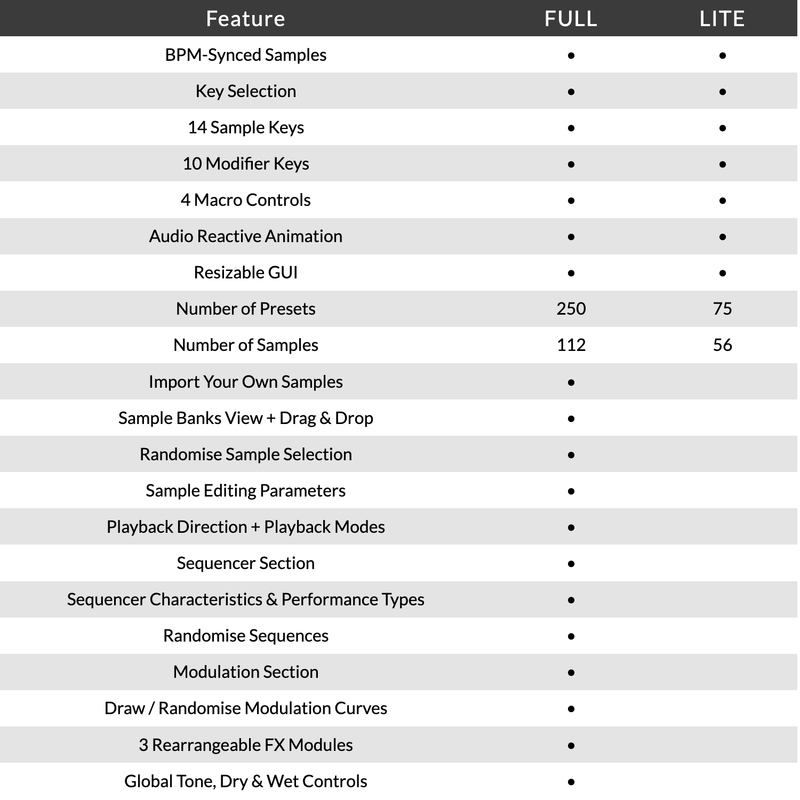
Version Comparison
System Requirements
macOS
- macOS 10.15 or higher (Intel / Native Apple Silicon supported).
- Plugin Formats: VST, VST3, AU, AAX, Standalone.
- DAW's Supported: Ableton Live, Pro Tools, Logic Pro, FL Studio, Cubase, Nuendo, Reaper, Reason + more.
- Compatibility: 64-bit compatible only.
- Recommended Buffer Size: 512 Samples or higher
Windows
- Windows 7 or higher
- Plugin formats: VST, VST3, AAX, Standalone
- DAWs supported: Ableton Live, Pro Tools, FL Studio, Cubase, Nuendo, Reaper, Reason + more.
- Compatibility: 64-bit compatible only.
- Recommended Buffer Size: 512 Samples or higher
Please Note: An internet connection is required to authorise this software.
KLAX
Drum & Bass production trio with releases on Warner Bros, Critical, Shogun Audio and more.
"When we're in search of exciting new ideas, we can always trust the Bloom instruments to spark some inspiration."
Rekkerd.org
Rekkerd.org is a music production blog featuring the latest news in audio plugins, samples, sound libraries, presets, reviews, contests, downloads and more.
"The Bloom instruments are great for jamming, writing, producing, or for a sprinkle of sounds to add to any track."
Proxima
Proxima is one of Holland’s most exciting electronic music artists of the last decade, with a string of outstanding releases on Shogun Audio, UKF, Hospital and many more.
"The versatile sequencer, ease of use and incredible samples make Bloom Vocal Choir a joy to use in the studio."


