


 Log In
.jpg)
Free gifts available with your purchase
Product information
Torque
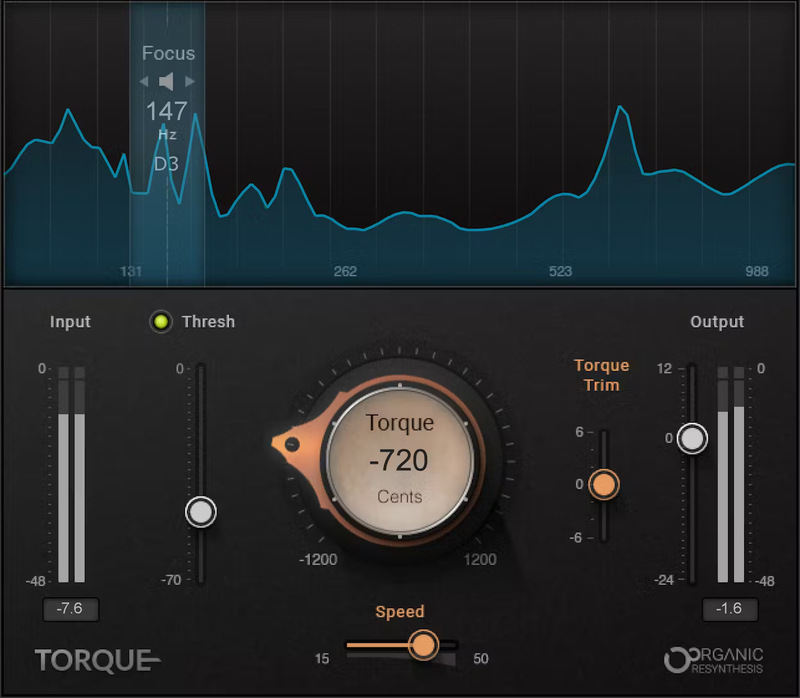
Tune Your Drums for Better Mixes
If you’ve tried to fix out-of-tune drums when mixing, you know pitch shifters aren’t up to the task. They smear transients, create artifacts, and neuter acoustic drums. Powered by Waves’ proprietary Organic ReSynthesis engine, Torque changes everything.
Torque can change tone and formants, while preserving the original drum sound’s natural attack, resonance, and duration—with focus, trim, and threshold options to further enhance your drums. Use Torque in the studio—or live, when you need to get the drums right in the mix.
Features
- Finally: Drums and percussion can sit perfectly in the mix
- Give depth and power to all drum sounds, including vintage analog
- Focus tonal changes on specific frequencies—ideal for loops
- Choose big or thin sounds, with up to ±1 octave changes
- Keeps the live feel and sound quality of acoustic drum parts
- Ideal for individual drums, but also does magic with buses and loops
- Eliminate the complexity and hassles of drum replacers
- Super-low latency for live performance
System Requirements
Mac
- macOS Monterey 12, Ventura 13, Sonoma 14, Sequoia 15
- VST / AU / AAX
PC
- Windows 10+
- VST / AAX
Installation Instructions














