/ Drum FX / Eddie Kramer Drum Channel
Waves

Eddie Kramer Drum Channel

5.0 (1 Reviews)
$27.99 $99.00

71% off until Dec 07

Waves Eddie Kramer Drum Channel
Waves Eddie Kramer Drum Channel gallery thumbnail
Buy Now
Product information

Eddie Kramer Drum Channel
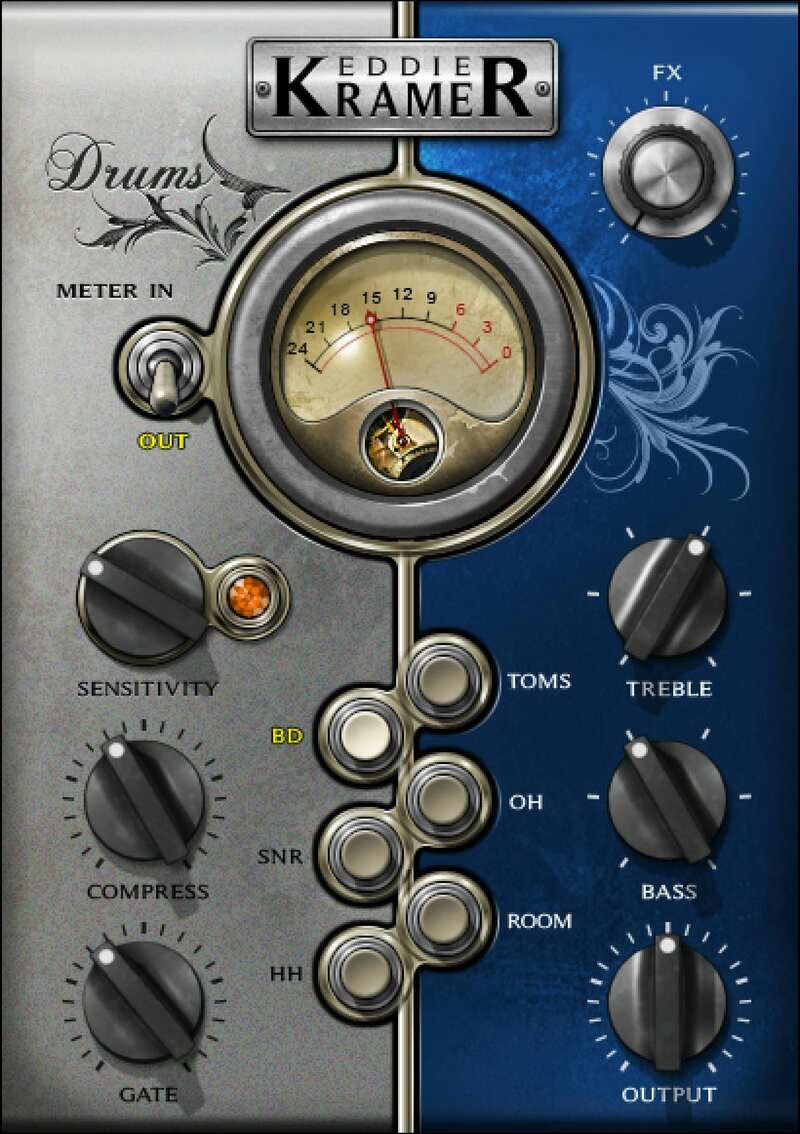
Classic Drum Sounds from the Legendary Producer for Hendrix and Zeppelin

Eddie Kramer’s acclaimed production and engineering with Led Zeppelin, Hendrix, and the Rolling Stones tells all you need to know about his drum sound. For a huge Zep-like sound drenched in atmosphere, to a squashed Hendrix sound, to dirty like the Stones, Eddie’s drum expertise can now grace your projects.

Designed for multi-tracked drums, the Drum Channel captures Eddie Kramer’s drum mixing chains in detail. The plugin has optimized settings for toms, kick, snare, high-hat, overheads, and room mics—everything you need to make each part of the kit come alive.

Features

  • Character-filled compression for drum sounds of the 60s & 70s
  • Optimized for individual drum tracks, from kick & snare to overheads
  • Gate to clean up drums, trim decay, and tame ringing toms
  • FX Send tailors effects for individual drum sounds
  • Tweak tone with finely tuned bass and treble controls
  • Add a vintage veneer to old-school analog electronic drum sounds

System Requirements

Mac

  • macOS Monterey 12, Ventura 13, Sonoma 14, Sequoia 15
  • VST / AU / AAX

PC

  • Windows 10+
  • VST / AAX
Installation Instructions

1. Head to https://www.waves.com/create-account

2. Enter your email and choose a password to create an account (if you already have a Waves account, choose Log in, enter your details and head to Step 5) > click 'Submit'

3. Open your email inbox > click the activation link in the email from Waves

4. Click 'Log in here' > Log in to your Waves account

5. Click 'Register New Products'

6. Enter the Serial Number found in your Plugin Boutique user account > click 'Submit'

7. Click download in your Plugin Boutique user account or head to https://www.waves.com/downloads/central > download the Waves Central app for your operating system

8. Install Waves Central > Open Waves Central

9. Click 'Log in' > enter your log in details

10. Click the 'Install Products' tab

11. Tick the blue dot on all products you wish to install or click the top dot to install all products > click 'Install & Activate'

12. Click 'OK'

13. Open your DAW > open the Waves plugin

Your Waves plugins are installed and ready to use, enjoy!

Plugin Boutique Rewards

Discover the most rewarding loyalty programme among all plugin retailers.

  • Free Loopmasters Samplepacks
  • Discounts on products and courses
  • Extra Virtual Cash claimed immediately at checkout
Find out more

Follow us:

X (Twitter) Facebook YouTube Instagram
Logo Logo

Plugin Boutique Limited, Part of the Beatport Group LLC.

Copyright © 2011-2025 Plugin Boutique. All rights reserved










