/ EQ / Helper Equalizer 2
W. A. Production

Helper Equalizer 2

4.4 (836 Reviews)
$10.00 $25.00

60% off until Dec 31

W.A Production Helper Equalizer 2 - Main Image
W.a Production Helper Equalizer 2 - User Interface
Buy Now
Product information

Helper Equalizer 2 is also available in the Helper Series 2 Bundle.

Helper Equalizer 2 is a unique and versatile equalizer plug-in that contains special features with excellent workflow and a simple-to-use user interface. Unlike any other equalizer plug-in, you’ll get to play with 5 different EQ shapes to shape your sound better.
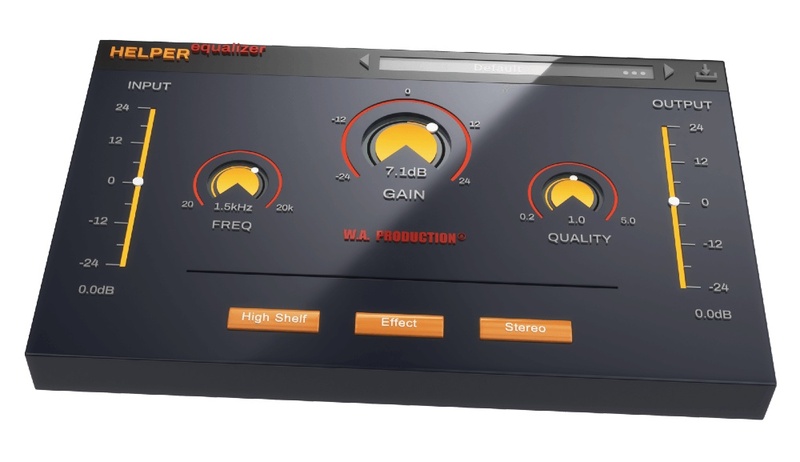
You have only 3 knobs to play with in this plug-in but do not be fooled by its simplicity. With the frequency knob, you can determine which frequency to be affected by the equalizer itself. With the gain knob, the volume of the sound can be increased or decreased to bring out the muddiness or to give some air to the sound. With the quality knob, you can adjust the filter slope to effectively equalize your sound. Although the gain knob and quality knob are not available in certain filter modules, they are still vital to proper audio equalizing.

You can also choose to effect different types of audio signal from the audio source – Stereo, Mid, Side, Left & Right. Imagine what all this unique feature offers you.

With the input and output gain control, proper gain staging can be done before and after the saturation process.

Features

  • Intuitive user interface
  • 5 different EQ shapes
  • 5 different channel modes
  • 10 Factory presets 
  • Responsive & CPU friendly
  • Resizable user interface

System Requirements

  • Windows 8 or higher (32 / 64-bit)
  • macOS 10.13 and later (64-bit only)

Please Note: AAX format requires Pro Tools 11 or higher.

Important Note for Mac Apple Silicon users: Before purchasing, please review the current compatibility status of this plugin on your system here.

Installation Instructions

Registration and Activation Video

Please Note: CHORDS is used as an example.

Registration

1. Click the Download button in your Plugin Boutique account or go to https://www.waproduction.com/users/login

2. Click 'Create New Account' (if you already have a W.A Production account, enter your details, log in and skip to step 5).

3. Enter your details > Choose your marketing preferences > Click 'Finish Registration'.

4. Your account has been registered > Click 'Register Plugin'.

5. On the license registration page, enter the license key from your Plugin Boutique account (which will be referred to as 'serial number' on our site) > Click 'Add'.

6. Your product will now be displayed in your W.A Production account > Scroll down to My Orders and click 'View Order'.

7. Click 'Download Files'.

8. Click 'Download'.

Mac Installation

1.  Once the download is complete, extract and open the ZIP folder you just downloaded > Open the Mac folder > Double-click the CHORDS .pkg installer file.

2. Click 'Continue'.

3. Read the Software License Agreement > Click 'Continue'.

4. Click 'Agree'. 

5. Click 'Install'. 

6. Click 'Close'.

7. Open CHORDS in your DAW.

8. Click the information icon in the bottom left-hand corner > Enter the serial number you were given in your W.A Production account > Click 'Authorize'.

Your software is now ready to use in your DAW!

Windows Installation

1. Once the download is complete, extract and open the ZIP folder you just downloaded > Open the PC folder > Double-click the CHORDS PC installer file.

2. Click 'Next'.

3. Click 'Next'.

4. Select which plugin formats you would like to install > Click 'Next' > Click 'Install'.

5. Click 'Finish'. 

6. Open CHORDS in your DAW.

7. Click the information icon in the bottom left-hand corner > Enter the serial number you were given in your W.A Production account > Click 'Authorize'.

Your software is now activated and ready to use in your DAW!

Plugin Boutique Rewards

Discover the most rewarding loyalty programme among all plugin retailers.

  • Free Loopmasters Samplepacks
  • Discounts on products and courses
  • Extra Virtual Cash claimed immediately at checkout
Find out more

Follow us:

X (Twitter) Facebook YouTube Instagram
Logo Logo

Plugin Boutique Limited, Part of the Beatport Group LLC.

Copyright © 2011-2025 Plugin Boutique. All rights reserved
