


Buy Grand Finale, get a free gift with purchase:

Audio Finalizer
Everything needed to finalize your project
Grand Finale is a multi-effect plug-in designed for finalizing complete mixes, stems, buses and/or individual audio tracks. The plug-in offers several modules in a pre-routed configuration. Each module has parameters to alter, and most modules offer a set of different algorithms to select. These features come together to make Grand Finale a powerful tool for quickly finalizing a track, bus or mix.
Trim the input signal, add your desired amount of compression, multi-band compression, stereo width, EQ, blend in some add compression and/or distortion, and glue it all together by balancing the input and output trim. Use the meters to monitor and adjust your output level to whatever destination.
New in version 2: Grand Finale has been given some much-needed love and attention resulting in a major facelift and some extra horsepower under the hood.
Anatomy
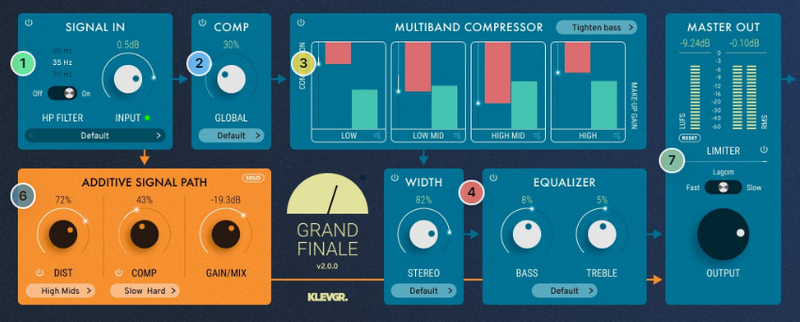
1. Input section - Make sure your audio enters the processor in a proper way. Input level & HP filter.
2. Compress - Give your favourite song a squeeze.
3. Multiband compress - Sometimes, each band needs a specific squeeze.
4. Width & EQ - Got two ears? Great! Make them feel wider. Fool-proof, yet powerful.
6. More is more - For more flavour, an additional signal path with some nasty distortion and/or squashed compression can be mixed in.
7. Master - Check your levels, both LUFS and RMS. And, if you want, add a limiter.
Features
- High-quality effects, trimmed for high-precision audio finalizing
- LUFS and RMS output metering
- Parallel signal in aligned phase
- Additive signal path with distortion and/or compression
- Revamped UI optimized for a quick and creative workflow
- Stereo width enhancer
- Multi-band compressor
- Fine-tuned limiter
- Collection of pre-made presets
System Requirements
- macOS 10.10 or later (optimized for the M1 processor)
- Windows 7 SP1 or later
- 64-bit AU, VST2, VST3, AAX
Please Note: Pana is used as an example:
Mac
License Redemption
1. Navigate to https://klevgrand.com/redeem > Paste your 16-digit redemption code found in your Plugin Boutique User Account > Click 'Submit!'.

2. Your redemption code has been accepted > Scroll down to Step 2.

3. Click either 'Sign in' if you already have a Klevgrand account, or 'Create new account' if you do not > Fill in your personal details > Click 'I'm ready'.

4. Your account has now been created.

5. Navigate to your email inbox and locate the activation email that you should have received from Klevgrand > Click 'Let me in!' to activate your account.

6. Create a password for your account > Click 'Enter Klevgrand'.

7. Your software and serial number is now available within your Klevgrand account > Click the Apple logo to download the installer file.

Installation
1. Launch the pana_x_x_x_macOS.dmg installer file.

2. Double click the KLEVGR. logo to launch the installer.

3. Click 'Continue'.

4. Click 'Continue'.

5. Click 'Agree'.

6. Click 'Install'.

7. Enter your system password > Click 'Install Software'.

8. Click 'Close'.

9. Navigate back to your Klevgrand My Account page > Click on the serial number to copy it to your clipboard.

10. Launch your DAW > Create a new audio track > Insert Pana onto the channel > Paste your serial number into the box.

Your software is now activated and ready to use within your DAW

Windows
License Redemption
1. Navigate to https://klevgrand.com/redeem > Paste your 16 digit redemption code found in your Plugin Boutique User Account > Click 'Submit!'.
2. Your redemption code has been accepted > Scroll down to Step 2.
3. Click either 'Sign in' if you already have a Klevgrand account, or 'Create new account' if you do not > Fill in your personal details > Click 'I'm ready'.
4. Your account has now been created.
5. Navigate to your email inbox and locate the activation email that you should have received from Klevgrand > Click 'Let me in!' to activate your account.
6. Create a password for your account > Click 'Enter Klevgrand'.
7. Your software and serial number is now available within your Klevgrand account > Click the Windows logo to download the installer file.
Installation
1. Unpack the pana_x_x_x_win.zip installer file > Launch the pana_x_x_x_win.exe file.

2. Click 'I accept the agreement' > Click 'Next'.

3. Click 'Next'.

4. Click 'Next'.

5. Click 'Next'.

6. Click 'Install'.

7. Click 'Finish'.

8. Navigate back to your Klevgrand My Account page > Click on the serial number to copy it to your clipboard.
9. Launch your DAW > Create a new audio track > Insert Pana onto the channel > Paste your serial number into the box.
Your software is now activated and ready to use within your DAW


