


Save $223.95 compared to buying products individually
Buy Klevgrand Superhero Effects Bundle, get a free gift with purchase:


Dial in the echoes of the past
Revolv is a unique reverb plugin like no other, emerging directly from cultural and sonic heritage. Whether you place your mix in a peaceful forest, an ancient ruin, or a sweaty sauna, Revolv’s impulse responses capture the unique ambiance of each location. Explore historically and acoustically unique spaces like the medieval Gotland ruins or Uppsala Cathedral, meticulously recorded to give your audio a sense of depth and authenticity that sets it apart.
Features
- 100+ carefully captured impulse responses from historic and modern Swedish locations.
- Unique, fast workflow for quickly switching between different IR:s.
- Works both as a traditional reverb and an exquisite room processor.
- Extensive background info on the many different locations.
- Up to three mic placements for each locations, featuring different microphone models.
- Fine-tune decay, predelay, width, and more for precise control over each space.
- Efficient optimized CPU design allows high-quality reverb without sacrificing your system’s performance.
- Tailor-made for film, TV, and video game sound design where authenticity and realism are critical.
- Powerful EQ featuring two parametric filters available (low / high cut, low / high shelf, bell)
Learn more about Revolv

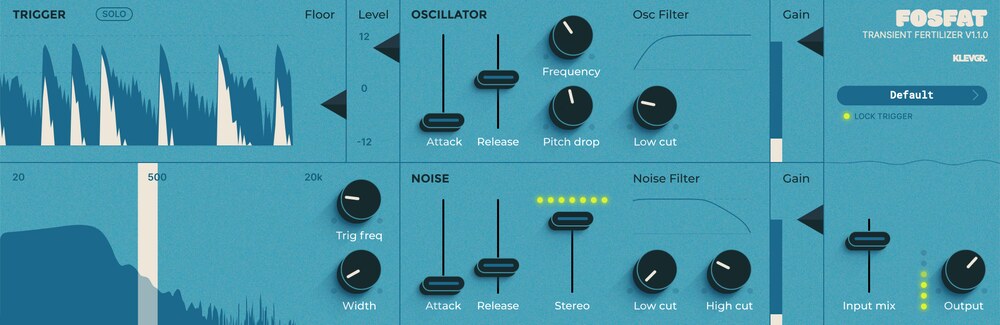
Bring life to your drums and percussion
No drum deserves to be dull or lame. Fosfat will add bite and oomph to your drums or percussion (or any percussive sounds). It follows the dynamics of the incoming sound and adds tonal and noise textures to it. Klevgrand thinks of it almost like an EQ, in the way it shapes the sound, but it adds instead of cutting or boosting. It’s perfect for when you have a nutrient-deficient recording (lacking bass or attack in a kick drum for example), or if you just want to add some extra sub or pleasant stereo fizz to any percussive sound.
In addition to the obvious option of using multiple instances of Fosfat across your drum tracks, the possibility to precisely dial in its trigger lets you pinpoint any frequency area or transient of your choice in recordings of whole drum kits or any drum loop sample. This gives you a very efficient and musical way of enhancing specific parts. Together with an oscillator, noise generator, low- and high-cut filters, stereo width, gain and more, you have a beat-fertilizing hothouse letting your percussive sounds really grow and bloom.
Features
- Multiple audio-visualizations makes dialling in accurate settings very easy
- Controls for trigger frequency and width respectively
- Sine wave oscillator with optional pitch drop
- Noise with adjustable stereo width
- Attack and release controls
- Low cut and high cut filters
- Four instances of volume control
- Wave rendition
- Preset collection
Learn more about Fosfat


Audio Enhancer
LUXE is an effect plugin that compresses and saturates an audio signal in a quite subtle but musical way. It is very useful for making a track "fit in the mix", and can be used with very good results on a drum bus, a vocal track, or anything in between.
LUXE is very easy to use – simply choose between the LUXE or FINESSE algorithms, and set the desired processing level. Don't be fooled by the modest control possibilities - under the hood is a very sophisticated set of parameters that will treat your incoming audio with great care, musicality, and warmth.
Features
- Super-simple interface that lets you focus on more important stuff than knobs
- Two carefully developed algorithms that cover a wide array of uses
- Output for controlling the signal
- Low CPU footprint
Learn more about Luxe

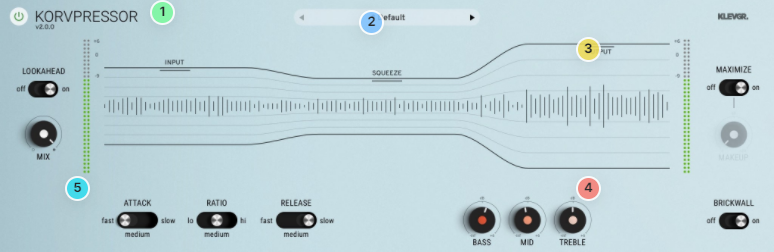
Smart Compressor
If you work with audio, you will eventually need a good compressor in your toolbox. Korvpressor is an adaptive compressor/limiter, designed for all purposes in audio treatment. It has a super-simple UI with a unique approach on how to tame and visualize a compressor, now also with some added controls to make it even more versatile.
The basic controls are still minimalistic – set the input gain, level of compression, and output gain. The compression algorithm was designed with transparency in mind, and Korvpressor will sound great on almost any kind of sound; all from a vocal track to a full-blown mix. If you push it even harder, it gives a nice squeezing effect.
Features
- Recognized high-quality compression algorithm
- Unique and easy-to-use UI
- New: Attack / Release time switch (three states)
- New: Dry/Wet mix
- New: Ratio switch (three states)
- New: Maximizer Mode on/off (with a Make Up parameter knob if set to off)
- New: Plenty of factory presets
- New: Output brickwall limiter on/off switch
- 3-band smooth EQ
- Lookahead on / off
Learn more about Korvpressor

Audio Gear Modeler
REAMP is a complex spectral saturation processor, simulating a set of different analog gear in a new and unique way. The benefits of this algorithm are that it is highly CPU efficient and adds (almost) no latency.
The seven models available are based on real analog gear, individually measured in two dimensions; gain responses (-inf dB to +6 dB) at the frequency spectrum 20Hz to 20kHz. This data is used to transform input audio to output audio.
A four-band spectral drive allows you to let the unit work even more.
Features
- Seven handpicked profiles based on gear Klevgrand love
- Spectral drive (four bands)
- Dry / Wet mix
- Plenty of factory presets
- Ultra low latency
Learn more about REAMP

Audio Finalizer
Grand Finale is a multi-effect plug-in designed for finalizing complete mixes, stems, buses and/or individual audio tracks. The plug-in offers several modules in a pre-routed configuration. Each module has parameters to alter, and most modules offer a set of different algorithms to select. These features come together to make Grand Finale a powerful tool for quickly finalizing a track, bus or mix.
Trim the input signal, add your desired amount of compression, multi-band compression, stereo width, EQ, blend in some add compression and/or distortion, and glue it all together by balancing the input and output trim. Use the meters to monitor and adjust your output level to whatever destination.
Features
- High-quality effects, trimmed for high-precision audio finalizing
- LUFS and RMS output metering
- Parallel signal in aligned phase
- Additive signal path with distortion and/or compression
- Revamped UI optimized for a quick and creative workflow
- Stereo width enhancer
- Multi-band compressor
- Fine-tuned limiter
- Collection of pre-made presets
Learn more about Grande Finale
- macOS 10.10 or later (optimized for the M1-processor)
- Windows 7 SP1 or later
- AU, VST-2, VST-3, AAX
Please Note: Pana is used as the example:
Mac
License Redemption
1. Navigate to https://klevgrand.com/redeem > Paste your 16 digit redemption code found in your Plugin Boutique User Account > Click 'Submit!'.

2. Your redemption code has been accepted > Scroll down to Step 2.

3. Click either 'Sign in' if you already have a Klevgrand account, or 'Create new account' if you do not > Fill in your personal details > Click 'I'm ready'.

4. Your account has now been created.

5. Navigate to your email inbox and locate the activation email that you should have received from Klevgrand > Click 'Let me in!' to activate your account.

6. Create a password for your account > Click 'Enter Klevgrand'.

7. Your software and serial number is now available within your Klevgrand account > Click the Apple logo to download the installer file.

Installation
1. Launch the pana_x_x_x_macOS.dmg installer file.

2. Double click the KLEVGR. logo to launch the installer.

3. Click 'Continue'.

4. Click 'Continue'.

5. Click 'Agree'.

6. Click 'Install'.

7. Enter your system password > Click 'Install Software'.

8. Click 'Close'.

9. Navigate back to your Klevgrand My Account page > Click on the serial number to copy it to your clipboard.

10. Launch your DAW > Create a new audio track > Insert Pana onto the channel > Paste your serial number into the box.

Your software is now activated and ready to use within your DAW

Windows
License Redemption
1. Navigate to https://klevgrand.com/redeem > Paste your 16 digit redemption code found in your Plugin Boutique User Account > Click 'Submit!'.
2. Your redemption code has been accepted > Scroll down to Step 2.
3. Click either 'Sign in' if you already have a Klevgrand account, or 'Create new account' if you do not > Fill in your personal details > Click 'I'm ready'.
4. Your account has now been created.
5. Navigate to your email inbox and locate the activation email that you should have received from Klevgrand > Click 'Let me in!' to activate your account.
6. Create a password for your account > Click 'Enter Klevgrand'.
7. Your software and serial number is now available within your Klevgrand account > Click the Windows logo to download the installer file.
Installation
1. Unpack the pana_x_x_x_win.zip installer file > Launch the pana_x_x_x_win.exe file.

2. Click 'I accept the agreement' > Click 'Next'.

3. Click 'Next'.

4. Click 'Next'.

5. Click 'Next'.

6. Click 'Install'.

7. Click 'Finish'.

8. Navigate back to your Klevgrand My Account page > Click on the serial number to copy it to your clipboard.
9. Launch your DAW > Create a new audio track > Insert Pana onto the channel > Paste your serial number into the box.
Your software is now activated and ready to use within your DAW


