


 Log In
.jpg)
Free gifts available with your purchase

Vocals, Evolved
VocalSynth 2 is an immersive vocal experience that adapts and adapts and evolves with your unique style and opens up a world of vocal possibilities. Color and shape vocals with five blendable eccentric must-haves and stompbox-style studio effects. A one-stop for past, present, and future vocal sounds, VocalSynth 2 features a Vocoder, Compuvox, Polyvox, Talkbox, and Biovox: a brand new effect based on the sonic qualities of the human vocal tract.
VocalSynth 2 Upgrades + Offers
- VocalSynth 2 + Bundle
- VocalSynth 2 Upgrade from V1
- VocalSynth 2 Upgrade from Music Production Suite
- Producertech Guide to VocalSynth 2
The Evolution of Vocals

Elevate your vocal productions with the music production’s most unique plug-in experience for vocals. Quickly get old school sounds you need or create a new school of vocal sounds. Get lost in layers, textures, effects, blending, and morphing in an experimental vocal playground and finally find that secret something that makes your vocals stand out. Choose and meld five unique vocal tools or pick from hundreds of presets for quick impact.
Killer sounds out of the box
We’ve completely redesigned VocalSynth to get you a better sound, faster than ever. Through meticulous design we’ve made improvements to every aspect of VocalSynth including: expanding the Vocoder for a more faithful sound, packing more power into Shred, optimizing CPU, adding more control within each module, and much more. We’ve also added brand new presets that take full advantage of all VocalSynth has to offer, so you can get up and running right out of the box.
Biovox: Vocals down to a science
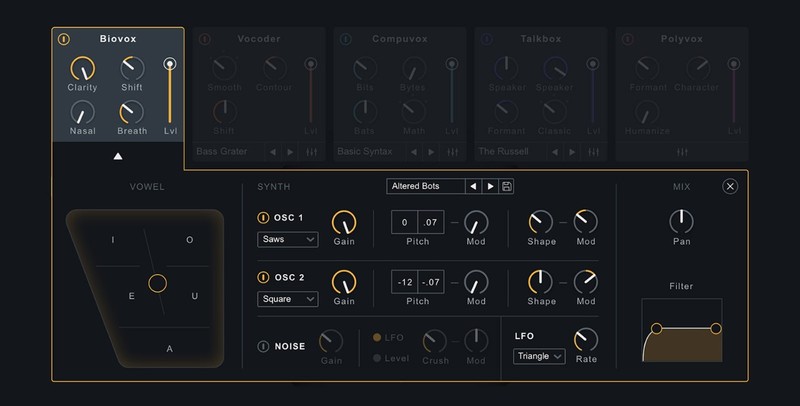
Create and manipulate your biological imprint with a brand new vocal effect. Using scientific modelling of a human vocal tract, adjust human vocal characteristics like nasality, vowel shapes, and formants for a smooth, textural vocal treatment to any audio signal. Use surgically to adapt takes to better fit your production or apply as a creative effect to make a vocal more present, breathy, or totally mangle it!
Stompbox playground
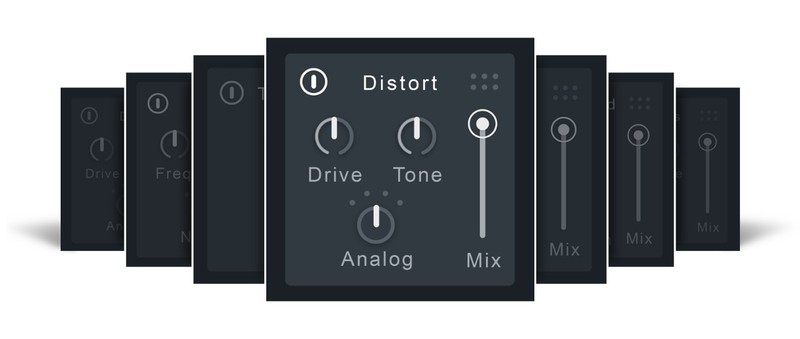
Further enhance your production with a custom drag-and-drop vocal effects chain featuring seven experimental effects including a new and improved Shred, Ring Mod, Chorus, Distort, Filter, Transform, and Delay. Add a little extra something special for a perfect cocktail of vocal effects.
Interactive visualization

Meet the Anemone, VocalSynth 2’s colorful animation that moves and grows with the shape of your audio signal. Driven by an advanced spectral analysis that reacts to the sonic characteristic of vowels, the Anemone blends fun interaction with a unique metering experience.
Inter-plugin communication
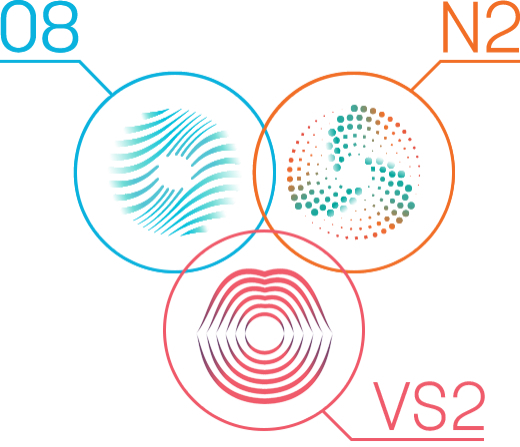
VocalSynth 2 works within the ecosystem of iZotope products. Like Neutron, Ozone, and Tonal Balance Control, VocalSynth 2 features inter-plugin communication, allowing seamless integration with essential tools for music production and analysis. VocalSynth 2 can be seen within Neutron 2’s Visual Mixer and Masking Meter and also within Tonal Balance Control, allowing you to interact and get visual feedback in real time.
3 Ways to Play
Three different modes allow you to interact with VocalSynth 2 in a way that suits your style. Helpful in-app setup instructions tailored to your DAW get you up and running with ease, so you can spend more time making creative decisions.
- Auto: Lock your vocals into key with real-time pitch correction, generate additional voices and harmonies, and seamlessly blend your module settings with VocalSynth’s intuitive mix panel.
- MIDI: Use MIDI signal to control your pitch and effortlessly create custom vocal harmonies as you play. This replicates the experience of playing a classic vocoder or talkbox!
- Side chain: Rather than using the synthesizer within VocalSynth, pipe in your own audio to use as your “carrier” signal. This lets you make any audio “talk” or create new outlandish sounds that would be impossible otherwise.
Features
- Biovox: Using scientific modelling of a human vocal tract, adjust human vocal characteristics like nasality, vowel shapes, and formants for a smooth, textural vocal treatment to any audio signal.
- Stompbox-style effects: VocalSynth 2’s effects include two brand new pedal-style effects: Chorus and Ring Mod with a unique tremolo effect. Now drag to re-order all seven effects including an improved Shred with sequencer as well as Distort, Filter, Transform, and Delay.
- 3 ways to play: VocalSynth 2 is built to be flexible, giving you three ways to interact and create: Auto Mode, MIDI Mode, and Sidechain Mode.
- Inter-plugin communication: Use VocalSynth 2 within Neutron 2’s Visual Mixer and Masking Meter, as well as Tonal Balance Control for a bird’s eye view of your music production at all times.
- Extensive sonic enhancements to the Vocoder module as well as Talkbox, Polyvox, and Compuvox that improve usability, CPU utilization, and sound quality.
- Reimagined interface with deep control: VocalSynth 2 includes a brand new, modern interface and the addition of advanced synthesizer controls for each individual module. Paired with a fluid, evolving visualization, VocalSynth 2 is primed for hours of creativity with you at the helm.
System Requirements
Operating Systems
- Mac: macOS Big Sur (11.7) — macOS Ventura (13.5) (Apple silicon Macs supported natively) (64-bit only)
- Windows: Windows 10-11 (64-bit only)
Plugin Formats
- AU (Mac only), AAX, VST3 (All formats 64-bit only)
- Please note: VST2 is no longer supported

Sasha
Grammy Award nominee, four-time International Dance Music Award winner and four-time DJ Mag award winner.
"VocalSynth 2 is great for taking a basic melody and turning it into something far more powerful and useful. It's great for mangling pianos too!"
Reviews Summary
While it aims to provide a helpful overview, it may not capture every perspective or detail. We encourage you to read individual reviews to make an informed decision.
Reviewers widely praise VocalSynth 2 as a versatile and creative vocal processing plugin, highlighting its diverse engines for vocoder, talkbox, and robotic effects, as well as its ability to provide subtle vocal thickness and lush harmonies. Users appreciate its depth, MIDI integration, and sound design potential, especially when purchased on sale. However, some note a learning curve, moderate CPU/latency impact, and caution that heavy use can sound unnatural, while a small minority were dissatisfied with the sound quality.


