


 Log In

Free gifts available with your purchase


The World’s #1 Music Theory Workstation
Scaler 3 helps you explore new directions, solve musical puzzles, and refine your musical ideas.
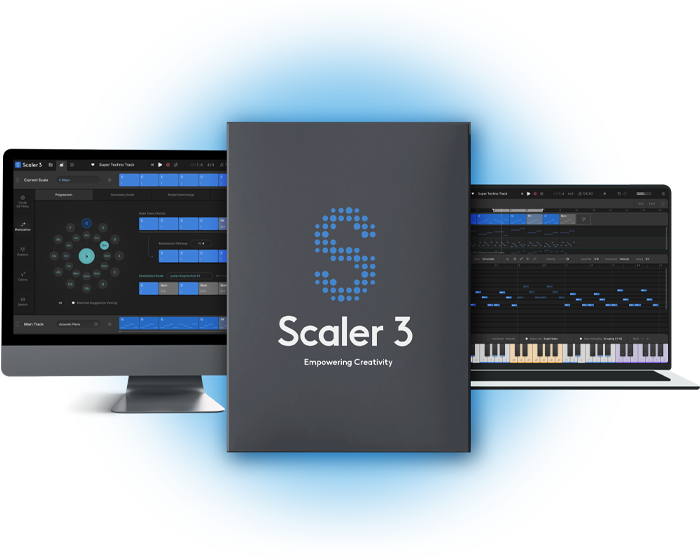
Scaler 3 helps you move from idea to finished music faster by making harmony, composition and music theory visual, practical and intuitive. Whether you’re writing your first progression or crafting sophisticated modulations, Scaler 3 helps you create with greater confidence while deepening your understanding of music.
How Scaler 3 helps you create

Songwriting
Build richer chord progressions, discover fresh ideas and overcome writer’s block with intelligent harmonic suggestions.

Film & Media Scoring
Explore advanced harmony, emotional modulations and orchestral progressions for cinematic composition.

Learn While You Create
Visualise harmony, scales and chord relationships as you work, naturally building your musical understanding.

Production & Performance
Generate melodies, basslines and performances, arrange complete songs and drive your favourite instruments inside your DAW.
Highlights

Multi-Bind
Bind multiple tracks together with Multi-Bind to create and perform complex arrangements with ease. Loop different sections, jump between parts, and audition individual tracks by muting or unmuting lanes, giving you more flexibility to experiment with your musical ideas.

Build Progressions
Drag and drop chords to build a progression. Choose from hundreds of chord sets categorised by artist and mood, and Scaler will be able to tell you which parent scales fit well with those chords. Stuck for ideas? Ask Scaler to suggest chords that will work next.
VST/AU Hosting
Load your favourite third-party instrument and effect plugins directly onto Chord Tracks and MIDI Lanes, with full support for both MIDI and audio effects. Seamlessly integrate your sounds and expand Scaler 3's creative potential within your workflow.
Multi-Lane Timeline
The Arrange page now includes a timeline-based layout with dedicated lanes for chords, melody, bass, and phrases. Each lane is synchronized with the main chord track, and clips are fully adjustable with independent control per lane or clip.
Explore Page
Discover a Harmonic Universe of chords untied to any specific scale. Categorized by genre and feel (EG, Dark, Bright, Neutral), the Explore page suggests compatible and experimental chord progressions, unlocking new paths for unique and bold harmonic structures.
Motions
Scaler's beloved Phrases, Performances, Melodies, and Basslines are reimagined as Motions, now with mood-based tags for easier browsing. Scaler 3 introduces hundreds of new Motions crafted by professional musicians, including the all-new Passages Motion.
Modulation Pathways
Solve your modulation puzzles with Scaler’s suggestions. From your current progression, choose a destination scale and the software will suggest multiple ways to reach it. You’ll also find Secondary Scale, Modal Interchange, Mediant and Neo-Riemannian modulation methods here, too.
Note Editing & Harmonic Modifiers
A comprehensive note editing matrix allows users to customize or create new Motions. MIDI lanes can be set to follow or run independently of Chord Tracks, with new Harmonic Modifiers and Motion Controls to adjust note range, density, pitch, and clip rotation – all within the chosen scale.

Scenes
Create evolving arrangements with Scenes. Build, duplicate, and arrange chord variations or sections to structure full tracks quickly and intuitively. Perform each Scene independently to explore different ideas or arrange full arrangements.
User Track Recording
Record melodies, chords, and ideas directly into Scaler’s piano roll. Capture chord triggers or Keys Lock performances and refine them with full MIDI editing and harmonic guides.

Divisi and Bass Follow
Control how chord voices are split across instruments with full Divisi and voice allocation, sending upper and lower notes to separate Scaler instances for realistic ensemble writing and richer layering. The Bass Follow Track automatically generates basslines that follow the root of your chord track.
Features
- Access over 1,000 chord sets, keys and modes, categorised by mood, artist and genre, including artist sets from Carl Cox, MJ Cole and The Temper Trap, across genres from Chill and Drum & Bass to Jazz, Cinematic, Pop, and Metal.
- Build intelligent chord progressions with chord suggestions, sequencing and automatic voice leading for smooth musical results.
- Create evolving arrangements with Scenes, letting you build, duplicate and arrange chord variations or song sections quickly.
- Use the Arrange Page timeline with dedicated lanes for chords, melody, bass and phrases, all synced to the main chord track.
- Detect chords, keys and scales from MIDI and Audio, then discover compatible chords that match your music.
- Transform chords into melodies, arpeggios, basslines and phrases with Scaler’s musician-made Motions library.
- Control chord playback from your MIDI keyboard with Bind to Keyboard for one-finger chords, melodies and arpeggios.
- Perform chords and Motions simultaneously with Multi-Bind, allowing you to loop multiple lanes at once for live performance, jamming and fast composition ideas.
- Combine different Motion types across multiple tracks, then move and audition them freely to build fuller melodic, bass, arpeggio and phrase-based arrangements.
- Edit performances with piano roll editing and creative modifiers for transposition, density, range and variation.
- Host your favourite VST and AU instruments and effects directly inside Scaler 3.
- Route chords, melodies, Scenes and performances to external instruments or plugins with full External MIDI Out.
- Sync chords across multiple Scaler 3 instances with Live Sync, keeping progressions consistent across your project.
- Create realistic ensemble parts with Divisi and advanced voice allocation, sending different voices to separate instruments.
- Generate basslines automatically with Bass Follow Track, following the root note of your chord progression.
- Explore harmonic movement with the Circle of Fifths, chord substitutions, extensions and related harmonic options.
- Use professional Modulation Suggestions to move between keys through progressions, secondary scales, modal interchange, mediants and Neo-Riemannian pathways.
- Experiment with Voice Grouping and advanced voicings, including drop voicings, guitar voicings and range-based chord shaping.
- Use the Explore Page to discover chords outside a fixed scale, including brighter, darker, compatible and adventurous options.
- Expand your harmonic vocabulary with the Colors Page, including substitutions, inversions, extensions, variations and parallel/negative harmony.
- Compare up to seven progressions side by side in the Sketch Pad.
- Record directly into Scaler’s piano roll with User Track, capturing melodies, chords, chord triggers and Keys Lock performances as editable MIDI.
- Play progressions with 50 internal sounds, including pianos, synths and orchestral instruments.
- Work in Standalone Mode without opening a DAW.
- Create ideas on iPad, then continue seamlessly in Scaler 3 on desktop. iPad version sold separately.
- Sync with your DAW’s position, tempo and time signature, or work independently using Scaler’s internal cycle tools.
- Get started quickly with a step-by-step onboarding tutorial.
Scaler 3.4 Changelog Release Notes
Scaler 3.4 introduces a major update with Discover and Variations (Suggest 2.0), bringing new ways to explore chord progressions, discover alternative harmonies and develop musical ideas.
This release also introduces dynamic Sketch Lane controls, enhanced chord editing, expanded MIDI functionality and numerous workflow improvements and stability fixes.
New Features & Content
Discover & Variations (Suggest 2.0)
A redesigned chord discovery and variation system offering more flexible and intuitive ways to explore harmony and create musical ideas by clicking the Suggest Icon.
- Redesigned Discover & Variations workflow - Explore chord possibilities through an improved interface designed to make harmonic discovery faster and more interactive.
- Diatonic, Borrowed and Adventurous suggestions - Discover chords that stay within the selected scale, borrow from related harmonic contexts or venture into more adventurous territory.
- Randomise Suggestions - Roll the dice to generate fresh chord suggestions from randomly selected chord sets, automatically adapting them to the selected scale when one is active.
- New Voicing Modes - Instantly explore alternative chord voicings using Dynamic, 1st and 2nd Inversions, Open 1 and 2, Guitar, Drop 2 and Drop 3 modes directly within Variations.
- New Note Editor in Variations - Edit individual chord notes and refine voicings directly within the Variations page.
- Chord Search in Variations - Search for specific chords and explore their available variations.
- Discover MIDI Bind - Assign Discover suggestions to MIDI keys for immediate performance and auditioning.
- Variation Voicing Keyswitches - Trigger alternative chord voicings using MIDI keyswitches, extending the familiar Bind workflow.
- Live Variation Updates - Chord variations update dynamically as notes are added or removed in the Note Editor.
Expanded Explore Genre Library
30 New Explore Constellations - Added 10 new genres, including Neo Soul, Afro House, UK Speed Garage, Melodic Techno, Modal Jazz, Modern Film Score and Indie & Dream Pop, each with Bright, Dark and Neutral variations. This introduces 480 new chord positions, also integrated into Discover for a broader range of genre-based chord suggestions.
Dynamic Sketch Lanes
Expanded Sketch Lane functionality makes it easier to create, audition and develop multiple musical ideas within Section C.
- Selectable Sketch Lanes - Select individual Sketch Lanes in Section C to make them the active editing destination.
- Enhanced Sketch Lane Integration - Improved navigation between the Main Track and Sketch Lanes, with automatic focus on the destination lane when transferring chords.
- Add to Main Track - Transfer musical ideas from Sketch Lanes directly to the Main Track using the expanded lane menu.
- Append or Replace Sketch Lane Chords - Choose whether to append chords to an existing Sketch Lane or replace its contents.
- Sketch Lane Fill and Replace Tools - Use Replace All Chords and Fill Empty Chords to develop and populate individual Sketch Lanes with suggestions that fit your progression and / or selected Scale.
- Independent Sketch Lane Playback - Audition each Sketch Lane independently using its own play button, while retaining separate Main Track playback controls.
- Lane-Specific Transposition - Semitone up/down controls apply independently to the selected Main Track or Sketch Lane.
Chord Editing & Workflow Improvements
- MIDI Note Editing - Add or remove individual notes from chords using MIDI input, enabling a more hands-on approach to chord construction.
- Improved Chord Naming - Refined chord recognition, naming and nomenclature for clearer harmonic identification.
- Enhanced MIDI Editor Note Feedback - View note names, velocity values and transposition amounts in real time when hovering over or moving notes in the MIDI Editor.
- Chord Duration Integration - New chords created using the Main Track's + button respect the selected chord duration.
- Relative and Absolute Chord Lengths - Expanded chord duration settings now include Relative and Absolute length options for greater flexibility when working with chord progressions.
- Expanded Motion Drag and Drop - Drag Motion clips directly onto User Tracks for greater arrangement flexibility.
- Expanded Chord Context Menus - Access Add to Main Track and Edit Chord actions from more locations throughout Scaler, including Sketch Lanes and the Arrange Page.
Interface & Usability Improvements
Playback, Timing, Metering & Workflow
- Numerical Tempo Entry - Double-click the tempo value to enter a precise BPM in Standalone mode or when the plugin is not synchronised to the DAW.
- Adjustable Metronome - Right-click the metronome to access its settings and adjust the metronome volume.
- Improved Chord Dragging - More consistent click-and-drag behaviour across Scaler, reducing accidental chord movement.
- Consistent MIDI Export Naming - Standardised the filename used when dragging MIDI into a DAW.
- Custom Default Preset - Choose between the factory default or saving your current Scaler configuration as the default startup state from Settings/Preferences.
- Master dBFS Peak Metering - Added dBFS peak level information to the Master channel in the Mixer for more precise monitoring.
Navigation & MIDI Capture
- Improved Folder and Sidebar Scrolling - Added scrollbars to folder browsers and modifier sidebars, improving navigation and accessibility, particularly for users without mouse-wheel scrolling.
- Enhanced MIDI Capture Feedback - Added clearer recording-state information, including a "Click to stop" prompt while MIDI capture is active.
- Improved MIDI Capture Controls - The Save button is now displayed only when MIDI data has been captured.
- Interface Refinements - Various improvements to navigation, control placement, chord selection and general workflow consistency.
Stability & Bug Fixes
Session Saving & Project Recall
- Addressed crashes occurring when opening or restoring sessions.
- Fixed selected Explore presets not being retained when reopening DAW projects.
- Fixed Arrange Motion tracks not retaining their MIDI input focus after project reload.
- Fixed an issue where chords dragged from Circle of Fifths suggestions could not be edited after saving and reopening a project.
Chord Editing & Interaction
- Fixed various issues affecting chord-note editing, selection and replacement.
- Improved chord selection and interaction consistency throughout Explore, Discover and Variations pages.
Detection, Motions & Voice Grouping
- Fixed Detection History interactions interfering with Voice Grouping and scale selection.
- Fixed Motion visualisations appearing blocked or incorrectly grouped.
- Improved MIDI input focus and interaction with Motion tracks.
General Stability & Interface
- Additional stability fixes across Scaler's chord-editing and navigation workflows.
- Restored mouse-wheel scrolling in the Keyboard instrument panel, allowing users to navigate higher and lower octaves.
- Fixed an issue where Diatonic chords could unexpectedly jump octaves when using certain voicing modes, including Drop 2.
MusicTech Magazine
The world's leading media brand at the intersection of music and technology
“Scaler 3 is the most advanced chord progression generator on the market, but it's far more than just that. It's a complete platform for creating.”
Attack Magazine
Electronic music magazine dedicated to dance music production and culture
"Scaler delivers the most comprehensive, powerful set of composition tools you can get"
Andrullian
A blog for all things music - musings, understanding theory, software tools, reviews and commentary
“Scaler 3 is an incredibly useful and powerful compositional tool for a whole range of genres whether you understand music theory or not.”
macOS
- macOS 10.14 or higher
- Natively compatible with Apple Silicon
- Standalone and Plugin Formats: VST, VST3, AU, AAX
- DAW’s Supported: Ableton Live, Pro Tools, Logic Pro, FL Studio, Cubase, Studio One, Bitwig, Reaper, Reason + more.
- Compatibility: 64-bit compatible only
Windows
- Windows 8 or higher
- Standalone and Plugin formats: VST, VST3, AAX
- DAWs supported: Ableton Live, Pro Tools, FL Studio, Cubase, Studio One, Bitwig, Reaper, Reason + more.
- Compatibility: 64-bit compatible only
Reviews Summary
While it aims to provide a helpful overview, it may not capture every perspective or detail. We encourage you to read individual reviews to make an informed decision.
Scaler 3 is widely praised as an inspiring and powerful tool for building chord progressions, discovering new harmonies, and overcoming creative blocks, making it especially valuable for users without extensive music theory knowledge. Reviewers appreciate its rich feature set, chord suggestions, and MIDI drag-and-drop workflow. However, the plugin faces common criticism for a steep learning curve and a complex, sometimes overwhelming user interface that feels like a DAW within a DAW, alongside occasional mentions of minor bugs and high CPU usage. Overall, most users consider it an indispensable asset to their music production toolkit once they invest the time to learn it.


