


 Log In

Free gifts available with your purchase

New Generation Composition Tool
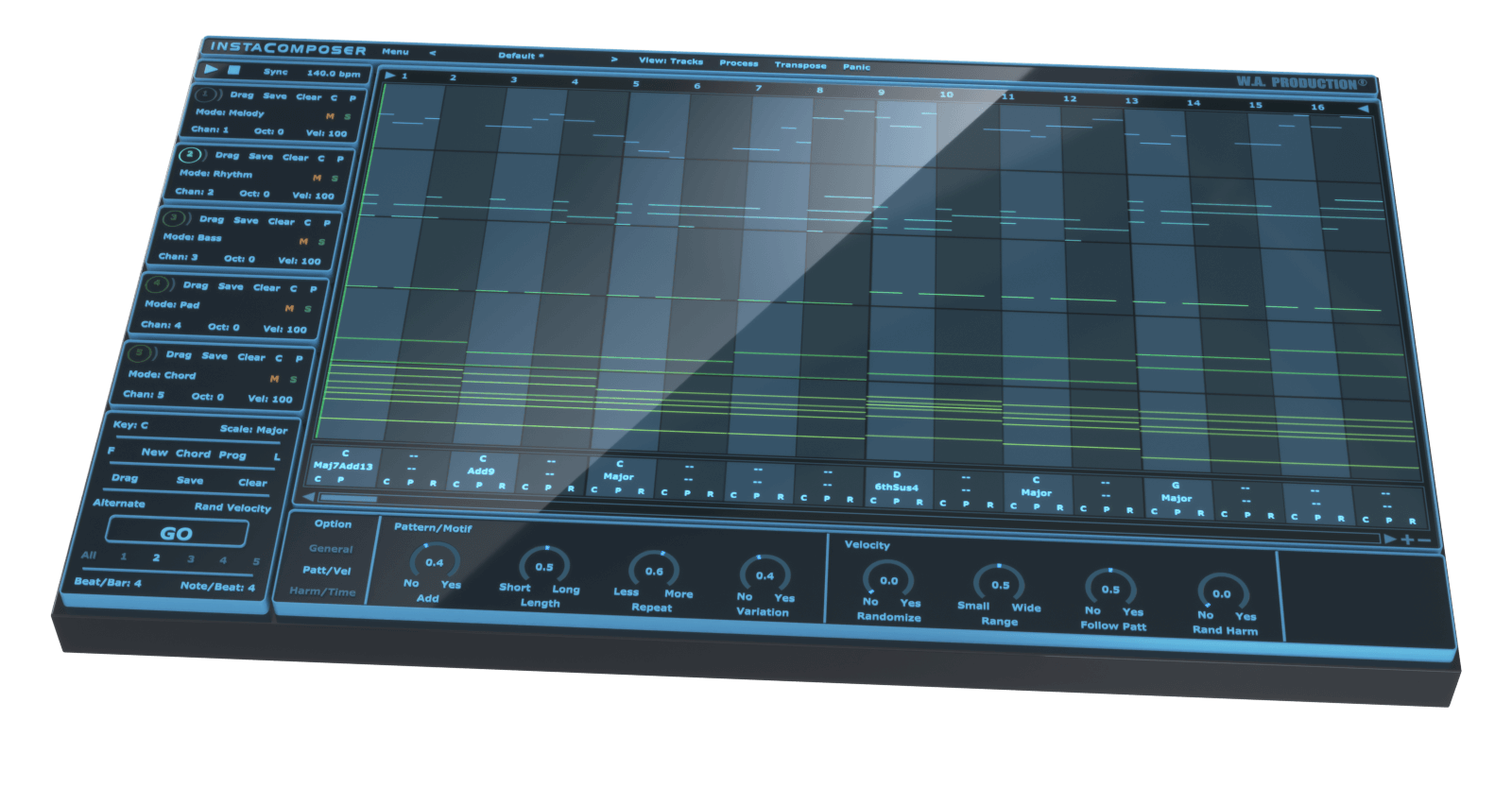
Sometimes inspiration comes at you thick and fast... but sometimes not. Instacomposer is your saviour when creativity runs dry, or when you just need your talent topped up. This MIDI generation plugin can conjure melody, rhythm, bass, pads and chords at the click of a button - all using artificial intelligence to create genuinely useful and musical riffs. This is the next step in automatic composition, using a complex algorithm to determine notes, harmonies and chords based on your personal preferences. With this much composing power at your fingertips, you’ll never be stuck in a musical rut again.
Artificial Intelligence
The backbone of Instacomposer is a behind-the-scenes decision-making matrix that creates notes based on both mathematics and musical knowledge. Plus, the artificial intelligence factors in a whole host of parameters that you can set in the bottom panel, from repetition probability to the complexity of chord shapes. Harmonic variations, strumming techniques and note density are just some of the myriad of options that can be adjusted, feeding the algorithm your own personal set of preferences.
Total Flexibility
Instacomposer is as unique as you are, taking into account your chosen scale, time signature and riff length. Choose to create new sequences for one, some or all of the 5 tracks, and in any combination of melody, rhythm, bass, pad and chord.
MIDI Editor
The onboard MIDI editor can be used to tweak the output of Instacomposer within the interface itself. This means that you can manipulate the music before it leaves the plugin, adding your own creativity and personal style on top of what the plugin has offered you. Move, copy and delete notes within a familiar piano-roll interface, even changing the velocity.
MIDI Export
Drag the MIDI tracks straight out of Instacomposer and into your DAW for ultimate ease of use. Alternatively, set up multi-channel instruments and route the MIDI from Instacomposer into your favourite VSTi’s. In this way, you can preview all 5 tracks simultaneously, without ever leaving the Instacomposer environment.
Presets
Instacomposer includes a huge number of factory presets; useful musical motifs to get you up and running quickly which can eventually become the basis for whole tracks.
W. A. Production are real-life producers making creative plugins to help you achieve studio quality processing quickly and easily. Enjoy!
Features
- Intelligent MIDI Generation plugin
- Create Melodies, Phrases, Riffs, Chords & more
- Infinite ideas at the click of a button
- Generate 5 tracks simultaneously
- Multi-track and Multi-channel routing
- Automatic harmonies and chord progression generation
- Comprehensive MIDI editing
- MIDI drag and drop
- Multiple time signatures
- Many controls for Probability, Complexity & Variation
- Factory Presets
- Full PDF Manual & Tutorial video
System Requirements
Windows
- Windows 8 and later (32 / 64-bit)
- VST Format
Mac
- macOS 10.13 and later (64-bit only)
- VST & AU Formats
Important Note for Mac Apple Silicon users: Before purchasing, please review the current compatibility status of this plugin on your system here.
DAW Compatibility
InstaComposer can be used on any software that supports VST or AAX plug-ins with MIDI routing or AU MIDI effect type. But to make sure it's compatible with yours please try the demo version before you buy (only major chords are allowed in trial version).
Windows
- FL Studio 12 (and newer)
- Cubase 10 (and newer)
- Studio One 5 (and newer)
- Ableton Live 9 (and newer) (Blue Cat's Patchwork plugin needed for multi-channel MIDI routing)
- Pro Tools 11 (and newer)
Mac
- FL Studio 12 (and newer)
- Cubase 10 (and newer)
- Studio One 5 (and newer)
- Ableton Live 9 (and newer) (Blue Cat's Patchwork plugin needed for multi-channel MIDI routing)
- Logic Pro X (and newer) (Blue Cat's Patchwork plugin needed for multi-channel MIDI routing)
- Pro Tools 11 (and newer)
Global
- NI Maschine - Blue Cat's Patchwork plugin needed for multi-channel MIDI routing
- Mixcraft - Blue Cat's Patchwork plugin needed for multi-channel MIDI routing
Incompatible with
- Maschine 2 (Win / Mac) - No MIDI routing. You can still use the Drag&Drop MIDI function.
- Reason (Win / Mac) - No MIDI routing. You can still use the Drag&Drop MIDI function.
Important Note: In order to use this product with multiple MIDI outputs in Ableton Live, a copy of Blue Cat's Patchwork is required.
The Samplecast
Podcast for sample library geeks, plugin enthusiasts and fans of toys that make noise
"With just a couple of clicks, I can generate never-ending melodic ideas and drag them straight into my projects. It’s absolutely seamless."
Vinai
Spinnin' Records / DJ Mag Top 100 DJs
"I love how fast InstaComposer helps me come up with new melodic ideas."
22Bullets
Spinnin' Records / Warner Music
"I can see how InstaComposer can help producers of all skill levels. Would highly recommend this versatile and innovative tool!"


