


 Log In
Free gifts available with your purchase
Your Next Level of Musical Innovation
W. A. Production proudly presents Ultimate MIDI Bundle 4, the newest evolution of our acclaimed MIDI toolkit series. This edition combines our groundbreaking InstaComposer 3 with the powerful new Loop Engine 3, along with every premium MIDI plugin included in Ultimate MIDI Bundle 3. Together, these tools form a complete creative suite designed to accelerate your workflow, inspire fresh ideas, and elevate your music to professional standards.
Bundle includes
Loop Engine 3
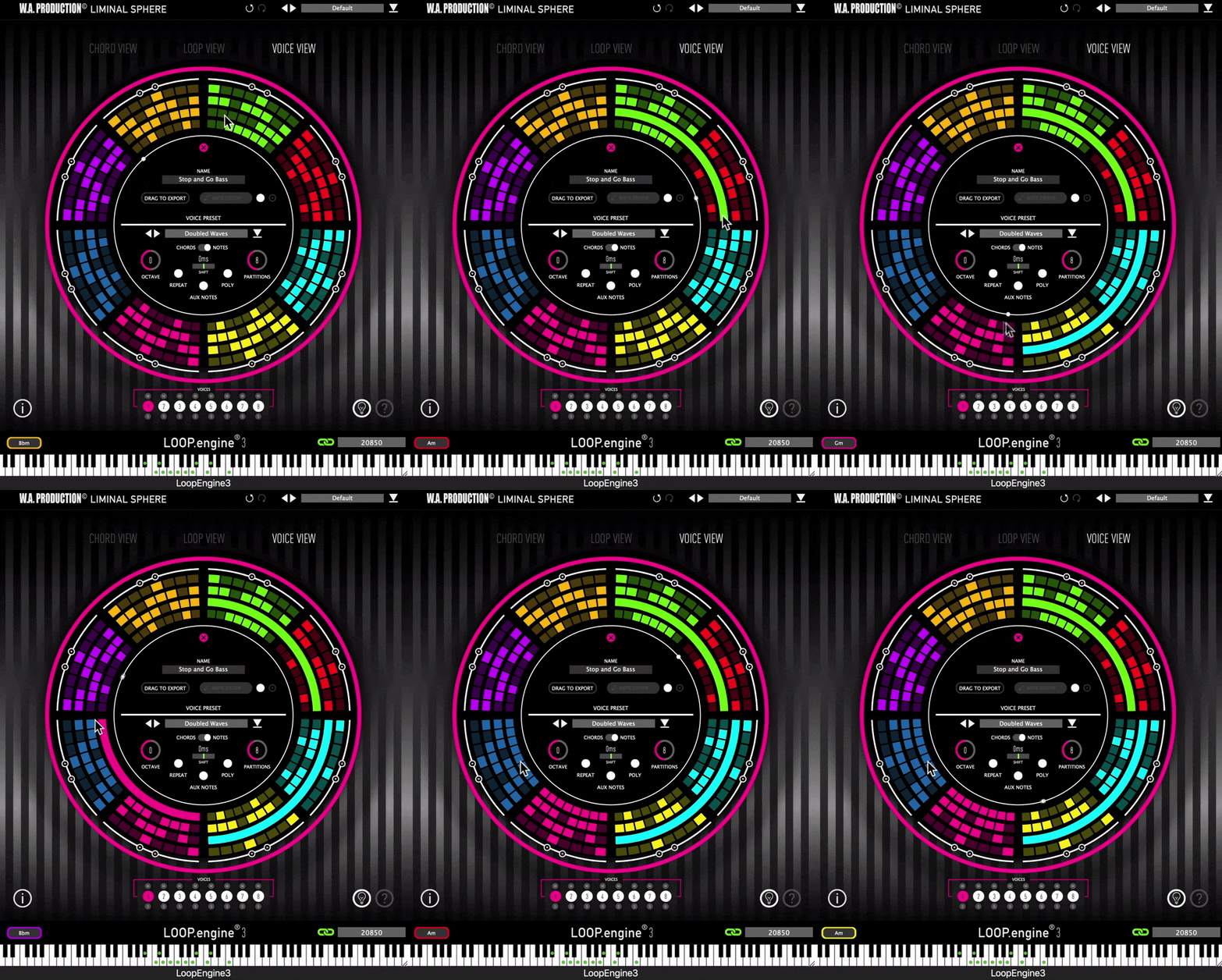
Loop evolution
W. A. Production and Liminal Sphere proudly present Loop Engine 3, the ultimate in looped MIDI generation, designed to spark your creativity and elevate your tracks to the next level. Version 3 of Loop Engine features cutting-edge enhancements to workflow, refined voice selection and a suite of new polyrhythmic and note-splitting tools.
Building upon the solid foundation of previous iterations, Loop Engine 3 breaks new ground for usability and flexibility. Conceived primarily for those who love loops, the chord shapes and divisible segments are your jumping off point to generate intricate patterns like never before; inspiring riffs, shuffling arps, soaring melodies and complex polyrhythmic sequences.
Features
- Experience a refined workflow with a streamlined interface, enhanced navigation, and dedicated voice selection options. Direct View allows switching between 3 different views; Chord, Loop & Voice
- The dedicated Listener plugin is intuitive, with color-coded voice channels and easy routing options.
- Fine-tune your rhythmic precision with partition-free note length modifications, creating elaborate melodies, basslines, arpeggios, and rhythms that extend beyond conventional chord notes.
- Note Editor offers precise note placement and a scrollable piano roll for ultimate creative control. Undo functionality has been added for effortless editing. Discover the power of polyrhythms with the optimized poly function.
- Temporal Offset / Shift fine-tunes the micro-timing of notes for enhanced rhythmic precision.
- Add Aux notes automatically, introducing tasteful passing notes to enrich chord transitions. Tie these to specific voices in the Listener plugin.
- Enhanced help gives you more guidance via the interface to maximise your experience with the plugin.
Learn more about Loop Engine 3
InstaComposer 3
Your MIDI Copilot
Instacomposer 3 is the ultimate upgrade to your creative workflow. Built on the rock-solid foundation of one of our most popular plugins, this powerful and intuitive tool is your magical musical muse. This MIDI generator plugin has been completely overhauled to embrace a brand new songwriting workflow, yet retains the same revolutionary composition features that you know and love. This is not an AI replacement for your genius, but a sophisticated co-pilot that puts professional-grade arrangement and production features directly at your fingertips.
True creativity comes from control, and that’s why Instacomposer 3 operates on advanced, transparent procedural generation. Every song, chord, riff and rhythm is generated based on configurable musical rules, giving you total command over the output. Absolutely nothing is trained on copyrighted material - this is pure, clean musical innovation that’s ready for your human touch.
Features
- Next generation MIDI Generation plugin
- Create Songs, Melodies, Phrases, Riffs, Chords & more
- Infinite song ideas at the click of a button
- Generate 6 tracks simultaneously
- Up to 8 Scenes per song section
- Multi-track and Multi-channel routing
- Automatic harmonies and chord progression generation
- Comprehensive MIDI editing
- MIDI drag and drop / MIDI import and analysis
- Multiple time signatures
- Many controls for Probability, Complexity & Variation
- Factory Presets
- Full PDF Manual & Tutorial vide
Learn more about InstaComposer 3
InstaChord 2
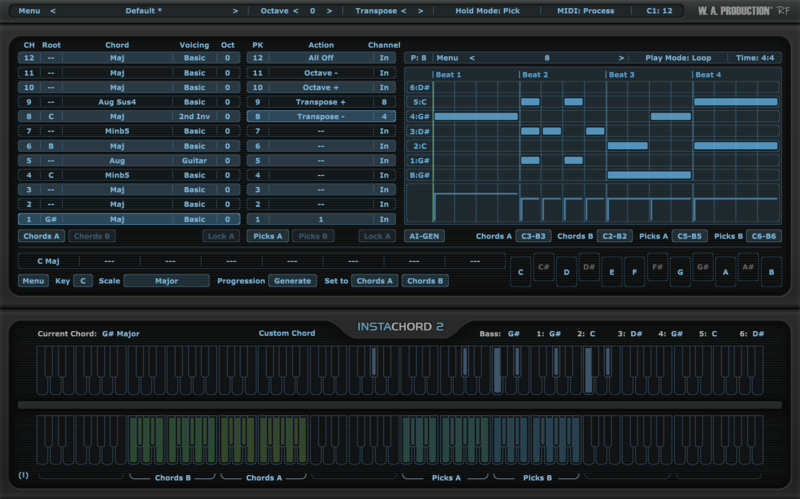
Humanised Chords
W.A Production believes that creative expression should be simple, intuitive, and inspiring. When you're making music, you need the right chords to set the tone, and Instachord 2 delivers exactly what you called for... and fast!
The team at W.A Production were so blown away with the reception to the original Instachord that they couldn’t resist developing that concept into a fully-fledged chord creator and mini-sequencer. Simple enough to be used by anyone, but with the power to make professional music, this dynamic MIDI processing plugin is the chord creation and sequencer tool that will take your music to the next level.
Features
- Inspiring Chord, Strum & Pattern MIDI Processor
- Connects to any Sequencer
- Advanced Pattern Editor
- AI Chord Sequence & Pattern Generation
- Playback Modes
- Edit & Create Custom Chords
- MIDI Drag & Drop Feature
- 60+ Chord Shapes & Multiple Voicings
- Resizable interface
- Factory Presets
- PDF Manual & Tutorial Video
Learn more about InstaChord 2
InstaScale
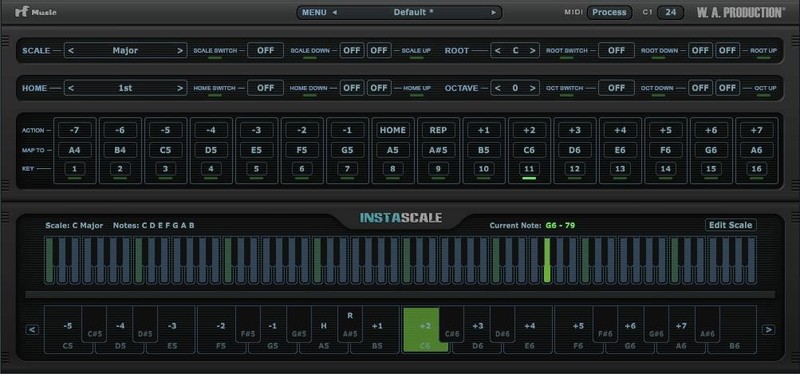
Explore the world of scales
W. A. Production is rolling out another innovative tool to assist you in your song creation adventures. Play your instruments using the brilliant idea of relative notes, rather than the old static approach. Explore the world of scales and expand your creativity in a way that you never have before.
Features
- Learning. With all the scales included in the plugin and various information displayed on the interface, Instascale can be a valuable source to study and learn different scales and modes very quickly.
- Ear Training. Get familiar with the scales in different keys and modes without having to know how to play them. Train your ear to recognize intervals and distances quickly. Using the home feature you can stay on a certain note and see what feelings it creates compared to the other notes of that scale.
- Serious playing. Instascale might seem like a strange and unfamiliar instrument at first but don't be fooled, like any other instrument with enough practice and dedication you can play a kind of mind blowing music that you could have never done with any other instrument out there.
- Experimenting and getting inspired. Considering that you can never hit a wrong note with Instascale, just play random keys and get inspired by the unpredictable but musically pleasant results. Happy accidents always happen. You don't even have to use your MIDI keyboard, you can use your drum pad/kit, map the pads to the correct keys and start playing. You'd be surprised how cool it feels and sounds.
- Breaking the rules. The foundation of the plugin is based on doing things differently, knowing the rules first and then breaking them. So let it inspire you to go even further and find new ways to create music without limiting your mind to the concept of black and white keys and minor and major scales. The plugin guards the rules but lets you change them, bend them or break them. It lets you change the scale, root and home notes on the fly, do crazy runs, it even allows you to create your own experimental scales.
Learn more about InstaScale
MIDIQ
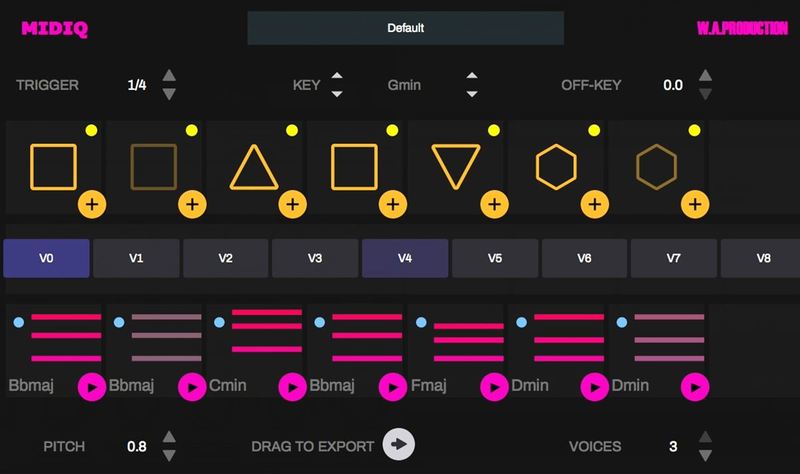
The Shape of Music
Sometimes you can sit down in the studio and you're just fresh out of ideas. That’s when you can reach for MIDIQ to kickstart concepts for chord sequences, harmonies and bass lines. MIDIQ is an innovative MIDI sequence generator for both studio and live applications, featuring a unique and highly interactive user interface.
Generating near-limitless chord sequence possibilities, MIDIQ uses a simple pattern language for the definition of repeating chords. The layout resembles a slot machine so the interface is very visual. In fact, you don’t need any knowledge of music theory to get some great results from MIDIQ.
Features
- Innovative user interface featuring a pattern definition area for chords
- Individual adjustments of MIDI velocity and muting of a generated chord
- Powered by intelligent algorithms for chord sequence generation
- Simplified piano roll display
- Factory Presets
- Drag to export
Learn more about MIDIQ
Windows
- Windows 8 and later (64-bit only)
- Formats: VST2, VST3, AAX
Mac
- macOS 10.13 and later (64-bit only)
- Formats: VST2, VST3, AAX, AU
Please Note: AAX compatible with ProTools 11 and higher only.


