


 Log In
What Are VST Plugins and What Are They Used for?
Learn what a VST is with Plugin Boutique including what VST stands for, the different types of VST plugins, their different uses, benefits, and more
Maybe you’re new to music production and are trying to make head or tails of the tools you need and how to use them, or maybe you’ve used a few VST plugins in your time but are shooting in the dark when it comes to understanding the tech behind them. Either way, this article will help you to understand what a VST plugin is and what they’re used for.
What is a VST plugin?
VST plugins are a way of adding third party instruments, tools and effects to your Digital Audio Workstation, or DAW. Most DAWs come with a range of useful instruments and effects, so VST plugins aren’t essential. On the other hand, there’s a whole world of unique and interesting VST plugins that let you expand on what your DAW has to offer.
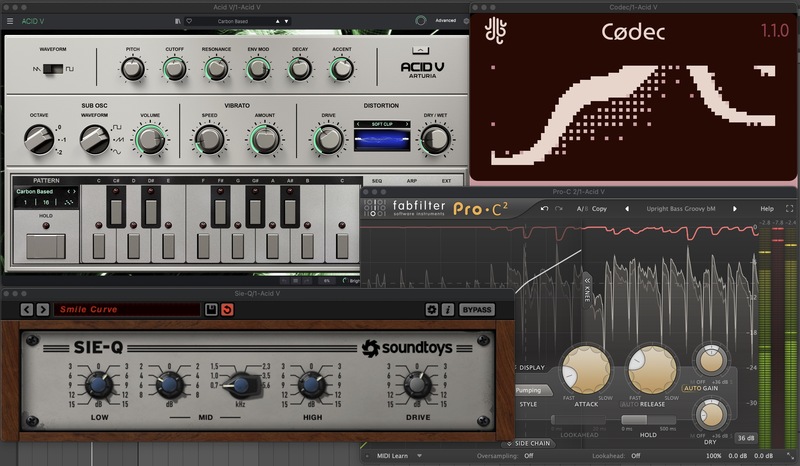
Whether you’re a recording engineer, sound designer, producer, composer or mix or mastering engineer, chances are you’ll have a few VST plugins up your sleeve. VST plugins can be used at all stages of working with audio, from sequencing and generating sound to tweaking, manipulating, or totally transforming it too.
What does VST stand for?
VST stands for Virtual Studio Technology, and it was developed by Steinberg Media Technologies in the late 90s to give musicians, producers and engineers a simple method of “plugging in” virtual instruments and effects with their DAW. The technology transformed the DAW from a glorified digital tape recorder to a comprehensive music studio.

What are Audio Units, CLAP and AAX plugins?
In addition to the VST file format, there are other formats of plugins that serve the same purpose. Apple developed a proprietary plugin format called Audio Units, or AU, that runs solely on Apple devices. Avid have their Avid Audio eXtension plugin format, designed specifically for their DSP-accelerated hardware and Pro Tools software. There’s also CLever Audio Plugin, an open source software architecture developed by Bitwig and U-He.
Most plugin installers allow you to select the plugin format that is compatible with your system and DAW, but you should check the plugin’s compatibility before purchasing. While VST is a specific file format, when we talk about VST plugins we tend to mean plugins in general.
What are VST plugins used for?
We’ve briefly touched on the purpose of VST plugins; to equip users to work entirely within the digital domain, but what are VST plugins actually used for and what advantages do they have over physical instruments?
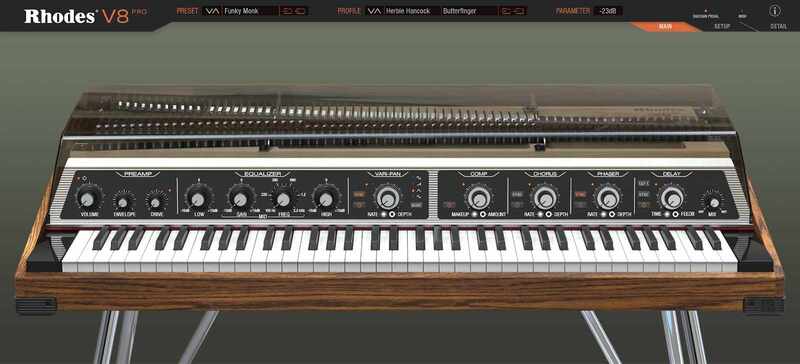
Let’s say you want to write a pop record using some drums, a bassline, a piano and some strings. Unless you’re some sort of musical prodigy with a huge instrument-packed studio, it’s unlikely that you’ll have all of these instruments on hand, not to mention the skills required to play them all. Within the digital world though, you can use VST plugins to program and sequence these instruments.
VST plugins are advantageous when it comes to mixing your music too. Maybe you’ll want your piano to sound like it’s being played in a large room or hall. Using a reverb VST plugin, you can apply just about any reverb you can imagine, and you can tweak the properties and character of that reverb without leaving your chair.
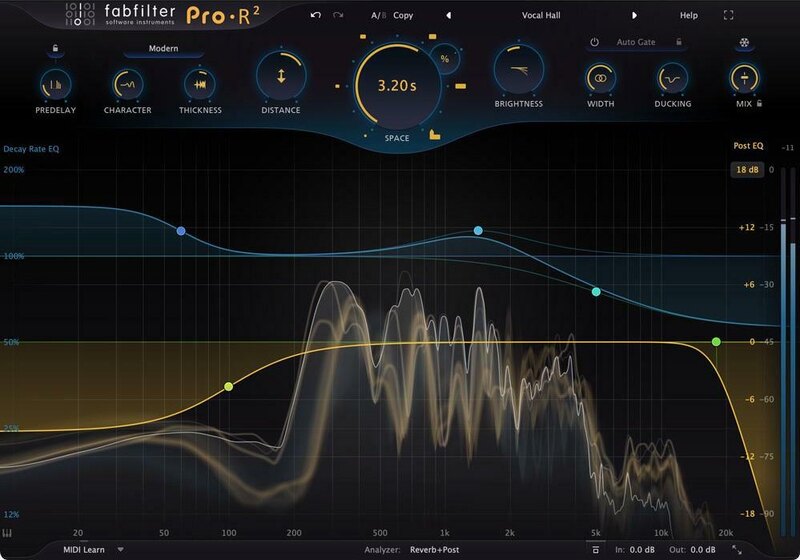
Aside from the obvious practicalities that VST plugins bring, there are some further benefits to the technology over physical instruments. VST plugins are all saved within your computer system, and require no ongoing maintenance. They often come with a range of presets, and you can save your own ready to be loaded up again in the future.
This is particularly helpful when it comes to switching between projects and sessions; all of your VST plugin settings are saved within the project and ready to go. You can also load multiple instances of any given VST plugin.
What are the different types of VST plugins?
Within the world of VST plugins, there are three main categories that each serve slightly different purposes.
VST Instruments or VSTi Plugins
The ‘i’ in VSTi stands for instrument, and is used to refer to VST plugins that generate sound. The sound generated could replicate traditional instruments, such as a piano or guitar, or they could be entirely new sounds.
VST instruments enable you to create audio within your DAW without using external sound sources or samples. VST instruments receive MIDI from an external source such as a sequencer or MIDI keyboard, or an internal source such as a piano roll or software sequencer (more on that shortly). The MIDI notes being played then tell the VST instrument what notes or noises to output.
As mentioned earlier, the advantages of VST instruments mostly come in the form of practical considerations such as physical space, loading presets, recalling DAW projects and using multiple instances of the same VST instrument. While digital technology is getting better and better at emulating real life instruments or analogue hardware synthesisers, some people prefer the sound and feel of physical instruments.
Another advantage of VST instruments is that they generally cost considerably less than the equivalent hardware instrument.

For example, a classic Roland TB-303 might set you back £3,000 in today’s market, but you can pick up a software emulation such as the Arturia Acid V or the D16 Group Phoscyon 2 for a fraction of the cost. These plugins do a great job of capturing that infamous acid-sound, but add a few extra modern features without breaking the bank.
VST Effects
If VST instruments are thought of as creating a sound, VST effects can be thought of as modifying or processing a sound. VST effects can include time-based effects such as reverbs and delays, pitch-based effects such as pitch correction, and dynamic processors such as compressors and limiters.
Once again, the pros and cons of VST effects boil down to practicality vs audio quality and character. VST effects tend to be more practical and accessible for most people, but in some cases their resulting audio doesn’t stack up against hardware equivalents. This is particularly true of reverb, saturation and distortion, where the processing power required to apply these effects in a pleasant and musical way leaves many engineers reaching for hardware processors. That said, those hardware processors do cost much more money and lack the same practical benefits of their software equivalents.
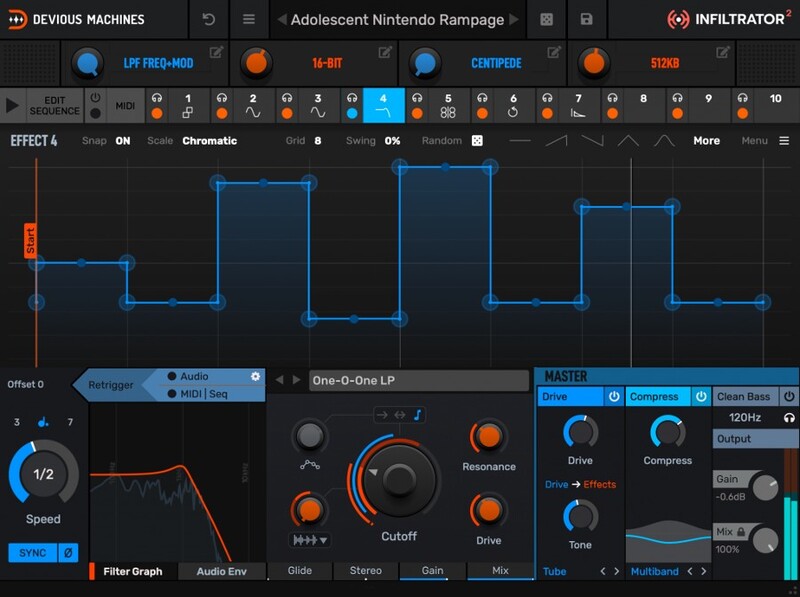
Another benefit of VST effects is that there are plugins on the market that process audio in a way that hardware never could. From complex multi-effects plugins such as Devious Machines Infiltrator 2, to advanced and expressive granular effects like Output Portal, the sky's the limit when it comes to digital signal processing.
VST MIDI Effects
The last category of plugin VSTs sits somewhere between a VST instrument and a VST effect in terms of its functionality. VST MIDI effects don’t generate sound themselves, but send MIDI data to a VST instrument to tell it what notes or sounds to play. Examples of VST MIDI effects include arpeggiators, sequencers and chord generators.
For example, if you feed three notes into an arpeggiator, it will automatically sequence those notes at the frequency and order that you set within the VST’s parameters. More advanced VST MIDI effects can generate entire melodies, chord progressions and sequences with just a few simple prompts.
While there are hardware sequencers on the market, they tend not to be as advanced or comprehensive as VST MIDI effects, and of course hardware is likely to cost more too. Many people opt for hardware sequencers as a way of maintaining hands on control of your audio.
Audiomodern develops some of the most innovative VST MIDI plugins on the market today, including Playbeat 3, a sequencer plugin which allows you to run up to eight independent sequencers, and apply various MIDI processes to your sequence on a step-by-step basis. If music theory isn’t your strength, a VST MIDI effect such as Scaler 2 can help you to get a grasp of the theory of key, scale and harmony within your compositions.
There’s a whole world of VST MIDI effects that can help you to make better music more easily.
How to use a VST plugin
Most plugin developers and marketplaces have step-by-step instructions on how to install a VST plugin, but the process usually follows the below order.
- Select and purchase your chosen plugin
- Download and run the plugin installer
- Select which plugin formats you want to install, and where you want to install them
- Depending on your system, DAW and plugin folder configuration, you may need to move the plugin files to a specific location for your DAW to be able to find them
- Load your DAW and allow it to scan for new plugins
- Locate and launch your plugin within your DAW
- You may need to enter a serial code or login credentials to authenticate the plugin
Where to find VST plugins
There are more and more VST plugins coming onto the market each day, and it can be hard to know where to start looking for your next investment. Plugin Boutique has a comprehensive and easy-to-navigate catalogue of VST plugins ranging from instruments to effects, MIDI sequencers to arpeggiators and much more. If you’re just starting out and not ready to start spending money on plugins yet, there’s even a dedicated section for free plugins too.
FAQs
What’s the difference between a DAW and a VST?
Both DAW and VST are acronyms that are frequently used in music production parlance, but they are in fact different entities. A digital audio workstation, or DAW, hosts VSTs and allows you to combine, process and mix audio, while a Virtual Studio Technology, or VST, is an additional tool that can be loaded into a DAW. To help you picture it, if you were to think of the DAW as a house, i.e. the bricks and mortar, then the VSTs and other plugins would be the furniture inside it.
Do you need a DAW to use a VST?
In general, VSTs are most commonly used within DAWs, which are designed to be able to load VSTs as an additional tool. However, some VSTs can run in standalone mode, without the use of a DAW. You can always check the system requirements for each plugin before downloading to see if this is the case.
Is it safe to download free VST plugins?
Downloading free VST plugins can be an excellent way of getting to grips with audio software and building up your plugin collection. There are some excellent free VST plugins out there that are available for download, and it is generally safe to do so as long as they are genuinely provided for free by a verifiable developer.
Do VSTs work on any DAW?
While VSTs are a cross-platform file format, not all VSTs work on every DAW. You’ll need to check each VST’s system requirements to ensure that it is compatible with your particular DAW.
How can you choose a VST plugin for your needs?
Finding the right VST plugin for your needs requires some research. A great way to research the pros and cons of a VST is to watch videos on different artists and processes. There are a number of excellent channels on YouTube that review VST plugins and compare them with alternatives in the same category.
Other articles
The Best Music Software Deals This Week [Live List]
As the music production landscape evolves week by week, so does the opportunity to save on powerful creative tools. New plugin releases, flash sales on VSTs and limited-time deals on music software can appear from any angle, making it harder than ever to keep track of what’s worth your attention. Whether you're looking for the latest bundles on offer, or even deals on exciting virtual instruments, it's as important as ever to stay up to date on what we have to offer. That’s where our live g
ESEA Heritage Month: 5 Artists You Should Know About
Founded in September 2021 by besea.n (Britain's East and South East Asian Network), ESEA Heritage Month celebrates the culture, history, and contributions of East and Southeast Asian communities across the UK. To mark the month, we’ve partnered with ESEA Music, a UK-based, community-led non-profit founded in 2021 to empower ESEA artists and music professionals, to spotlight five incredible independent artists shaping the UK music landscape. Jeremine Chan Malaysian Chinese • Multi-Genre / E
Aaron Suiss Builds Self-Actualization From Diva’s INIT Patch
Presets are a normal part of modern production, and Aaron Suiss is pretty open about using them for some of the biggest layers in his latest release, “Self-Actualization,” which spent a week in the Hype Charts on Beatport. The bass and pad began with Plug Hugger presets inside u-he Diva. But the star of the show was the arpeggiator, which he created from INIT after the options he auditioned just didn’t bring the emotional depth and power the record needed. Created with Enzo Vood and released
Synth Month Sale: The Best Deals on Synth VSTs & Bundles
It’s September, and that only means one thing for all you producers out there – it’s Plugin Boutique’s Synth Month, the ultimate synth plugins sale! Across the month, you can buy synthesizers at massive discounts. Expect big savings on the best software synths, from characterful vintage synth emulations all the way through to cutting-edge modern sound machines. Not only that, but you’ll be able to pick up some deliciously discounted synth bundles that can’t be missed. To celebrate, we


