


 Log In
Best Chorus Plugins Guide: Create Sounds That Resonate
Discover the tools you should use to create big, sweeping chorus sounds
In hardware form, the chorus effect has been around since the 1970s, with one of the first commercially available chorus devices being the Boss CE-1 Pedal, which was based on the chorus effect in the JC-120 Jazz Amplifier. The following decade, the first digital choruses made it onto the market. Now, there is a chorus effect for every scenario, whether that’s analogue, digital or in plugin form.
Choruses can be categorised as a time-based modulation effect. That is, that they rely on the manipulation of time and the modulation of pitch in order to make a sound seem thicker or more exciting. Choruses work by generating at least one copy of a signal, delaying them and modulating their timing before mixing them back in with the dry signal.
In this article, we’ll look at some potential applications of the chorus effect, how to choose a chorus plugin and how to get the most out of it in your productions.
Applications of chorus plugins
From thickening up lead vocals to adding shimmer to guitars, the chorus is a staple effect in music from the past half a century. Try applying a chorus effect to a very static and narrow sound, you should hear it introduce some subtle (or not so subtle depending on the plugin) undulation in the width, level and pitch. This is where their strengths lie - bringing movement, excitement and dynamism to elements that need a bit of spicing up. Some plugins even come with a built-in chorus effect, like the V8 Pro.
Countless musicians have used the chorus effect in different ways throughout the years. The Red Hot Chilli Peppers’ John Frusciante is said to keep a Boss CE-1 on his pedal board, as can be heard on their track Soul to Squeeze. A more recent example of chorus being used in a production comes courtesy of Steve Lacy and his track Some. Pay special attention to the guitar and how it seems to shimmer around the stereo image.
Choosing the right chorus plugin
Most DAWs ship with some form of chorus effect, but you might want to consider going a step further and adding a third party chorus plugin to your arsenal in order to expand your options. First, figure out what you want to achieve with your chorus.
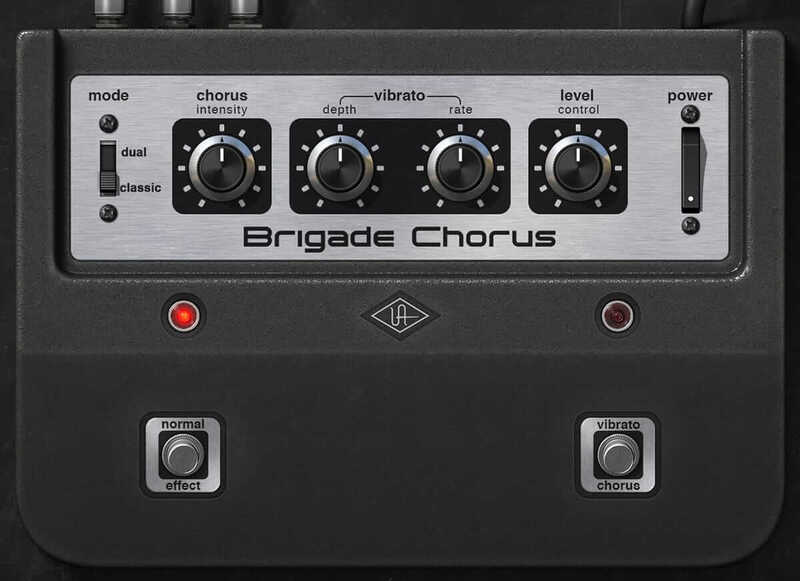
If you’re looking to emulate the tone and character of a legendary hardware chorus, then something like Arturia’s Chorus JUN-6 or Universal Audio’s Brigade Chorus Pedal probably fit the bill. The former is based on the Roland Juno 6’s legendary inbuilt chorus effect, and the latter is based on the historic Boss CE-1.
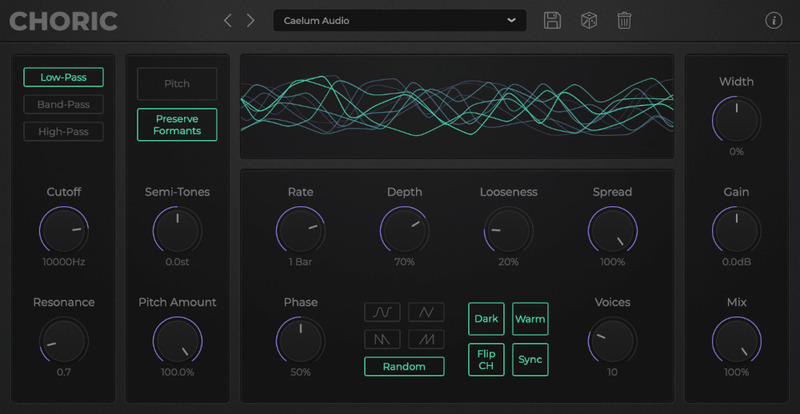
Perhaps you’re looking for something more versatile, in which case there are modern chorus plugins that ought to tick all your boxes such as D16 Group’s Syntorus 2 or Caelum Audio’s Choric. These options give you extra chorus modes, filters, additional modulation options and much more.
Recommended Chorus Plugins
Without further ado, here’s the Plugin Boutique pick of some of the best chorus plugins on the market today.
Sinevibes: Blend – £19.96
Best balance of flexibility and simplicity in a chorus plugin
|
Price: |
£19.96 |
|
Platforms: |
Windows and Mac |
|
Type: |
Chorus |
|
Format: |
AU, VST3, AAX |
|
Features: |
Up to 16 chorus layers, individual modulation generator per layer, three interpolation algorithms and inbuilt high pass filter |
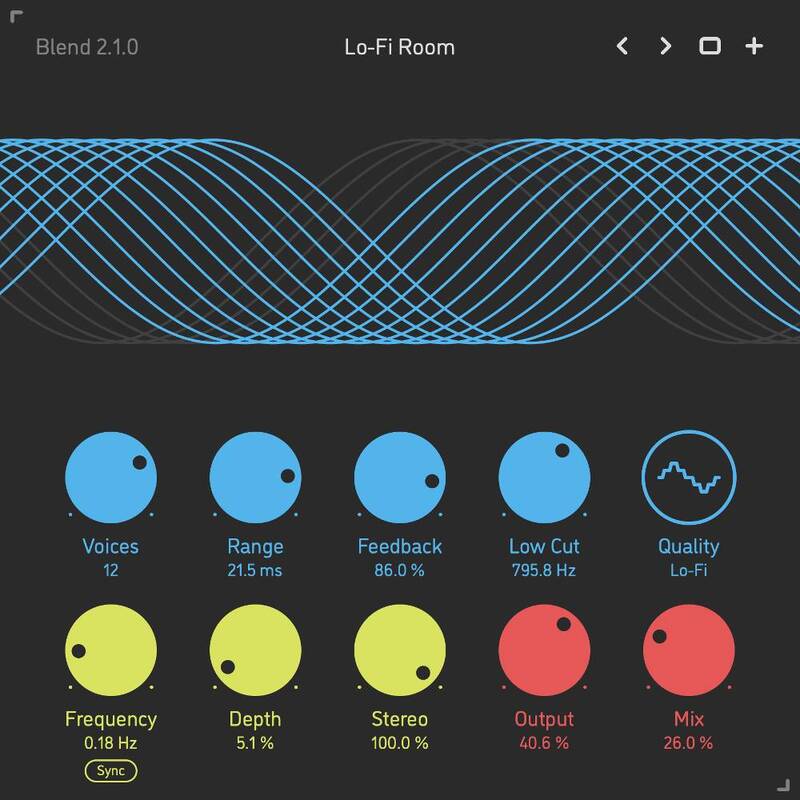
Blend by Sinevibes is a simple but versatile chorus with a few tricks up its sleeve. The simple to use interface not only makes it easy to tweak parameters, but helps you to visualise the processing being applied. The 16 layers of chorus each have their own feedback line so you can take it into ensemble territory. There are three interpolation modes, giving you distinct flavours of chorus, and the inbuilt high pass filter lets you remove the low frequencies from the input to avoid phase issues.
Arturia: Chorus DIMENSION-D – £85.16
An accurate software emulation of a chorus effect classic
|
Price: |
£85.16 |
|
Platforms: |
Windows and Mac |
|
Type: |
Chorus |
|
Format: |
AU, VST, AAX, NKS |
|
Features: |
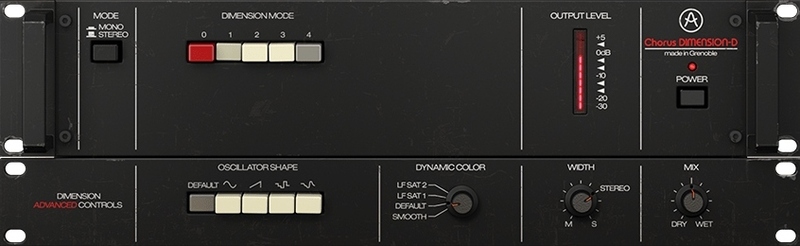
Classic chorus effect with four modes, emulated BBD response for a warm tone, four LFO shapes and stereo width control |
The analogue-modelled Arturia Chorus DIMENSION-D emulates the Roland Dimension D, arguably one of the greatest chorus units ever to be made. In addition to the smooth and musical modulation that the DIMENSION-D achieves, the plugin colours the delayed and modulated duplicates of the signal to add even more character to the effect.
Universal Audio: Brigade Chorus Pedal – £149.00
Best emulation of the unit that catalysed the chorus effect
|
Price: |
£149.00 |
|
Platforms: |
Windows and Mac |
|
Type: |
Chorus |
|
Format: |
AU, VST3, AAX |
|
Features: |
Classic and Dual Modes for flexible chorus options, warm and thick chorus tone that works on any sound source, apply everything from subtle movement to extreme vibrato effects |
The Boss CE-1 pedal should need no introduction by now. While the original pedals are hard to come by these days, UAD has the solution for that: the Brigade Chorus Pedal plugin. This plugin’s Classic Mode works as per the original, with the left channel remaining dry and the right side being processed. In Dual Mode, both channels are independently processed, giving you a larger-than-life chorus effect sure to bring any static elements in your mix to life.
Caelum Audio: Choric – £49.99
Most experimental chorus plugin for getting creative
|
Price: |
£49.99 |
|
Platforms: |
Windows and Mac |
|
Type: |
Chorus |
|
Format: |
AU, VST3, AAX |
|
Features: |
Up to 32 voices of chorus, unique modulation shapes, up to one octave pitch shifting with formant control, low pass, high pass and band pass filter modes, warm mode for analogue style saturation or dark mode for a rolled off high end |
Caelum Audio’s Choric is the answer to anyone who says that a chorus plugin is just a chorus plugin. With up to 32 voices of chorus, unique and random modulation shapes and a global randomise button, Choric takes the humble chorus effect into a new realm. Not only that, but the three filter modes and pitch shifting with formant control give you complete control of your chorus effect.
Installing your new chorus plugin
Most plugin developers and marketplaces have step-by-step instructions on how to install a plugin, but the process usually follows the below order.
- Select and purchase your chosen chorus plugin
- Download and run the plugin installer
- Select which plugin formats you want to install, and where you want to install them
- Depending on your system, DAW and plugin folder configuration, you may need to move the plugin files to a specific location for your DAW to be able to find them
- Load your DAW and allow it to scan for new plugins
- Locate and launch your chorus plugin within your DAW
- You may need to enter a serial code or login credentials to authenticate the plugin
After following the above steps, you can now add your chorus as an insert or return effect within your DAW. If your chorus plugin ships with factory presets, try cycling through some of them to get a feel of what the plugin is capable of. It’s also worth checking out the manual to make sure you’re not missing any key functions or features.
Tips for getting the best results with chorus plugins
Here are a few quick tips to get you started with your new chorus plugin.
Use your chorus plugin in parallel
Historically, chorus hardware such as pedals would be used as an insert between a guitar or keyboard and an amplifier or mixer. Using plugins allows you to place the device anywhere in the signal chain. By using the chorus in parallel, you leave the original signal completely intact. It also allows you to apply the processing to a specific frequency range by placing an EQ before it, or you can apply the same chorus to multiple elements by sending them all to the same return channel. This helps to add a sense of cohesion to your overall mix.
Combine your chorus plugins with other processing
Chorus plugins are a great way to add a layer of shimmer and shine to your signal, but you can take that even further by combining the effect with other processing. Using the parallel processing technique from the last tip, you could place a high pass filter on a return channel, followed by a short to medium-length reverb at 100% wet, then a chorus plugin applying an extreme chorus effect. The result is a glistening reverb that adds a layer of air and sparkle to the top of a mix.
Automate your chorus plugins
Another benefit of chorus plugins over hardware choruses is that you can quickly and easily automate your choruses between sections. After applying a chorus to your lead vocal or synth, try automating the depth or mix amount of your chorus plugin to be higher in the (you guessed it) chorus. This will have the effect of making the element seem bigger, thicker and more exciting during those high-energy moments.
Chorus Plugins FAQ Summary
What is a chorus effect?
A chorus effect is a time-based modulation effect that can be used for adding movement, shimmer, stereo width and modulation to sounds. Choruses can come in many forms, including pedals, multi-effects units and plugins.
How does a chorus plugin work?
The way in which a chorus plugin works is by digitally duplicating a signal at least once. The duplicated signals are then delayed and pitch modulated. The processed signals are then mixed back in with the dry signal to create the chorus effect.
What are the best chorus plugins?
Here are a selection of the best chorus plugins available today:
- Caelum Audio Choric
- Arturia Chorus JUN-6
- Arturia Chorus DIMENSION-D
- Universal Audio Studio D Chorus
- Universal Audio Brigade Chorus Pedal
- Sinevibes Blend
- D16 Group Syntorus 2
Where to get chorus plugins
Plugin Boutique is home to a growing range of high quality chorus plugins to suit all abilities and budgets. Whatever your music production intentions may be, there is a suitable chorus plugin for your needs on Plugin Boutique’s Chorus page.
Other articles
ESEA Heritage Month: 5 Artists You Should Know About
Founded in September 2021 by besea.n (Britain's East and South East Asian Network), ESEA Heritage Month celebrates the culture, history, and contributions of East and Southeast Asian communities across the UK. To mark the month, we’ve partnered with ESEA Music, a UK-based, community-led non-profit founded in 2021 to empower ESEA artists and music professionals, to spotlight five incredible independent artists shaping the UK music landscape. Jeremine Chan Malaysian Chinese • Multi-Genre / E
Aaron Suiss Builds Self-Actualization From Diva’s INIT Patch
Presets are a normal part of modern production, and Aaron Suiss is pretty open about using them for some of the biggest layers in his latest release, “Self-Actualization,” which spent a week in the Hype Charts on Beatport. The bass and pad began with Plug Hugger presets inside u-he Diva. But the star of the show was the arpeggiator, which he created from INIT after the options he auditioned just didn’t bring the emotional depth and power the record needed. Created with Enzo Vood and released
Synth Month Sale: The Best Deals on Synth VSTs & Bundles
It’s September, and that only means one thing for all you producers out there – it’s Plugin Boutique’s Synth Month, the ultimate synth plugins sale! Across the month, you can buy synthesizers at massive discounts. Expect big savings on the best software synths, from characterful vintage synth emulations all the way through to cutting-edge modern sound machines. Not only that, but you’ll be able to pick up some deliciously discounted synth bundles that can’t be missed. To celebrate, we
Free VST Plugins You Should Actually Get
[Article Last updated: 12 September 2026] – There are a lot of free plugins out there, and you can sometimes feel overwhelmed by the paradox of choice. Thankfully, we've done the hard work, so you don't have to. Here’s a carefully curated list of the best free plugins that pretty much any music producer can benefit from. We even update this list approximately weekly to keep you informed of the new free plugins arriving on the scene. We’ve been especially considerate of plugins with a wi


