


 Log In
The Best Vocoder Plugins Out There in 2025
Discover the best options for vocoder plugins, including both analogue-style tone-generating synths and digital filter banks to connect any two sources
Do the robot! The vocoder sound is a classic music production technique, and the tool used to get it is a classic in its own right. Modern software vocoders go further than their old-school analogue counterparts thanks to the benefits and flexibility of digital technology. But that doesn’t mean you have to sound newfangled – today’s vocoder plugins have also become adept at emulating the classic synth tones associated with these devices.
In this article, we’ll cover the best vocoder plugins available to buy on Plugin Boutique, pointing out what type of user each is best suited for, and helping you to locate your ideal tool.
If you’re not fully sure what a vocoder is and how it works, check out the sections below our list first, by clicking to scroll down to each section: What is a vocoder and How does a vocoder work?
Looking for wilder vocal effects?
Don’t get confused. Vocoders usually bring to mind a specific type of ‘talking synth’ effect – the kind that would be at home in Stanley Kubrick's A Clockwork Orange. This effect is different to other, more modern vocal processing sounds, like those that create today’s highly-processed vocals featuring in modern music.
For a broader look at creative vocal effects, go beyond the vocoder and check out 12 Of The Best Vocal Processing Plugins.
In This Article
- Softube Vocoder
- Zynaptiq Orange Vocoder IV
- MeldaProduction MVocoder
- Arturia Vocoder V
- XILS-lab XILS V+
- Waldorf Lector
- What is a vocoder?
- How does a vocoder work?
- What are some common production techniques using vocoders?
- Where to get vocoder plugins
Softube Vocoder
A modern take on the analogue hardware vocoder – the best of both worlds
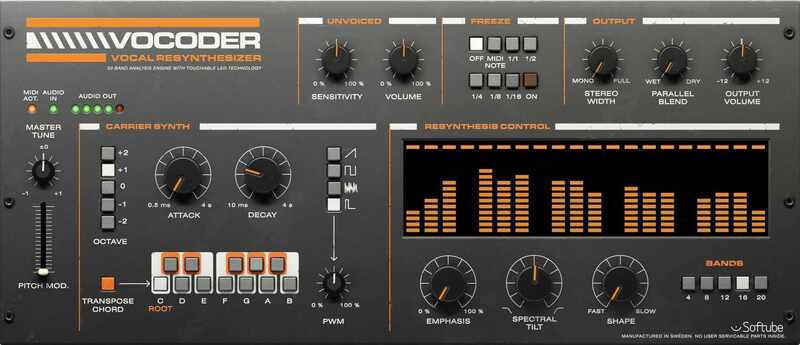
Softube have been emulating the best recording studio hardware in the world for years, and so their analogue-style vocoder has got to be near the top of any list like this. This plugin is something of an homage to hardware vocoders in general, rather than a nod to any specific one.
With your voice signal going into Softube Vocoder, the carrier tones are taken care of by the onboard synthesiser, which has a choice of Saw, Square, Noise and Pulse waveforms, plus Attack and Decay controls for their envelope settings. There are some Softube-made innovations for the voice signal too, with a Freeze control and an ‘Unvoiced’ section that processes plosives and sibilance. You can control the balance of the actual vocoding using Emphasis, Spectral Tilt and Shape controls, and define how “high-res” it is by setting the number of bands.
Pros
- Classic analogue-style vocoder – a ‘dream vocoder’ emulation
- Extra quality-of-life features and modern twists
- Simple and traditional vocoder
Cons
- Not a plugin for mixing two audio signals
- Some won’t be satisfied with old-school synthesis options
Zynaptiq Orange Vocoder IV
Powerful and unashamedly digital vocoder for pushing sound forward
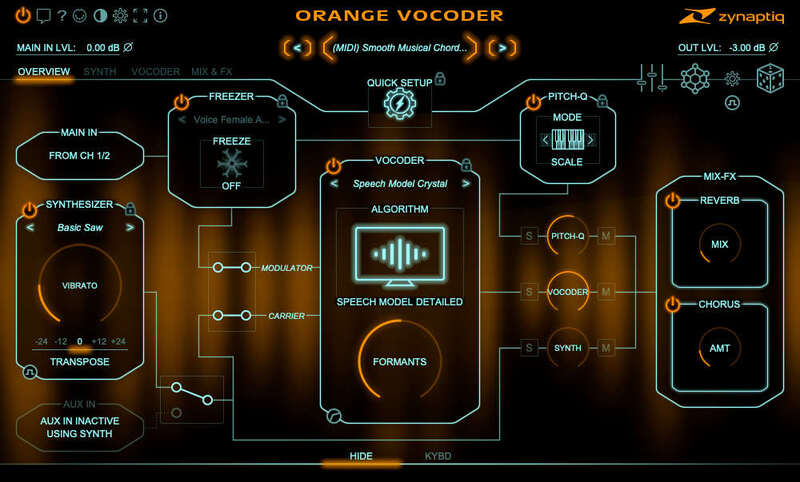
As you can tell by the version number, there’s quite a history in zynaptiq’s Orange Vocoder line. By version 4, it’s been improved enough to be something of an ultimate choice in digital vocoders. For example, it’s got 24 vocoding modes, each of which is good at doing different jobs, from vintage style to live to speech-specialised.
Everything you’ll ever need in a vocoder? Probably lots that you never even thought of, too: formant shifting, freeze mode, reverb, distortion and filtering. The synth also offers the best of digital, with FM synthesis, ring modulation, hard sync, loads of distortion, envelope following… there’s a lot going on.
As alternative options, you should check out the smaller version, Orange Vocoder Nano, and zynaptiq’s Pitchmap::Colors.
Pros
- Probably the most powerful vocoder ever made
- Comprehensive features in synthesis, vocoding and effects
- 24 vocoding modes to tailor your processing for your application
Cons
- Can be expensive when compared to other options
- With great power comes great learning curve
MeldaProduction MVocoder
A powerful vocoder for mixing two sources – no synth onboard
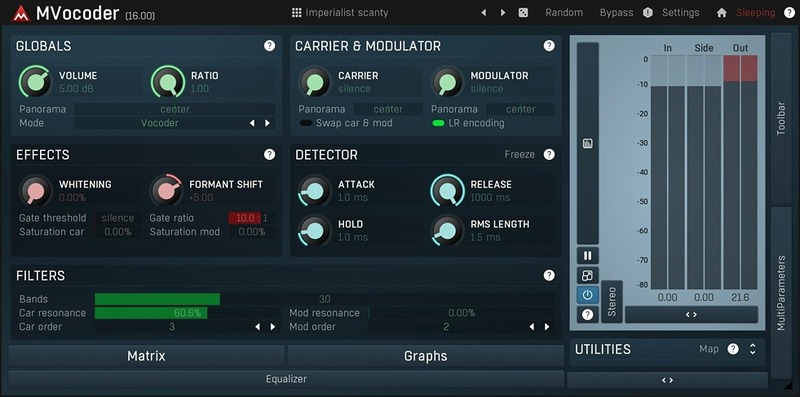
A lot of the plugins in this article are tradition-style vocoders that house an onboard synth to generate their carrier signals – at least as one option. MVocoder is different, offering just the combination of the two signals through its bank of filters. This could be the exact news you’ve been waiting for if you’re dying to turn a synth like Vital, Phase Plant or Pigments into a vocoder carrier. If you’re into basic ‘talking synth effects’ and want the work done for you, This plugin probably isn’t for you.
MVocoder lets you choose the exact number of bands in your setup, and lets you specify the resonance and slope of the filters in its internal banks. There are some modulator effects that make an input vocal mix better while vocoding, and timing settings for the Detector. Features like mid/side and gain compensation make MVocoder feel like a truly powerful, flexible and versatile plugin.
MVocoder may have been around for a long time, but thanks to MeldaProduction’s regular updates of their entire software suite, it can feel like a modern plugin as well.
Pros
- Just a vocoder – no synth section
- Powerful vocoder options that guide you to a better sound
- Unique features like mid/side and gain compensation
Cons
- Just a vocoder – no synth section
- Hard to grasp the operation unless you’re quite experienced
Arturia Vocoder V
Models the classic Moog Vocoder and adds loads of further features too
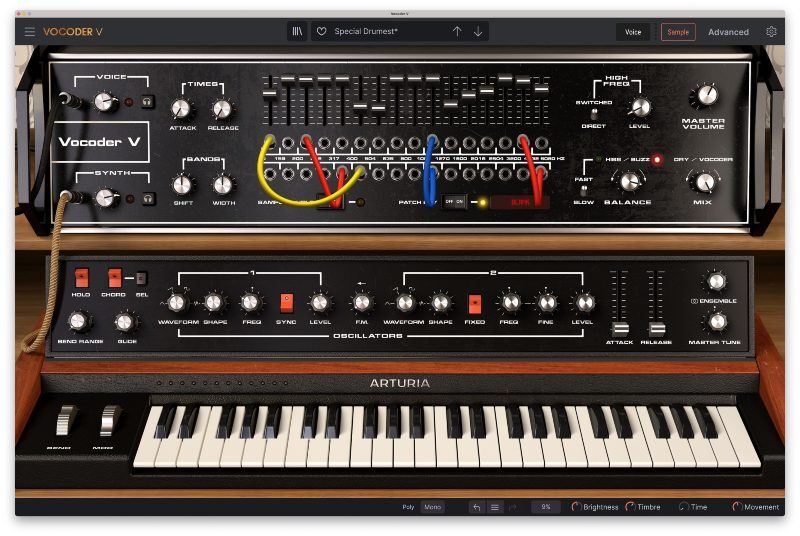
With their take on the Moog Vocoder, Arturia have gone down the route of modelling a particular vintage unit, but in their usual style, the French company has added a boatload of extra features to bring Vocoder V into the modern age. You get a synthesizer instrument to use as the carrier signal, while the modulator (the vocal) is either sidechained in as an external input or generated through loading samples into the plugin.
The synth gives you two oscillators, FM is possible, and there’s waveshaping too. You can activate hard sync for the oscillators, and chord/glide options. A full patchbay lets you take the default 16 bands and mess with them, sending some bands into others for some more creative experimentation. There are also 11 effects onboard to take your vocoder effects even further – with Arturia’s analogue goodness baked in.
Pros
- Vintage vocoding vibes…
- …but in a modern interface with digital features and flexibility
- Extra modulation and effects to round out your sound
Cons
- Only models one particular vocoder unit
- Vintage vocoding isn’t for everyone
XILS-lab XILS V+
A plugin take on Roland’s VP-330 vocoder, with many improvements
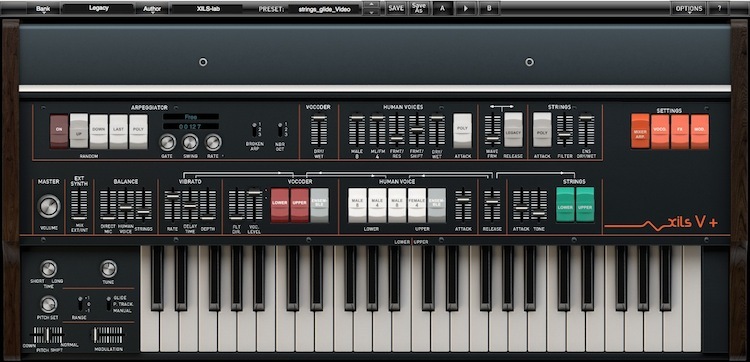
This 10-band vocoder plugin is an emulation and improvement of a classic Roland vocoder string synth unit. XILS-lab have gone to great lengths to take the flaws of the original unit and iron them out for this plugin release.
You get dedicated string synth controls, your input modulator (usually a vocal source) and 10 bands to modulate. XILS-lab have given users access to parameters that weren’t available in the original hardware, and they’ve added a Stereo Space effect, a Reverb and a Phaser. There’s also tons more modulation in here, which improved this vocoder’s sound design potential.
XILS-lab haven’t just launched one vocoder and called it a day. You should check out their XILS 201 Vocoder, and the XILS Vocoder 5000 as possible alternatives to XILS V+.
Pros
- Classic string synth tones – better than the original hardware
- Useful additions include effects and lots of modulation potential
Cons
- A very specific sound that’s not for everyone
Waldorf Lector
A vocoder made with the same synthesis technology behind Waldorf synths
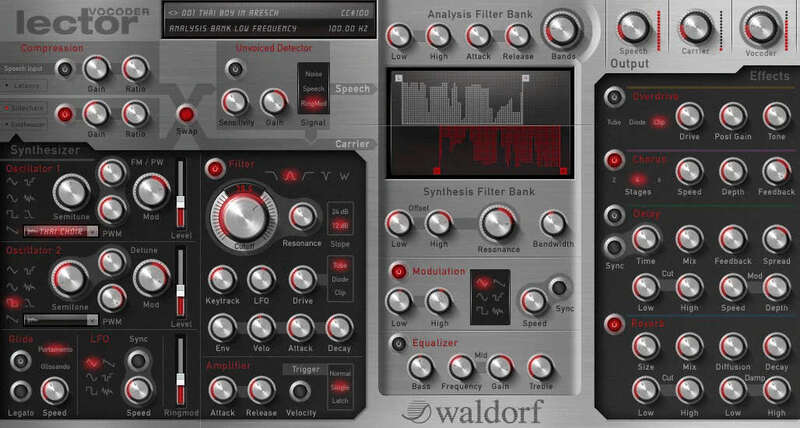
Waldorf’s impressive synthesis capabilities are evident in both the hardware and software worlds, so when these are combined with a vocoder, it’s time to take this talking synth seriously.
You get a comprehensive synthesizer section that puts most old-school vintage units to shame, and the filter bank that provides the actual vocoding is also highly tweakable. Finally, on output, there’s a lot more flexibility with the balance of both signals, plus chorus, distortion, delay and reverb effects – all from a single window.
Pros
- Lots of scope for tailoring synth and vocoding properties
Cons
- There are newer, more modern options out there
What is a vocoder?
A vocoder takes two signals and combines them in a specific way. The classic use for a vocoder is in the ‘talking synth’ or ‘singing synth’ sound. In this setup, a synth can be played and a microphone sung into, and thanks to the processing of the vocoder, the synth seems to be singing the words.
Technically, a vocoder is the name for the device that takes two signals and combines them in the same way as above. A vocoder device could have once been mounted in a recording studio’s rack, but these days will more likely exist as a plugin in software form.
Another meaning of ‘vocoder’ is a whole package. In classic designs such as the Roland VP-330, a keyboard and microphone are provided, with a synthesizer and microphone signal meeting through a vocoder circuit. This gives the user a packaged ‘instrument’ without worrying about any signal routing behind the scenes – it’s less flexible but easier to get started instantly.
How does a vocoder work?
In a vocoder, two signals are combined. One signal is known as the Carrier and the other is known as the Modulator.
In the classic and basic example of a vocoder effect being used on a voice signal and a synthesizer signal, the synthesizer signal is acting as the Carrier and the voice signal is acting as the Modulator.
First, both signals are analysed using two identical banks of filters, splitting each into constituent bands of different frequencies. For the modulator signal, its filters will be analysed; for the carrier signal, its filters will be controlled.
Analysing the level of each filter for the modulator signal, and how it moves over time, the vocoder takes the changing level of each filter and applies that changing level to the same band over the carrier signal. The modulator’s frequency-band energy over time is now mimicked by the carrier signal, and this is sent to the output of the vocoder.
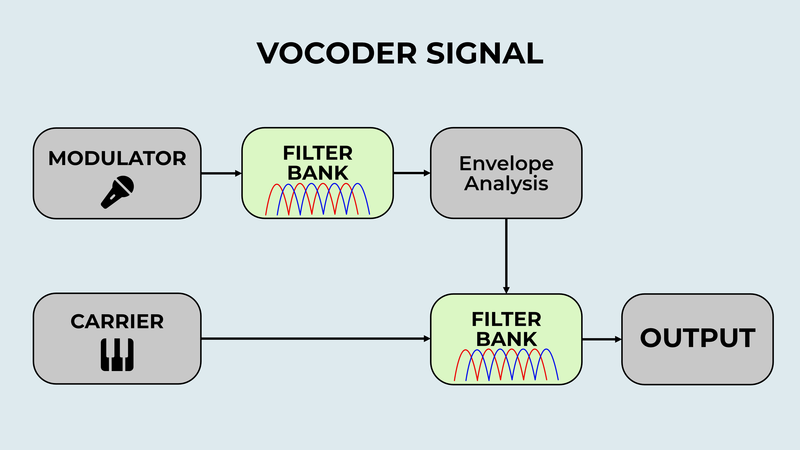
It’s not that the modulator signal still exists in the output or that it’s combined literally with the carrier signal (summed). The point here is that the movement over each band of the modulator has been analysed, and then imposed on the carrier signal without having passed through to the vocoder’s output itself.
The filter banks used to split up both signals are subject to change from vocoder model to vocoder model. By using more filters, the ‘resolution’ of the vocoder will improve, although this needs more components (in the hardware world) and more programming and CPU cycles (in the software world).
What are some common production techniques using vocoders?
To improve the sound of a vocoder, often producers will emphasise consonants in speech by adding white noise to the modulator signal. Consonants like "s," "t," and "ch" often have a significant amount of high-frequency content, which can be lost or masked in a vocoded signal. Adding a small amount of white noise to the modulator signal can help preserve these high-frequency details, making the processed voice clearer and more understandable.
Compressing a voice signal before it is processed by the vocoder can help achieve a more consistent output. A more highly dynamic modulator signal can result in a fluctuating or inconsistent vocoded output. Compression smooths out these dynamics, allowing for a more even and predictable vocoder effect.
Some vocoders offer pre-emphasis and de-emphasis filtering options, which can be used to boost or reduce specific frequency ranges of the modulator signal before and after processing. IE, change the modulator signal’s frequency content dramatically on the way in, then compensate for this on the way out with a complementary EQ curve.
Enough singing synths! What else can you do with a vocoder?
Instead of using a voice as the modulator, you could use percussive elements like drums or rhythmic patterns. This technique can create interesting textures where the rhythmic dynamics of the drums shape the carrier signal, producing a hybrid sound that blends the harmonic qualities of the carrier (such as a synth or pad) with the rhythmic qualities of the drums.
Another creative use of a vocoder is to use field recordings or ambient sounds as the modulator. For example, using sounds like rain, city noises, or mechanical hums to modulate a carrier signal can create evolving, atmospheric effects that feel organic and unique. This technique allows you to incorporate environmental or found sounds into a musical piece. It's particularly effective in genres like ambient, experimental, or cinematic music, where unusual textures are desirable.
Where to get vocoder plugins
You can get your fill of vocoder plugins – including all the ones we’ve listed in this article – at Plugin Boutique.
Other articles
The Best Music Software Deals This Week [Live List]
As the music production landscape evolves week by week, so does the opportunity to save on powerful creative tools. New plugin releases, flash sales on VSTs and limited-time deals on music software can appear from any angle, making it harder than ever to keep track of what’s worth your attention. Whether you're looking for the latest bundles on offer, or even deals on exciting virtual instruments, it's as important as ever to stay up to date on what we have to offer. That’s where our live g
ESEA Heritage Month: 5 Artists You Should Know About
Founded in September 2021 by besea.n (Britain's East and South East Asian Network), ESEA Heritage Month celebrates the culture, history, and contributions of East and Southeast Asian communities across the UK. To mark the month, we’ve partnered with ESEA Music, a UK-based, community-led non-profit founded in 2021 to empower ESEA artists and music professionals, to spotlight five incredible independent artists shaping the UK music landscape. Jeremine Chan Malaysian Chinese • Multi-Genre / E
Aaron Suiss Builds Self-Actualization From Diva’s INIT Patch
Presets are a normal part of modern production, and Aaron Suiss is pretty open about using them for some of the biggest layers in his latest release, “Self-Actualization,” which spent a week in the Hype Charts on Beatport. The bass and pad began with Plug Hugger presets inside u-he Diva. But the star of the show was the arpeggiator, which he created from INIT after the options he auditioned just didn’t bring the emotional depth and power the record needed. Created with Enzo Vood and released
Synth Month Sale: The Best Deals on Synth VSTs & Bundles
It’s September, and that only means one thing for all you producers out there – it’s Plugin Boutique’s Synth Month, the ultimate synth plugins sale! Across the month, you can buy synthesizers at massive discounts. Expect big savings on the best software synths, from characterful vintage synth emulations all the way through to cutting-edge modern sound machines. Not only that, but you’ll be able to pick up some deliciously discounted synth bundles that can’t be missed. To celebrate, we


