


Buy Core Bundle, get a free gift with purchase:
The Sonnox Core Bundle delivers the ultimate suite of professional mixing and mastering tools — a collection of 13 industry-standard plugins trusted by top engineers to achieve precision, clarity, and musicality in every production.
Tackle any stage of your workflow with Oxford Drum Gate for transparent drum gating, Oxford Dynamics and Oxford Dynamic EQ for detailed dynamic control, and Oxford Envolution for frequency-dependent envelope shaping. Refine your tonal balance with Oxford EQ, enhance presence and warmth with Oxford Inflator, and achieve loud, polished masters with Oxford Limiter. Clean up sibilance using Oxford SuprEsser, craft immersive spaces with Oxford Reverb, and shape transient detail with Oxford TransMod. Completing the collection, Claro, Voca, and VoxDoubler bring clarity, character, and dimension to every vocal performance.
Every plugin in the Core Bundle embodies Sonnox’s hallmark sonic transparency and precision engineering, offering a perfect balance of technical control and musical warmth. From surgical mixing and mastering to expressive creative sound design, this bundle equips you with the definitive tools to deliver mixes that inspire confidence and stand out on any stage. The Sonnox Core Bundle isn’t just a collection of plugins — it’s the foundation of professional sound.
Bundle Contents:
- Oxford Drum Gate
- Oxford Dynamics
- Oxford Dynamic EQ
- Oxford Envolution
- Oxford EQ
- Oxford Inflator
- Oxford Limiter
- Oxford SuprEsser
- Oxford Reverb
- Oxford TransMod
- Claro
- Voca
- VoxDoubler
Oxford Drum Gate
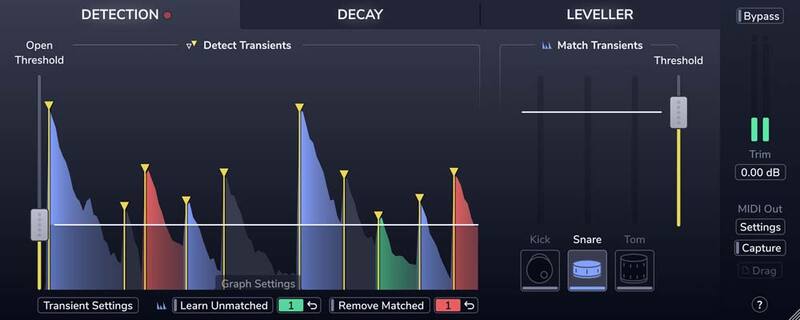
Precise and transparent drum gating
Have you become frustrated with the results of unreliable drum gating using traditional tools; chatter, misdetection, choked or lost ghost notes? Are you tired of overly complex and manual workflows?
Then meet the new Oxford Drum Gate; it's swift and logical workflow solves these problems and delivers the fastest, most musical and transparent results available. At the heart of the Drum Gate is intelligent drum-hit detection. First, the Plug-In detects them all with tailor-made transient detection. Then, you simply decide which ones to keep.
Features
- Precise transient detection and intelligent drum-type matching to effortlessly separate the hits you want to keep from the spill you don't.
- Create custom drum profiles to isolate unusual drum types or fix the occasional kick, snare, or tom mismatch.
- A decay curve that adapts to the velocity of each drum hit, giving you consistent spill reduction on dynamic performances.
- The Spectral decay editor lets you preserve the resonance, ring, or rattle of each drum hit while quickly clamping down on the spill.
- The leveller's dual-target and amount controls let you improve level consistency without losing the contrast between loud hits and soft ghost notes.
- Real-time MIDI output and MIDI file capture, for accurately triggering drum samples.
Learn more about Oxford Drum Gate.
Oxford Dynamics
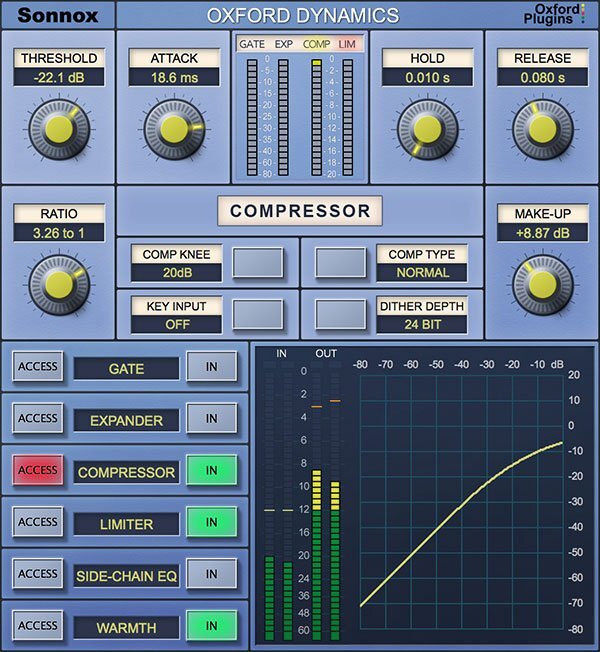
A powerful all-in-one dynamics control plugin
Oxford Dynamics is a powerhouse of dynamic control in a single plugin that features six independent processes for precision dynamic sculpting of your tracks.
- Gate
- Expander
- Compressor
- Limiter
- 2-band side-chain EQ
- Warmth control
From subtle control of a vocal to a pumping side-chained effect; from lightning-fast gating and precision expansion to peak level limiting of single tracks and buses alike. Sonic clarity at all times – with the option of tube-like harmonic saturation when you need it.
Features
- Gate, Expander, Compressor, Limiter & 2-band side-chain EQ
- Warmth for extra presence and tube-like saturation
- 3 different compressor types; Normal, Classic and Linear
- Variable soft knee; 0 dBr to –20 dBr in 5 dB steps
- Ultra-low noise and distortion
- The dynamics section from the acclaimed Sony OXF-R3 console
Learn more about Oxford Dynamics.
Oxford Dynamic EQ
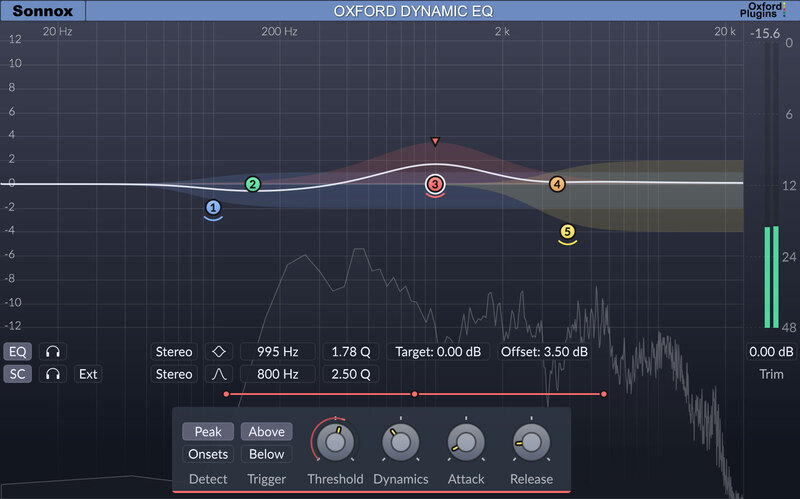
Have you tried to control boomy or harsh frequencies using a traditional static EQ but found you compromised the integrity of the original recording? Then found that writing automation lost you precious time and sounded unnatural? Perhaps you’ve heard that a multiband compressor is the answer but it left you scratching your head?
Then the Oxford Dynamic EQ is the tool you need, providing just the required amount of processing when you need it and takes little time to set up. 5 bands of the ultra-musical Type-3 EQ curve can be overlapped to bring unparalleled control and characteristic Sonnox transparency to your single sources, instrument groups and 2-bus alike.
The Dynamic EQ introduces unique features such as the option to engage the effect by onset (transient) detection – very useful when working with drums and percussion. Additionally, mid-side processing can be used to enhance a vocal without affecting side-channel balance or to open up a mix by focusing low-end energy in the centre.
This highly-tweakable space-carving capabilities of the Dynamic EQ will be a welcome addition to your mixing arsenal.
Features
- 5 bands of the Oxford Type-3 EQ curve which offer proportional-Q, often considered the most musical EQ curve-type
- All bands can overlap fluidly without the static phase distortion or low-frequency artefacts associated with multiband compressors
- Each band can process and/or detect from mono, stereo, mid or side channels
- Flexible per-band internal/external side chain controls
- A clear and informative GUI simplifies the often-complex workflows associated with multiband dynamic plug-ins
- Flexible upwards/downwards compression and upwards/downwards expansion
- Engage the effect either by setting a level threshold or by using the unique onset detection feature for very precise transient processing
Learn more about Oxford Dynamic EQ.
Oxford Envolution
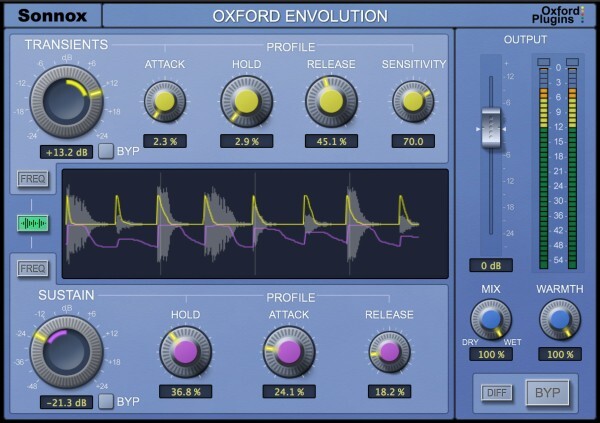
Envolution is a frequency-dependent envelope shaper with separate transient and sustain sections, to radically re-shape the envelope of your instruments or audio.
Use a broader tilt mode or the more parametric-style focus mode to choose which frequencies are processed.
Insert on a track, bus or even master output to add presence/distance to drums, piano, guitar and any other percussive content. Boost sustain to make the ambience around a recording bloom, or cut it for quick and precise gating.
We love the more creative and extreme side of the plug-in too; like using the DIFF button to generate negative ratio compression effects.
Features
- Frequency-dependent control of Transients & Sustain
- Tilt/parametric targeting of frequencies to process
- DIFF button to solo the effect
- Use in parallel without phase cancellation
- Warmth control for - Harmonic saturation/tone shaping and prevention of excessive output levels
- Many great presets to get you started
Learn more about Oxford Envolution.
Oxford EQ
A great sounding EQ is essential to any mix. Which EQ to use can vary depending on artistic requirement, but quality and flexibility are both critical at all times. What if there was one Plug-In with four distinct EQ types – from surgical to musical – with a track record of being used to mix the biggest hits, films, and live shows?
Enter our flagship Oxford EQ, a Plug-In that traces its heritage to the original EQ section on the acclaimed Sony OXF-R3 digital console. Hallmark sonic transparency meets a simple and interactive interface – resulting in quick, confident and great sounding mix decisions.
Features
- 5-band parametric EQ with variable-slope HP/LP filters
- Four completely different sounding EQ types
- Clinical EQ similar to the SSL4000 E series
- Tighter ‘cut’ for removing problem frequencies
- Classic EQ similar to Neve and SSL G series curves
- Wide and gentle curves perfect for mastering
- Automatable A/B compare button toggles EQ settings
- Ultra-low noise and distortion
Learn more about Oxford EQ.
Oxford Inflator
The Secret to Award-Winning Mixes
For years, the Oxford Inflator has been a “secret weapon” for mixing and mastering engineers. Renowned for delivering instant sonic enhancement and elevating tracks to new heights. Inflator guarantees unmatched life and vibrancy in your mix.
The Inflator Difference - Why Pros Keep Coming Back
Every producer faces that moment when EQ and compression just aren’t cutting it. A vocal lacks punch, a mix bus feels too thin, or an entire track is missing that certain spark.
This is where the Oxford Inflator stands apart from imitators and remains a fixture in professional studios worldwide.
Whether you’re adding subtle depth or making a track explode with intensity, the Inflator brings an undeniable presence, warmth, and power to your mix—all without squashing dynamics or adding unwanted distortion. It delivers results other plugins can only hope to imitate.
Features
- Instant Excitement - Need vocals to jump to the front of the mix or guitars to cut through with attitude? Inflator instantly adds warmth, depth, and character to any track. Whether it’s subtle saturation or full-on intensity, you control the excitement.
- Uncompromising Dynamic Range - Inflator’s magic lies in its ability to enhance loudness without flattening your track’s dynamics. No need to sacrifice emotional impact for volume—Inflator lets your music retain its energy while still standing out in today’s loudness-driven market.
- Unmatched Legacy & Compatibility - We’ve maintained cross-compatibility across all platforms and DAWs for years, ensuring your Inflator settings carry over seamlessly from session to session—whether from 10 years ago or today. Investing in the Oxford Inflator means you’re not just getting today’s best exciter plugin—you’re future-proofing your workflow.
- The Real Deal - With imitators flooding the market, it’s easy to get lost in the noise. But when you choose the Oxford Inflator, you’re choosing the plugin that pros have trusted for over a decade. Backed by Sonnox’s renowned customer support and regular updates, you can be confident you’re using the most reliable, authentic tool in your arsenal.
Learn more about Oxford Inflator.
Oxford Limiter
The Limiter That Lets You Go Further
Craft stunning masters that deliver maximum loudness, density and presence.
Pushing your mix to the limit can feel risky—you want more loudness, but you don’t want to crush the life out of it. That’s where the Oxford Limiter steps in. Designed to deliver maximum loudness while preserving your mix’s detail and energy, it lets you go further than you ever thought possible.
Where other limiters crumble under pressure, the Oxford Limiter stands strong. It gives you the confidence to push harder, keeping every hit, kick, and snare punchy and defined.
Features
- Peak limiting with attack, release & variable soft-knee
- Enhance section to increase perceived loudness
- Recon meter shows actual rather than sampled signal
- Auto Comp fixes recon errors without losing overall loudness: conforming to the industry's true peak measurement standard (ITU-R BS.1770-4)
- Audition and apply TPDF dither for 24-bit and 16-bit output word lengths with four types of variable noise shaping
- Four variable-strength noise shaping modes for use with highly dynamic program material
- Full backwards compatibility with previous plugin versions
- Great library of factory presets to get you started
Learn more about Oxford Limiter.
Oxford SuprEsser
The Oxford SuprEsser is both a very highly-featured professional De-Esser and a Dynamic EQ. There is a simple mode for quick fixes, but also an advanced mode for increased functionality and fine-tuning. The combination of an intuitive FFT display and three listen modes enables the user to easily see and hear exactly where the problem frequencies are, allowing the rapid reduction or removal of the offending audio. As well as being able to trigger the full band compression, only the offending frequencies can be carefully carved out. Since the SuprEsser can operate at all frequencies, ‘plosives’ and other annoyances can also be removed effortlessly, making it more than a simple De-Esser. Additional features include Automatic Level Tracking, Linear Phase Filtering and a Wet/Dry blend control for final balancing.
Features
- 64-bit compliant (AAX / AU / VST)
- Highly featured professional De-Esser
- Linear Phase Dynamic EQ
- Transparently controls aggressive frequencies
- Automatic Level Tracking follows energy levels (no need to automate threshold)
- Large intuitive graphic display makes finding frequencies very easy
- Full Spectrum Operation (20Hz -20KHz)
- Three different 'Listen' modes
- Very easy to use
- Advanced Mode for ultimate control of the Dynamic EQ
- Many creative as well as corrective uses
- Presets giving good starting points
Learn more about Oxford SuprEsser.
Oxford Reverb
Craft Any Reverb Imaginable
Craft the perfect reverb for any track with Oxford Reverb—a highly flexible, algorithmic reverb plugin offering precise control over every aspect of spatial design.
Oxford Reverb puts you in control of designing every inch of your reverb space. Whether you’re building intimate, tight room ambiences or expansive, rich concert hall effects, Oxford Reverb’s range of adjustable parameters lets you sculpt your environment exactly as you envision it. With separate control over early reflections and reverb tails, plus built-in equalisation, dispersion, and absorption features, you can build spaces as natural or surreal as you can imagine.
For producers who require maximum flexibility, Oxford Reverb allows you to avoid the constraints of preset algorithms or convolution snapshots, offering an almost limitless range of custom reverb spaces. It’s more than just a reverb plugin — it’s a sonic canvas.
For Music Production
Oxford Reverb fits seamlessly into any mix, from adding subtle room reverb to vocals to creating complex, evolving spaces for synths. Its intuitive interface lets you quickly dial in the perfect sound or explore new creative possibilities.
Features
- Separate Early Reflection and Reverb Tail Control - Fine-tune the early reflections and reverb tail independently to craft realistic spaces or creative soundscapes. This level of control lets you precisely adjust the size, shape, and stereo image of your space.
- Integrated 5-Band Reverb EQ - Tailor your reverb’s tonal character without needing external plugins with an Oxford EQ built-in, allowing you to sculpt the frequency response of the reverb, adding clarity, removing muddiness, or accentuating specific frequencies to fit your mix.
- Dispersion, Phase, and Absorption Controls - Go beyond basic reverb shaping with advanced dispersion and absorption settings, ensuring your reverb behaves realistically or adds unique textures. Adjust phase differences between stereo signals to widen or narrow the sound field, creating an immersive spatial experience.
- Over 120 Presets - If you need a starting point, Oxford Reverb comes with more than 120 presets, covering small dry rooms to reverb chambers and vast halls. Whether you want a vintage Lexicon-inspired reverb, an EMT plate, or a modern, ambient space, these presets offer instant inspiration.
Learn more about Oxford Reverb.
Oxford TransMod
Precision Transient Shaping for Every Mix
Sculpt the perfect attack and control transients with Oxford TransMod—a detailed tool designed for shaping transients with precision in any production.
When it comes to surgical control over transients, Oxford TransMod is the tool you need. Designed to give engineers and producers absolute precision, TransMod allows you to shape, modify, and refine the attack of individual elements in a mix. Whether you’re enhancing the punch of your drums, softening overly harsh percussive hits, or reducing unwanted transient peaks, TransMod offers unparalleled control without affecting your track's tone or overall balance.
Where Oxford Envolution excels at creative, frequency-dependent shaping and adding dynamic tonal control, TransMod is a more focused, technical solution for those times when you need to fine-tune transients with accuracy. Think of TransMod as your surgical instrument for delicate transient work, perfect for any genre or application where control is key.
Features
- Harden or soften attacks and transients
- Radical or subtle changes – with up to 24db of boost/cut
- Add harmonic enrichment for extra loudness, presence & punch allowing peaks up to 6db above digital max without clipping
- Increase or reduce the effects of room ambience
- Achieve a fabulous gated overdriven drum kit in seconds
Learn more about Oxford TransMod.
Claro
Whether you're a bedroom producer or a Grammy-winning pro, you want to take control to develop your own musical voice. Claro will empower you to make informed musical decisions in a unique and intuitive way.
Claro is a comprehensive EQ plugin that serves the production process from composition to final mix, with three distinct views, progressively adding deeper insight and precision to prevent mud, clutter, or harshness, helping you blend your tracks into a clear and balanced mix.
Features
- Claro's EQ is highly flexible, with each of its 26 bands offering:
- A clean, musical-sounding EQ that resembles the well-loved Neve types, their modern derivatives and the SSL G Series, as well as many high-end outboard equalisers.
- Left, Right, Mid, Side, Mono, or Stereo channel processing giving you the capability to correct, widen, narrow, or make space within each track.
- A wide 20hz - 40kHz range. The extended high-frequency range offers a smooth, airy quality - excellent for vocals and mix busses.
- Variable Q, including resonance and overshoot on the cut and shelving filters, respectively, giving you the ability to mimic classic synth filters and hardware EQ curves.
- Variable slopes on all band shapes, up to super-steep (120dB per octave) for surgical work and treating precise audio bands
- Claro's automation is smooth and artefact-free, unlike most premium EQs.
- Auto Gain uniquely keeps your track at the same loudness, no matter the signal content or how you choose to EQ it.
Learn more about Claro.
Voca
The Future of Vocal Compression
Every engineer, mixer, or producer knows that vocals are the star of any top-tier mix. Perfecting vocal production is indeed an art, and with Sonnox Voca, it’s an art that’s about to get a whole lot easier.
Supercharge Your Vocal and Simplify Your Workflow
Struggling to juggle multiple plugins, decipher complex controls, and work within the confines of contextless presets can overwhelm and impede your creative process, leading to subpar vocal productions that lack the 'wow' factor. But don't worry; Sonnox have a solution to that.
Meet Sonnox Voca, the definitive solution for professional-sounding vocals, fast.
With Voca, you're not just eliminating the need for multiple compressor plugins - you're elevating your workflow to a whole new level of simplicity and efficiency. Say goodbye to the complexities of thresholds, ratios, time constants, gain reduction, and makeup gain. Embrace Voca's unique and intuitive interface that champions your individual artistic input. Liberate your creativity from contextless presets and outdated best practices. With Voca, swiftly achieve professional, upfront vocals that perfectly blend with your mix, captivating your audience. Experience a workflow transformation that leads to an unforgettable auditory experience.
Learn more about Voca.
VoxDoubler
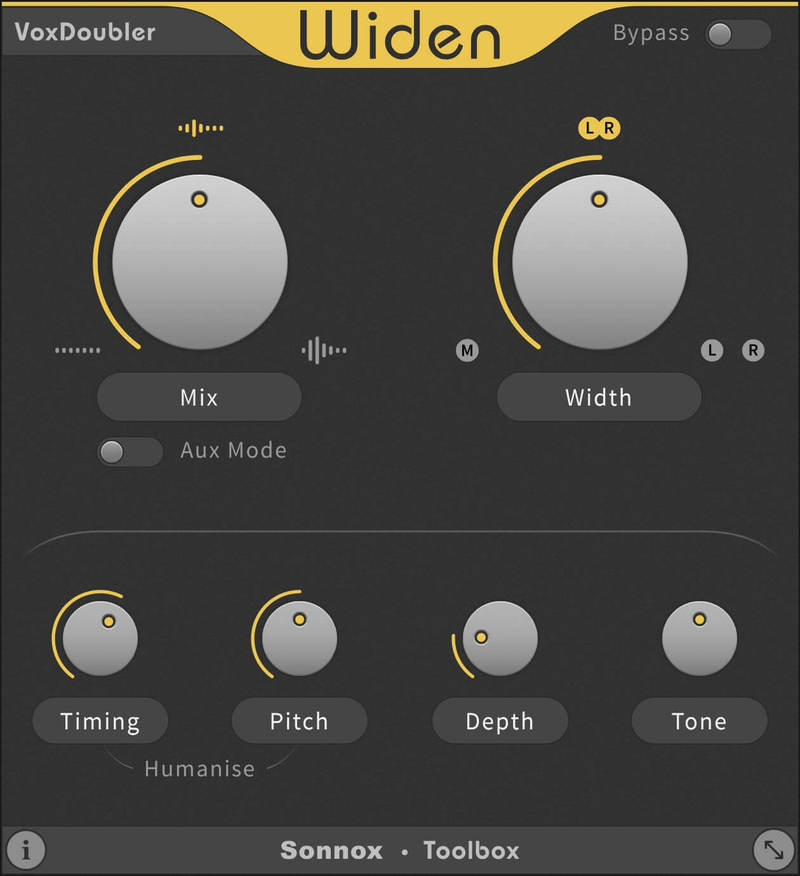
VoxDoubler is presented as two separate Plug-Ins that focus on the two most common vocal doubling workflows.
Vocal performances lie at the very heart of a song. Doubling vocals is a really effective way of adding more contrast, drama and presence to the story of your song.
It’s therefore hard to imagine much of recorded popular music without the special quality that double-tracked vocals bring to a mix, either used over an entire track or just to help a chorus or key lyric connect with a listener.
Why VoxDoubler?
You want believable and natural sounding doubles but don’t have access to your vocalist, or the time required to:
- Record extra takes in order to comp doubles
- Transfer a lead take into an external editor, make copies of it and then manipulate the pitch and timing of them
- Maybe you like the speed of using a classic stereo imager, chorus or harmonising effect, but aren’t so happy with the rather unnatural artefacts that can often occur?
Features
- Generate believable double and triple vocal tracks to create width, depth or add thickness
- Humanise section to adjust the Timing and Pitch of the doubles relative to the original vocal
- Depth control to push the new doubled voices deeper into the mix
- Tone control to prevent sibilant doubles from becoming distracting, or to brighten those that are too muddy
- Track/Aux mode allows you to apply the effect in place or, for more advanced control, mix it in parallel on an aux return
- A more cost-effective alternative, both in terms of initial outlay and speed of use, than more complex and manual processes
- Engineered for vocals, but try it on instruments too!
- Hallmark Sonnox audio precision, transparency and reliability
Learn more about VoxDoubler.
macOS
- macOS 10.12 or later (Intel / M1 Apple Silicon supported) (64-bit only)
- Plugin Formats - AAX Native, AU, VST3
- Supported Hosts - Pro Tools 11 or above or any desktop application that supports Audio Unit (AU) or VST3 plugins.
Windows
- Windows 10 or later
- Plugin Formats - AAX Native, VST3
- Supported Hosts - Pro Tools 11 or above or any desktop application that supports VST3 plugins.
Activation
The Toolbox range offers 2 activations for each product licence you buy.
Providing you have an iLok account, each activation will allow you to authorise your plugin on one of these devices:
- Machine
- iLok device, iLok2 / iLok3 required with latest drivers OR
- iLok Cloud (Active internet connection required)
Note: VoxDoubler has been used as an example.
Mac
2. Visit Sonnox to register your product.
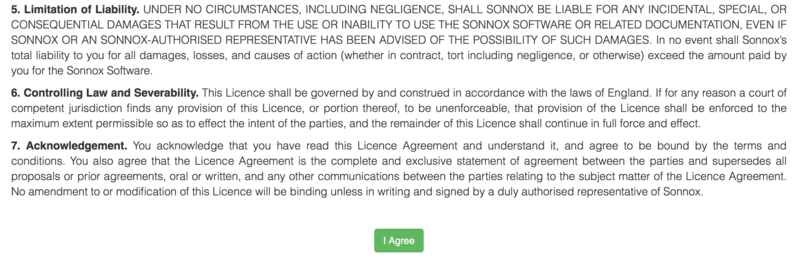
3. Read the Sonnox Software Licence Agreement > Click 'I Agree' at the bottom of the page.
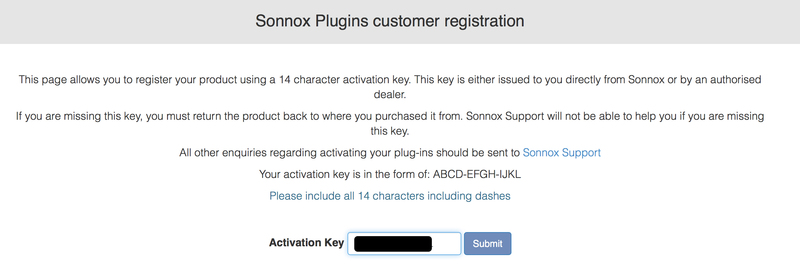
4. Copy and paste/manually type in the 14 character Activation Key (serial number) from your User Account, into the 'Activation Key' box and click 'Submit.'
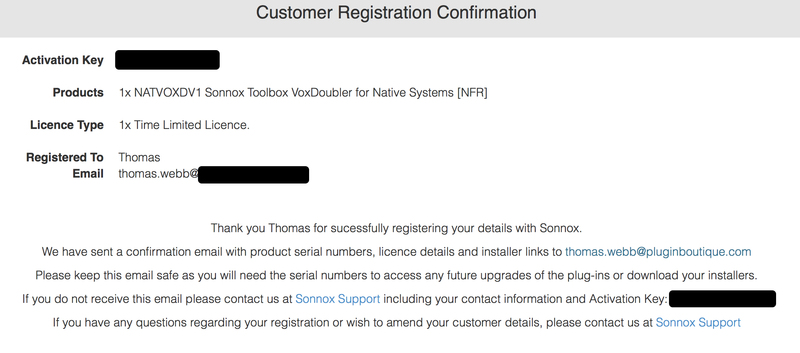
5. Enter your personal details and complete the customer registration page and once inputted, click 'Submit.'

6. Your software product has now been successfully registered.
Please note:
- You will have been sent a confirmation email containing your product serial numbers, licence details and installer links to your registered Sonnox email address.
- Please keep this email safe as you will need the serial numbers to access any future upgrades of the plug-ins or download your installers
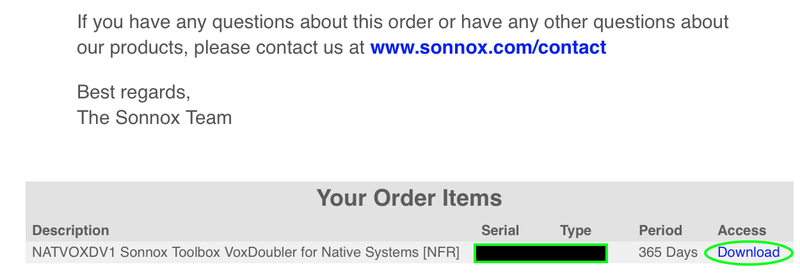
7. Log into your email address inbox and click the 'Download' option.
NB: This email may be located in the spam/junk folder of your inbox.
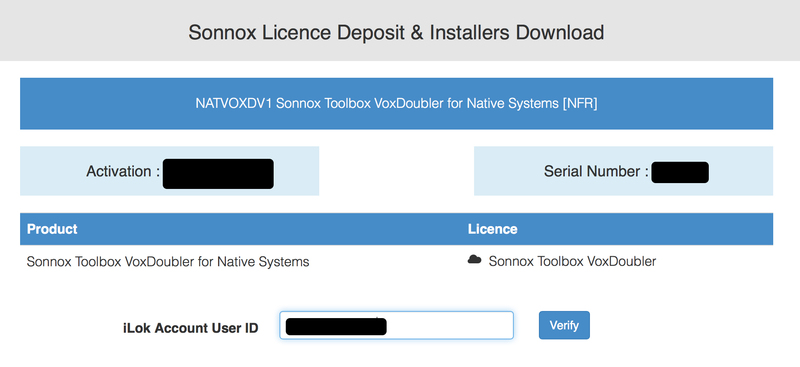
8. Enter your iLok Account User ID and then click 'Verify.'
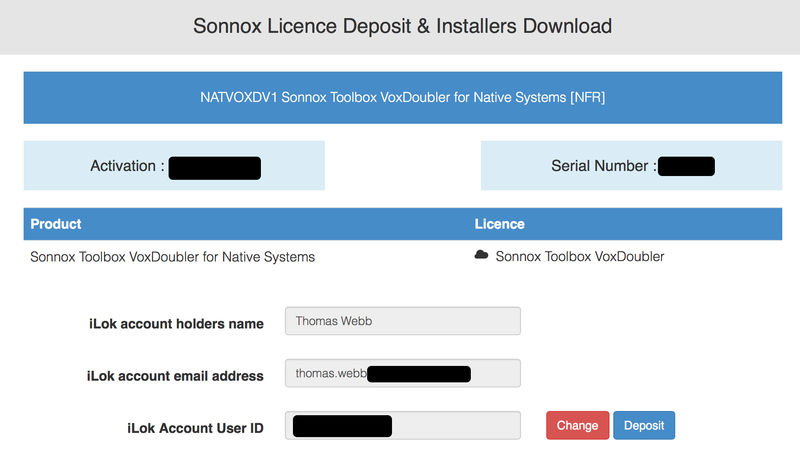
9. Check and verify your details by selecting 'Deposit.'
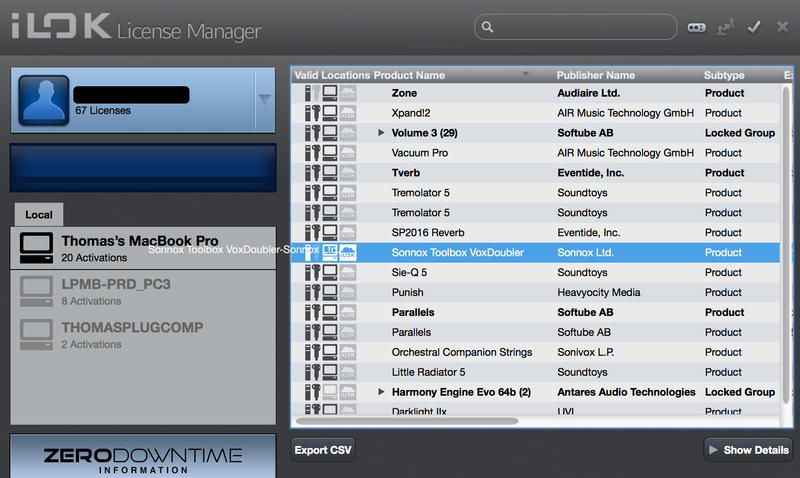
10. Launch your iLok licence manager application and log into your account > locate the Sonnox VoxDoubler product name and drag and drop this onto the computer/iLok USB location that you wish to activate the software to.
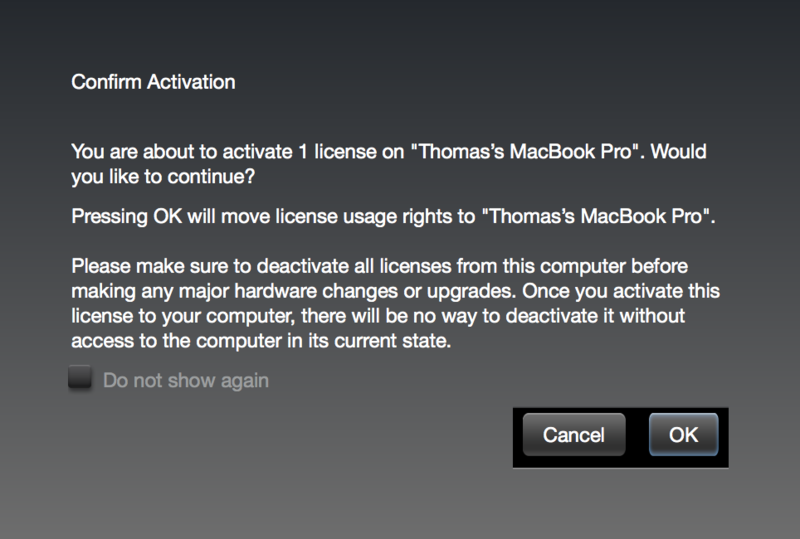
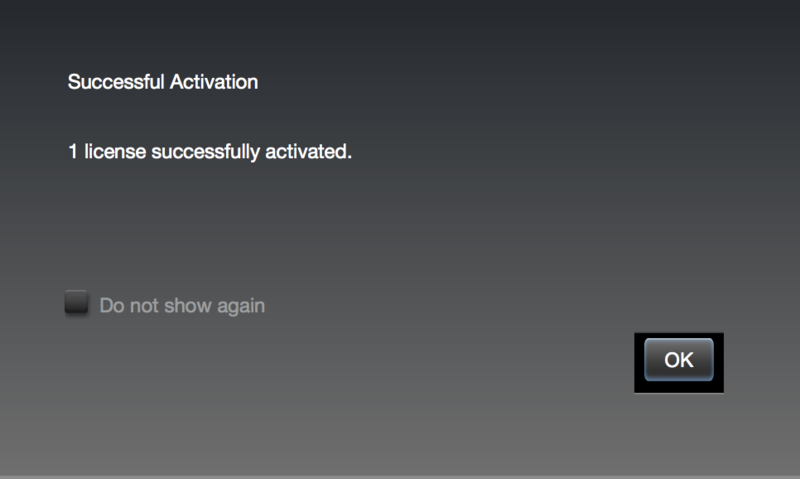
11. Select 'OK' to confirm the activation.
12. The software is now successfully activated to your location of choice > you can now close the iLok licence manager application.
13. Click 'Mac Installers' to navigate to the product download section.
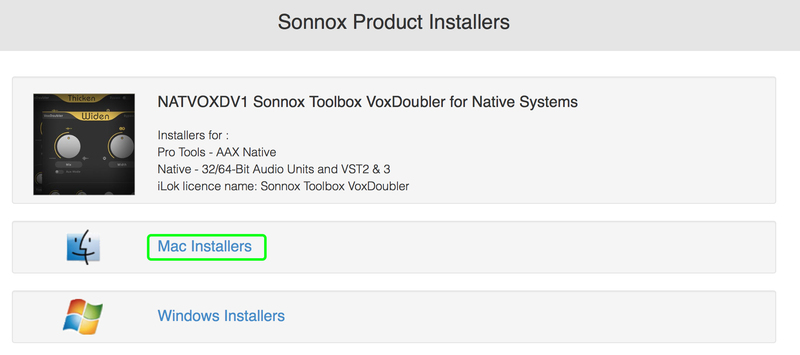
14. Select the 'Sonnox Toolbox VoxDoubler' link to initiate the downloading of the software.

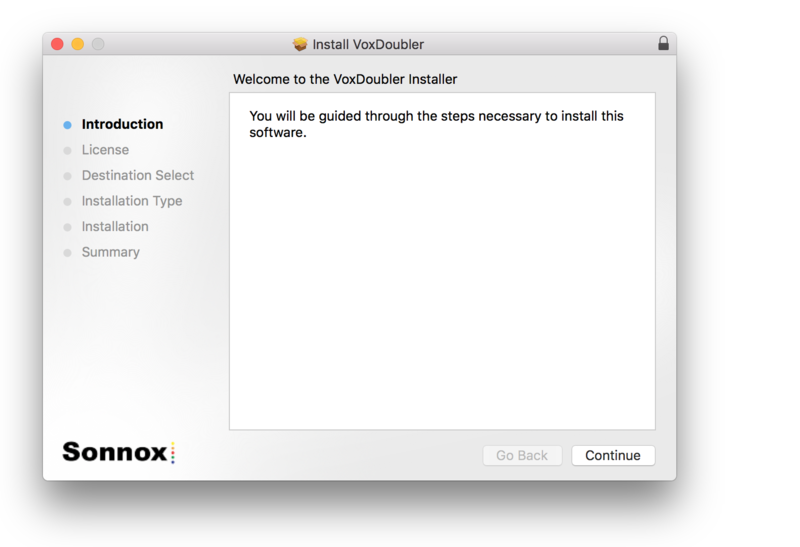
15. Once the .pkg file has successfully downloaded, double-click it to begin the installation process > click 'Continue.'
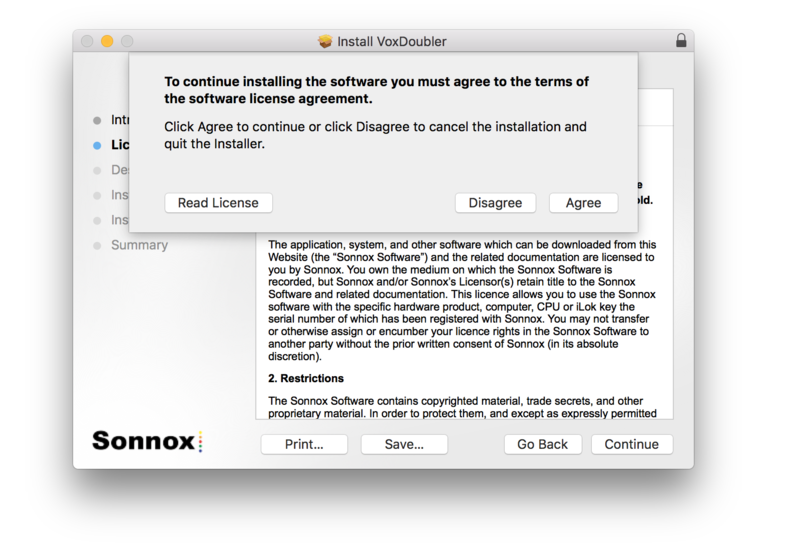
16. Read through the Licence Agreement > click 'Continue' then 'Agree.'
17. Select a computer destination in which to install the software to > click 'Continue.'
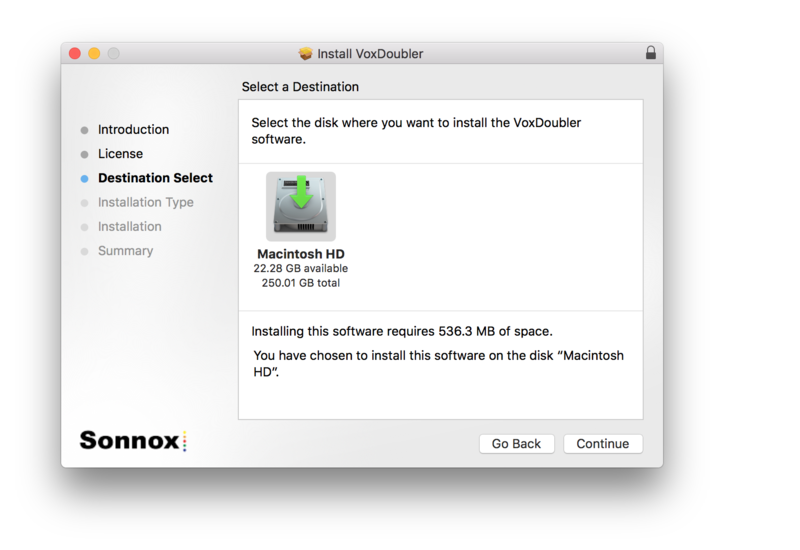
18. Select which software components you wish to install > click 'Continue.'
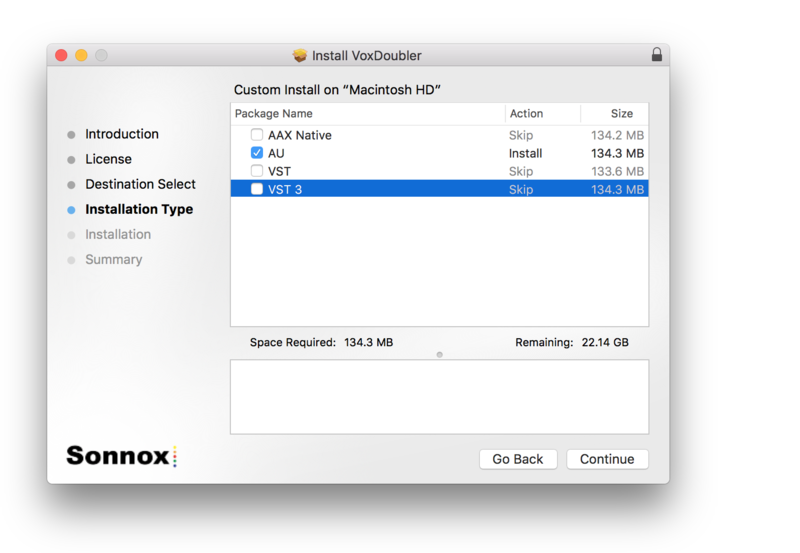
19. Review the installation and click 'Install.'
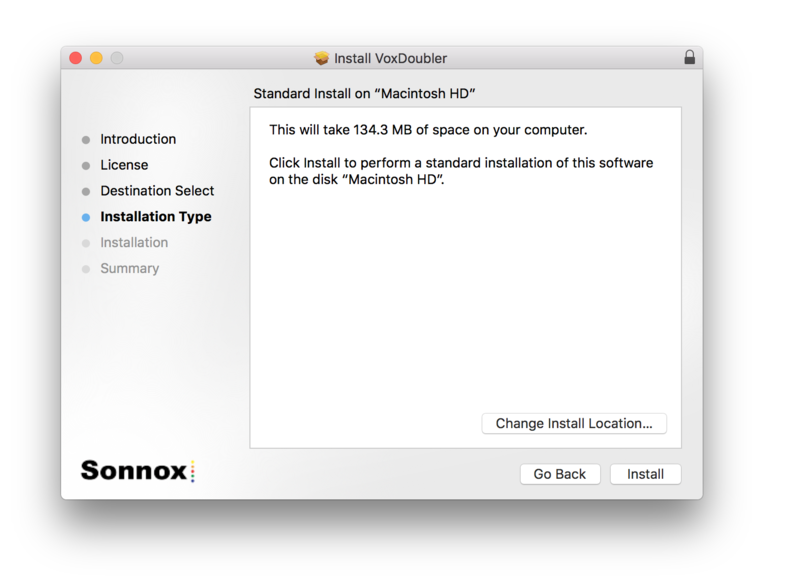
20. The installation of the software has successfully completed > click 'Close.'
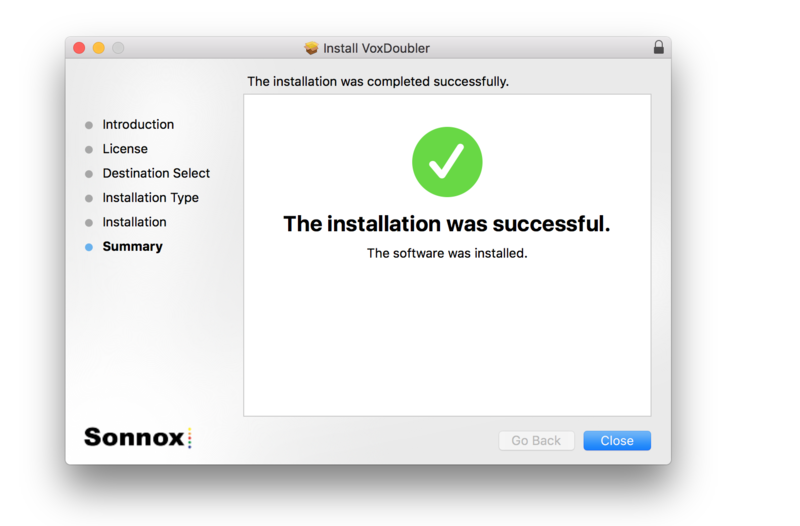
21. Restart/open your DAW, then locate and select Vox Doubler from your Audio FX drop-down selection.
Note: if the software fails to show, restart your DAW and/or rescan your plugin selection to refresh the installation.
The Software is now Ready for Use!
Windows
Note: Either an iLok USB Key and/or FREE soft iLok licence manager account (and application) are required to activate your Sonnox Software. If you do not have an iLok Key, you can purchase one from HERE and your FREE iLok account can be created HERE.
2. Visit Sonnox to register your product.
3. Read the Sonnox Software Licence Agreement > Click 'I Agree' at the bottom of the page.
4. Copy and paste/manually type in the 14 character Activation Key (serial number) from your User Account, into the 'Activation Key' box and click 'Submit.'
5. Enter your personal details and complete the customer registration page and once inputted, click 'Submit.'
6. Your software product has now been successfully registered.
Please note:
- You will have been sent a confirmation email containing your product serial numbers, licence details and installer links to your registered Sonnox email address.
- Please keep this email safe as you will need the serial numbers to access any future upgrades of the plug-ins or download your installers
7. Log into your email address inbox and click the 'Download' option.
NB: This email may be located in the spam/junk folder of your inbox.
8. Enter your iLok Account User ID and then click 'Verify.'
9. Check and verify your details by selecting 'Deposit.'
10. Launch your iLok licence manager application and log into your account > locate the Sonnox VoxDoubler product name and drag and drop this onto the computer/iLok USB location that you wish to activate the software to.
11. Select 'OK' to confirm the activation.
12. The software is now successfully activated to your location of choice > you can now close the iLok licence manager application.
13. Click 'Mac Installers' to navigate to the product download section.
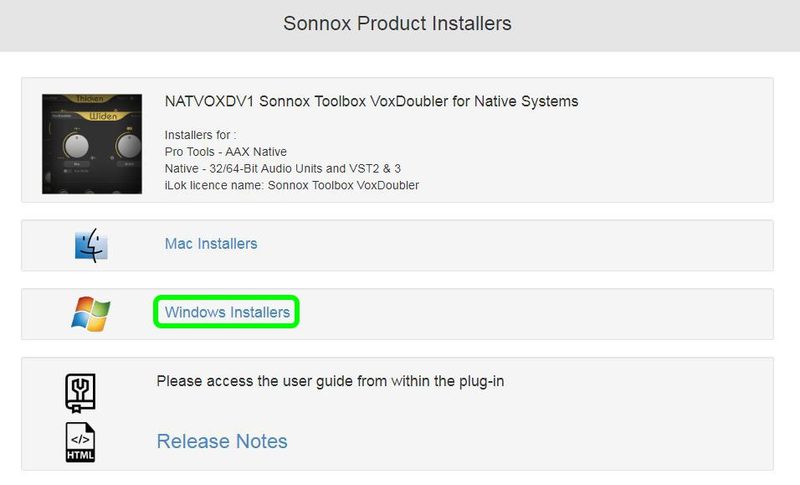
14. Select the 'Sonnox Toolbox VoxDoubler' link to initiate the downloading of the software.

15. Once the .exe file has successfully downloaded, double-click it to begin the installation process > click 'Run.'

16. click 'Next.'
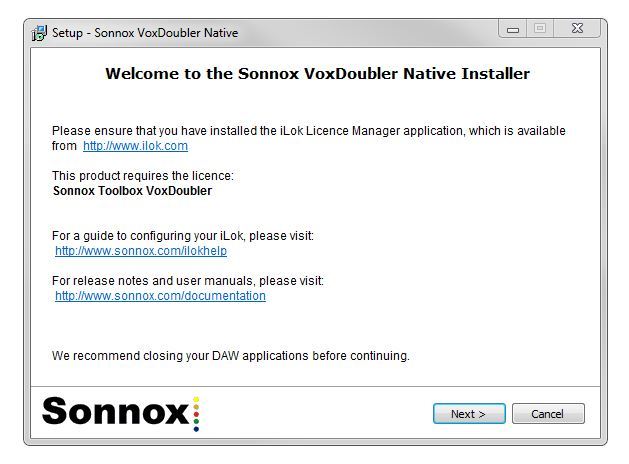
17. Read through the information and select the 'I accept the agreement' as well as 'I cannot sell/transfer my licence without prior permission from Sonivox' boxes > then click 'Next.'
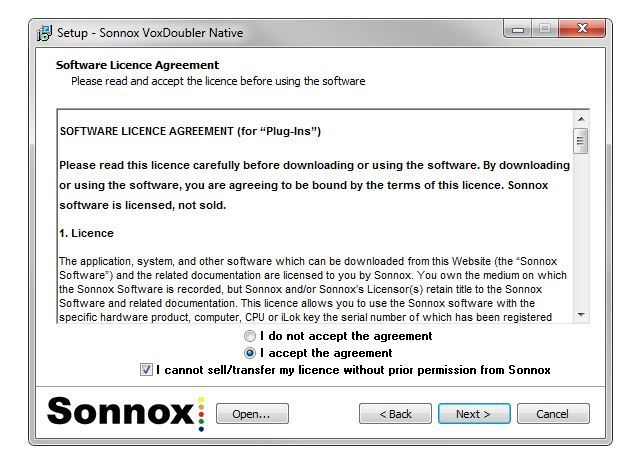
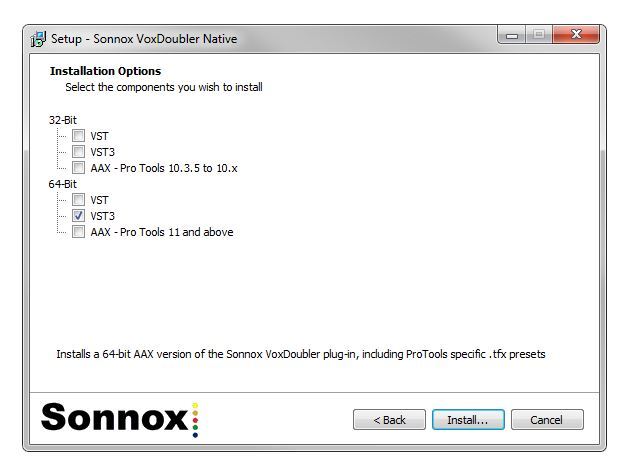
18. Select which software components you wish to install > click 'Install.'
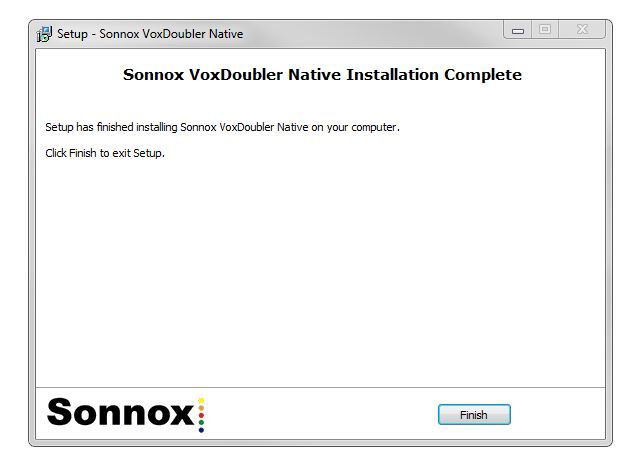
19. The installation of the software has successfully completed > click 'Finish.'
20. Restart/open your DAW, then locate and select Vox Doubler from your Audio FX drop-down selection.
Note: if the software fails to show, restart your DAW and/or rescan your plugin selection to refresh the installation.
The Software is now Ready for Use!


